Power / Batteries & Chargers
Quick Installation Guide for RELiON InSight 12V Lithium Battery
Quick installation guide for the RELiON InSight 12V lithium battery. Includes wiring instructions, parallel connection rules, LED status indicators, and safety precautions.
Table of contents
Manual images
Click an image to enlargeQuick guide from the manual
This document provides essential installation and operation instructions for the RELiON InSight 12V lithium battery. Key requirements include using parallel connections only, ensuring proper cable lengths, and following specific torque settings for terminal connections. The battery features an integrated LED interface for monitoring state-of-charge (SOC) and system status.
Installation Instructions
Follow these steps to ensure a safe and correct installation:
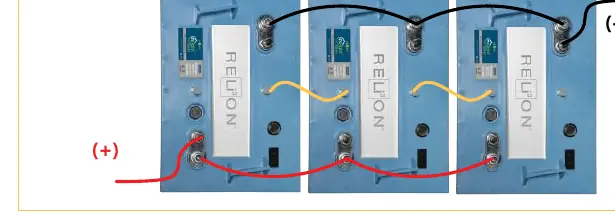
- Parallel Connections Only: InSight batteries must be connected in parallel to meet energy requirements. They cannot be connected in series.
- Proximity: Install new InSight batteries close to each other in the battery compartment.
- Battery Spacers: Use RELiON Battery Spacers to fill empty spots if replacing existing batteries with fewer units, ensuring the batteries are securely held down.
- Cable Size: Use cables of equal lengths to connect your batteries.
- Torque: Tighten connections to 79.7 – 88.5 in-lbs (6.6 - 7.4 ft-lbs / 9 – 10 N-m).
- CAN Cables: Connect the provided 1 ft CAN cables from the Output (positive side) of the first battery to the Input (negative side) of the second battery. The CAN port on the negative side of the first battery and the positive side of the last battery will remain unused.
Battery Interface and Operation
The battery cover features two tri-colored LEDs (green, yellow, red) to communicate status, SOC, and protection modes. LED1 is on the left, and LED2 is on the right when facing the battery from the positive post side.
- Power ON: Press and hold the Power button for 5 seconds until LED1 flashes green, then release. Once one battery is awake, the remaining batteries will automatically wake up.
- Display SOC: With the battery ON, tap the Power button once. The LED will display the SOC for 6 seconds.
- Power OFF: Tap, release, then press and hold the button for 6 seconds until both LED1 and LED2 are solid red, then release.
LED Status and SOC
The LEDs indicate the State of Charge (SOC) when the Power button is tapped once:
- 95% - 100%: LED1 Solid Green, LED2 Solid Green
- 75% - 95%: LED1 Solid Green, LED2 Flashing Green
- 50% - 75%: LED1 Solid Green, LED2 Solid Yellow
- 30% - 50%: LED1 Solid Green, LED2 Flashing Yellow
- 10% - 30%: LED1 Solid Green, LED2 Solid Red
- 0% - 10%: LED1 Solid Green, LED2 Flashing Red
Charging
It is recommended to use or select a Lithium, GEL, or AGM charge profile, in that order of availability.
Safety Precautions
- Wear safety glasses when installing batteries.
- Use a wrench with a rubber-coated handle.
- Do not place any objects on top of the batteries.
- Ensure all cable connections are properly tightened.
- Refer to the RELiON LiFePO4 Safety Document for detailed safety information.
Technical Support
For technical questions, contact the original place of purchase or RELiON Battery directly at [email protected] or call +1 (803) 547-7288. Visit Relionbattery.com for more resources.
Official resources from the manual
Practical help
Common problems
Batteries not waking up
Ensure they are connected properly and press/hold the Power button on one battery until the LED flashes green.
Batteries not balancing
If SOC is unequal, they will balance automatically upon being used.
Before use
- Ensure parallel connection only (no series)
- Use cables of equal length
- Use battery spacers if replacing existing batteries
- Verify torque settings (9-10 Nm)
- Connect CAN cables from Output to Input
Images and diagrams
- Wiring diagram shows parallel connection with CAN cables linking batteries from Output to Input.
- Battery interface shows location of terminals, CANbus ports, power button, and status LEDs.
Model compatibility
- InSight batteries must be connected in parallel only.
- Compatible with Lithium, GEL, or AGM charge profiles.

Manual page author
David Miller
Documentation analyst
Organizes user manual content into clear summaries, with attention to model details, product context, and everyday usability.