Power / Portable Power Stations
User Manual for RELiON Outlaw 1072S Portable Power Station
Quick guide for the RELiON Outlaw 1072S portable power station. Learn how to charge, discharge, maintain, and troubleshoot your device with this comprehensive manual summary.
Table of contents
Manual images
Click an image to enlargeQuick Guide
The RELiON Outlaw 1072S is a portable power station and solar generator designed to provide AC and DC power. This guide covers the essential operation, charging, and maintenance procedures required to safely use your device.
Product Overview
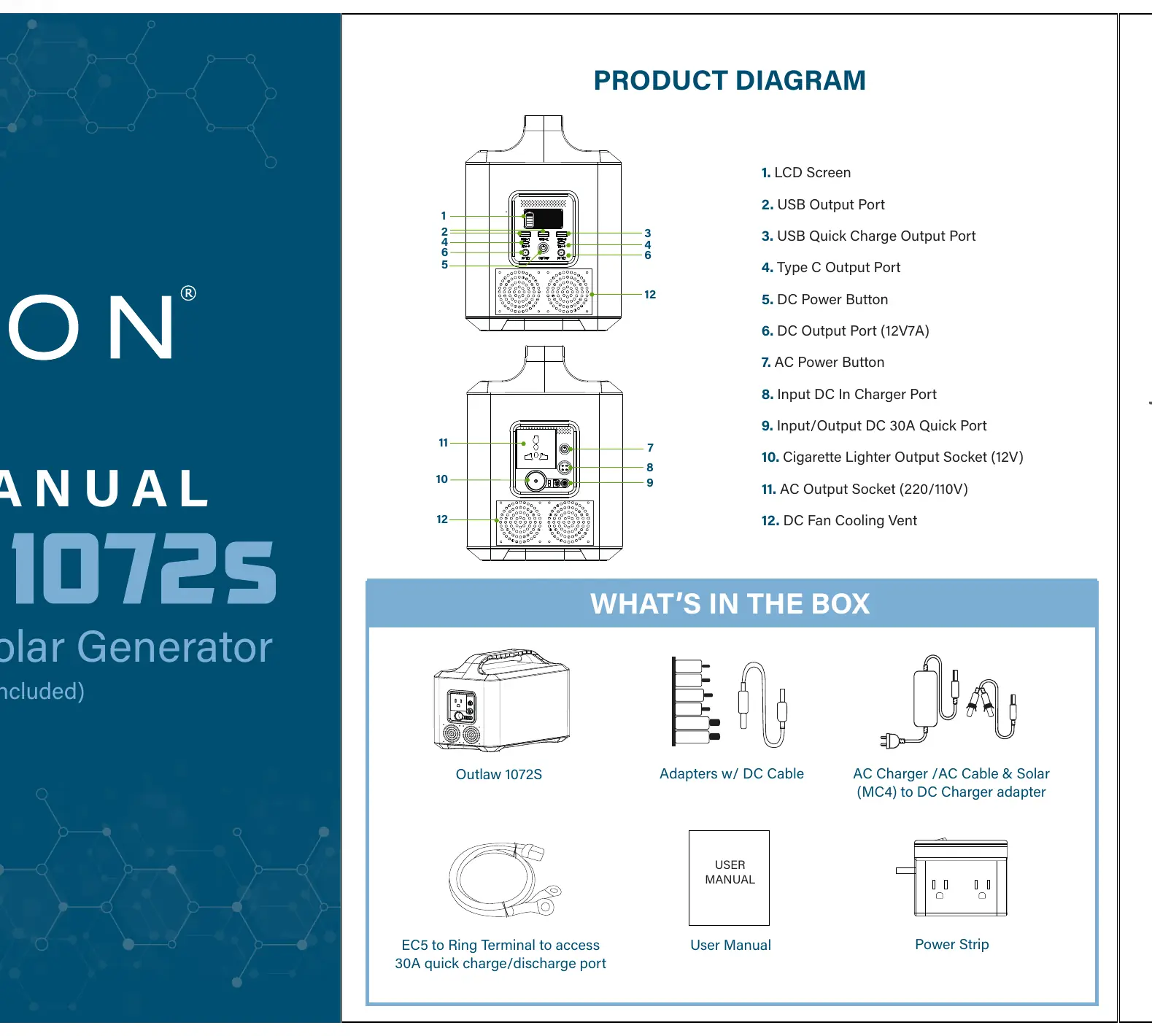
The unit features an LCD screen, multiple USB ports (including Type-C PD and Quick Charge 3.0), AC outlets, and DC ports. A cooling vent is located on the side to manage temperature. Always ensure the unit is placed in a well-ventilated area during operation.
Discharging Operation
To power your devices:
- Set the AC and/or DC power switches to the ON position.
- Plug your devices into the appropriate receptacles.
- Use the provided power strip if more than one AC outlet is required.
- The backlit LCD screen may shut off to preserve power if there are no active external loads; apply an external load to activate the display.
- Turn off each output by pressing its power button when not in use to preserve battery life.
Protection Mode: If the total output exceeds 1,150W for more than 10 seconds, the BMS will enter protection mode. To recover, set the AC and DC switches to OFF, unplug all devices, then set the switches back to ON and reconnect your devices.
Charging Operation
AC Charging: During standby, the AC charger indicator shows LED1 red and LED2 green. During charging, LED2 turns red. When fully charged, LED1 turns red and LED2 turns green. Disconnect the cable promptly upon completion.
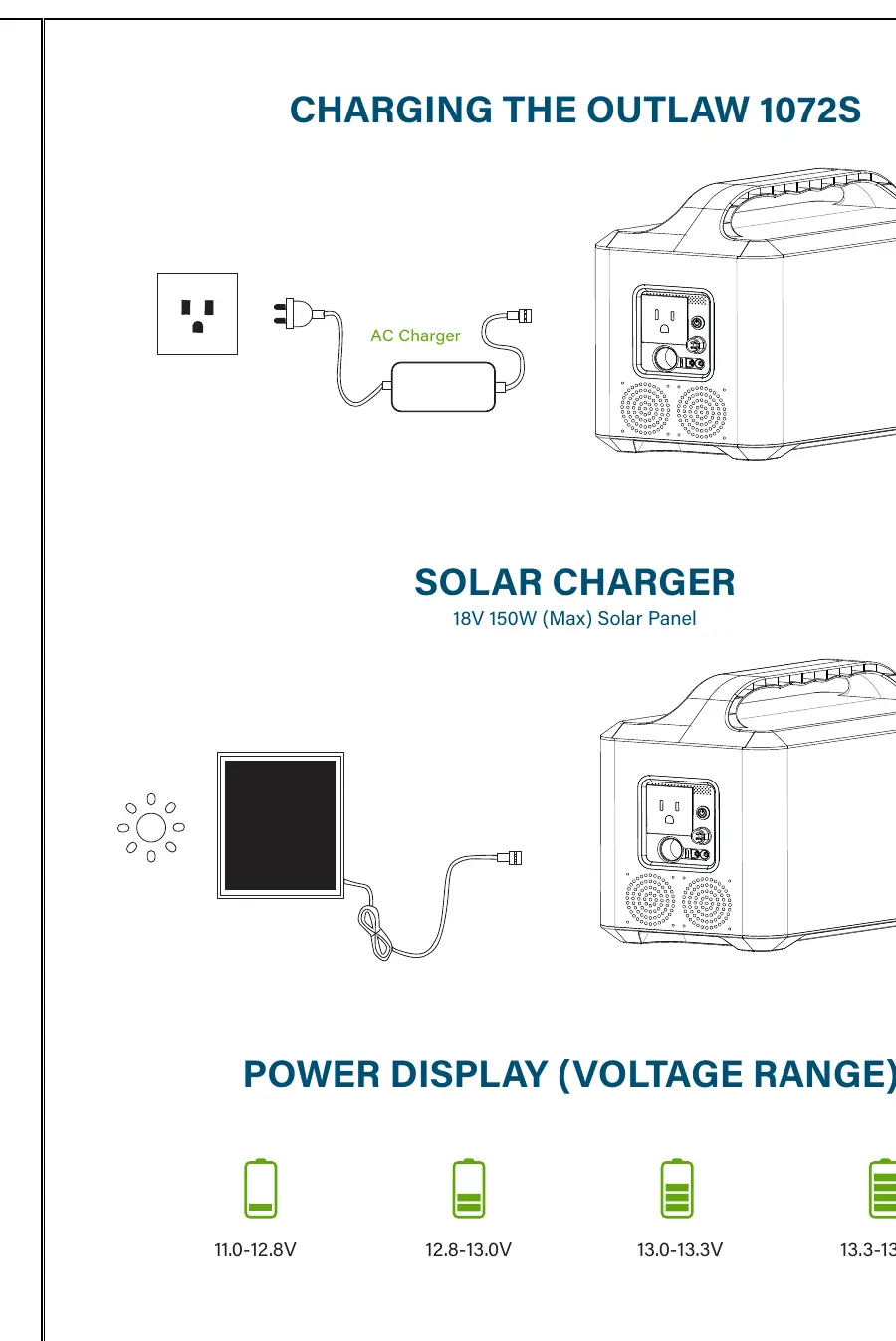
Solar Charging: The unit supports solar panel charging (Max 18V, 150W). Connect the solar panel to the designated input.
Safety and Maintenance
- Maintenance: Discharge and recharge the unit at least once every six months to preserve lifespan.
- Temperature: Avoid extreme temperatures. Operating range is -20°C to 60°C; charging range is 0°C to 50°C.
- Handling: Do not disassemble, immerse in water, or drop the unit. Do not use on aircraft.
- Quick Plug (EC5): The EC5 connector is a direct live connection to the battery. Use caution when handling. It can be replaced with a matching connector for DC appliances with current requirements between 10A and 30A.
Specifications
- Capacity: 12.8V 72Ah (921.6Wh)
- AC Output: 110V, 60Hz, 1000W continuous, 2000W surge peak
- Weight: 14.5kg (31.96 lbs)
- Dimensions: 368 x 200 x 275mm
- Protection: Under/Over Voltage, Over Current, Short Circuit, Temperature Control, Surge Protection
Practical help
Common problems
Power station shuts off unexpectedly
Total output likely exceeded 1150W for more than 10 seconds. Turn AC/DC switches OFF, unplug devices, then restart.
LCD screen is blank
The screen may shut off to preserve power when no load is detected. Apply an external load to wake the display.
Before use
- Check the battery level via the voltage display.
- Ensure AC and DC switches are in the OFF position before plugging in devices.
- Verify that the solar panel used is 18V 150W (Max).
- Ensure the unit is in a well-ventilated area.
Images and diagrams
- The product diagram identifies 12 key components, including the LCD screen, USB ports, AC/DC outputs, and the cooling vent.
Model compatibility
- Solar panels must be 18V 150W (Max).
- The EC5 quick plug can be replaced with a matching connector for DC appliances requiring between 10A and 30A.

Manual page author
David Miller
Documentation analyst
Organizes user manual content into clear summaries, with attention to model details, product context, and everyday usability.