General / Other Manuals
Installation Manual for RockBoard QuickMount Pedal Riser
Quick guide for installing and using the RockBoard QuickMount Pedal Riser. Learn how to mount, adjust, and remove the riser to optimize your pedalboard setup.
Table of contents
Quick guide from the manual
The RockBoard QuickMount Pedal Riser is designed to raise effects pedals in the upper rows of your pedalboard. It allows for better access to footswitches and can compensate for the angle of the pedalboard to keep pedals parallel to the floor. The system uses a tool-free QuickMount mechanism compatible with RockBoard pedalboards.
Mounting
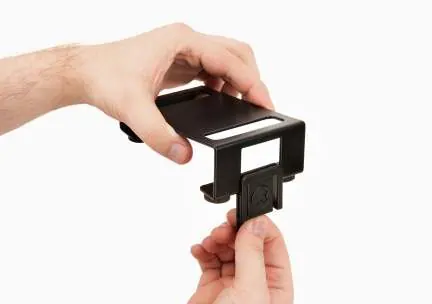
- Insert Lock: Push the included QuickMount lock into the opening on the higher side of the Pedal Riser.
- Hook into Grid: Hook the nut located on the flatter side of the Pedal Riser into the slot grid of your RockBoard pedalboard.
- Latch: Carefully push the Pedal Riser down until the QuickMount lock latches securely into the slot grid of the pedalboard.
Removal
To remove the Pedal Riser, press the QuickMount lock lightly from the underside of the pedalboard to release the latch, then lift the riser out.
Orientation and Usage
The Pedal Riser can be mounted in two different orientations depending on your needs:
- Parallel Alignment: If the higher side of the Pedal Riser points towards the flat, lower end of the pedalboard, the riser compensates for the angle of the pedalboard, aligning the pedal parallel to the floor.
- Ergonomic Access: If the flat side faces the lower end of the pedalboard, the riser supports the angle of the pedalboard, providing easier, ergonomic access to the effects pedals in the upper row.
Compatibility
The QuickMount Pedal Riser features the same slot grid as standard RockBoard pedalboards. If you use effects pedals equipped with QuickMount Pedal Mounting Plates, you can mount these directly onto the Pedal Riser.
Practical help
Common problems
Cannot remove the Pedal Riser from the board.
Press the QuickMount lock from the underside of the pedalboard to release the latch before attempting to lift the riser.
Pedal is not parallel to the floor.
Ensure the higher side of the Pedal Riser is pointing towards the flat, lower end of the pedalboard.
Before use
- Verify you have the QuickMount lock included with the riser.
- Identify the slot grid on your RockBoard pedalboard.
- Determine if you need parallel alignment or ergonomic access to choose the correct orientation.
Specs in practice
- QuickMount lock
- The mechanism used to secure the riser to the pedalboard slot grid without tools.
Images and diagrams
- Step 1: Inserting the QuickMount lock into the riser.
- Step 2: Hooking the riser into the pedalboard slot.
- Step 3: Latching the riser into place.
- Step 4: Releasing the lock from the underside.
Model compatibility
- Compatible with RockBoard pedalboards featuring a slot grid.
- Supports effects pedals equipped with QuickMount Pedal Mounting Plates.

Manual page author
David Miller
Documentation analyst
Organizes user manual content into clear summaries, with attention to model details, product context, and everyday usability.