Tools / Power Tools
Ryobi 18V Brushless Impact Driver R18IDBL User Guide
Quick guide for the Ryobi 18V Brushless Impact Driver R18IDBL, covering operation, mode selection, safety warnings, and technical specifications.
Table of contents
Manual images
Jump to the sectionQuick guide from the manual
This document provides essential safety and operational instructions for the Ryobi 18V Brushless Impact Driver (R18IDBL). Always read the full manual before use. The tool is designed for fastening and removing screws and bolts, with a specialized DeckDrive mode for decking screws.
Device description
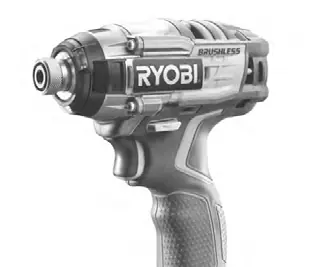
The impact driver features a 6.35mm coupler, tri-beam LED, variable-speed trigger, and mode selection button. It is powered by an 18V battery pack.
Operation and mode selection
Use the mode selection button to adjust performance:
- Speed 1: For small screws.
- Speed 2: For mid-sized screws (better control).
- Speed 3: Maximum speed and power for large screws.
- DeckDrive mode: Optimized for driving decking screws with a soft start-up and automatic speed adjustment.
Safety and maintenance
Always wear eye protection and hearing protection. Keep the tool away from moisture and explosive atmospheres. Disconnect the battery before making adjustments or changing bits. Do not use solvents for cleaning; use clean cloths to remove dirt. All repairs should be performed by an authorized service center.
Technical specifications
- Voltage: 18V
- Coupler: 6.35mm
- No-load speed: 0-650 (low), 0-1700 (medium), 0-3000 (high) min-1
- Max torque: 50 Nm (low), 100 Nm (medium), 270 Nm (high)
- Impacts per minute: 0-3900 IPM
Manufacturer information
Ryobi
Practical help
Common problems
Tool does not start or stops during operation
Check if the battery is properly connected and charged. Ensure the switch is not in the off-position.
Screw head damage or poor control
Use the appropriate speed setting (1, 2, or 3) or DeckDrive mode for the specific screw size and material.
Vibration or discomfort
Take frequent breaks, keep hands warm, and limit daily exposure to reduce the risk of vibration-related issues.
Before use
- Ensure the battery is fully charged and compatible.
- Wear safety goggles and hearing protection.
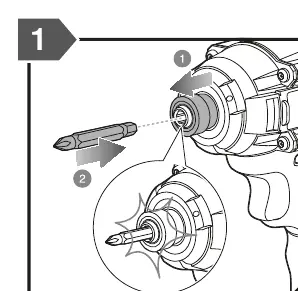
- Check that the bit is securely inserted into the coupler.
- Verify the direction of rotation selector is set correctly.
- Ensure the work area is clean and well-lit.
Specs in practice
- DeckDrive mode
- A specialized profile for decking screws that starts slowly to catch the thread and adjusts speed automatically.
- Impacts per minute (IPM)
- The frequency of the hammering action, which helps drive screws into hard materials.
Images and diagrams
- The diagram shows the bit insertion process into the coupler.
- The mode selection panel indicates the current speed setting (1, 2, 3, or DeckDrive).
- The battery port is located at the base of the handle.
Model compatibility
- Compatible with Ryobi 18V Lithium-Ion battery packs (e.g., RB18L13 to RB18L50).
- Compatible with specified Ryobi chargers (e.g., BCS618G, BCL14181H, RC18150U).

Manual page author
Michael Turner
Technical manual editor
Reviews PDF manuals for structure, safety notes, and practical product details so readers can find the right information quickly.