Power / Solar Chargers
User Guide for Sandberg 509-22 HDMI 2.0 Switch
Quick guide for the Sandberg 509-22 HDMI 2.0 Switch. Learn how to use the device in switch and splitter modes, understand port configurations, and switch between inputs.
Quick answers from the manual
Quick answer
- The Sandberg 509-22 is a bi-directional HDMI 2.0 device that can function as a switch (2 sources to 1 monitor) or a splitter (1 source to 2 monitors). p. 2, 3
Key actions
- Switching inputs p. 2
Technical specifications
| Parameter | Value | Meaning | Pages |
|---|---|---|---|
| Resolution | 4K60 | Supports 4K resolution at 60Hz refresh rate. | p. 1 |
Show 1 more answers Show less
Where to find it in the PDF
- Product Overview p. 2
- Usage Modes p. 3
Table of contents
Manual images
Click an image to enlargeQuick guide from the manual
The Sandberg 509-22 is a versatile HDMI 2.0 device that functions as both a switch and a splitter. It allows you to connect two HDMI sources to one monitor (Switch-mode) or one HDMI source to two monitors (Splitter-mode). The device supports 4K60 resolution.
Product overview
The device features a central switch button and three HDMI ports. The functionality of the ports changes depending on the selected mode:
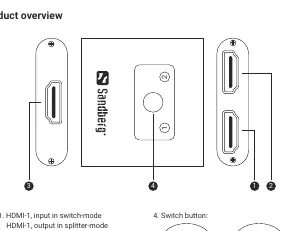
- Port 1 & 2: Act as inputs in Switch-mode and outputs in Splitter-mode.
- Port 3: Acts as an output in Switch-mode and an input in Splitter-mode.
- Switch button (4): Used to toggle between HDMI-1 and HDMI-2.
Operating modes
The device supports two distinct operating modes:
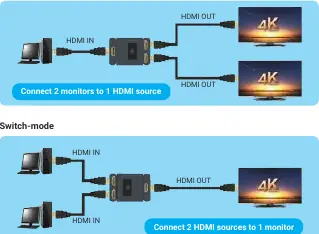
- Splitter-mode: Connect one HDMI source to two monitors. The signal is sent to both displays simultaneously.
- Switch-mode: Connect two HDMI sources to one monitor. Use the switch button to select which source is displayed.
Switching inputs
To change the active source in Switch-mode, use the physical switch button on the top of the device:
- Up position: Selects HDMI-1.
- Down position: Selects HDMI-2.
Support and warranty
The product includes a five-year warranty. For technical support, visit http://helpdesk.sandberg.world. For warranty terms and product registration, visit www.sandberg.world/warranty. Information regarding electronic waste handling is available at www.sandberg.world/weee.
Official resources from the manual
Manufacturer information
Sandberg A/S
Practical help
Common problems
No signal on display
Ensure all HDMI cables are securely connected. Verify that the switch button is in the correct position for the desired input.
Incorrect mode
Ensure the cables are connected according to the specific mode (Switch vs. Splitter) as defined in the product overview.
Before use
- Identify if you need Switch-mode (2 sources to 1 monitor) or Splitter-mode (1 source to 2 monitors).
- Ensure you have high-quality HDMI cables.
- Verify the switch button position before powering on your devices.
Show more Show less
Images and diagrams
- The diagram on page 2 identifies the ports and the switch button.
- The diagram on page 3 illustrates the cable connections for both Splitter-mode and Switch-mode.

Manual page author
Michael Turner
Technical manual editor