Power / Solar Chargers
Sandberg Wireless Charger for Desk 10W User Guide
Quick guide for the Sandberg Wireless Charger for Desk 10W (441-16). Learn how to install the charger into your desk, connect it to power, and charge your devices efficiently.
Table of contents
Manual images
Click an image to enlargeQuick guide from the manual
This document provides instructions for installing and using the Sandberg Wireless Charger for Desk 10W (model 441-16). The charger is designed to be mounted directly into a desk surface for a clean, integrated look.
Installation
To install the wireless charger into your desk:
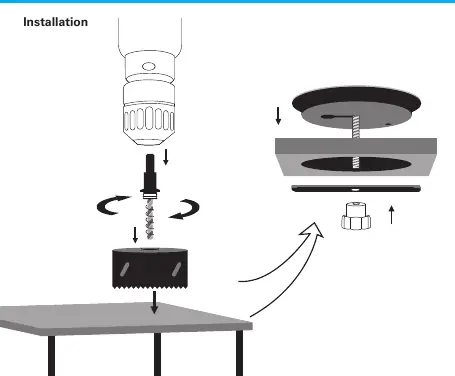
- Use a hole saw to drill a hole in the desired location on your desk surface.
- Insert the wireless charger unit into the hole from the top.
- Secure the unit from underneath the desk using the provided locking nut.
Connection and Usage
Connect the USB cable to a power source. The charging speed depends on the power adapter used:
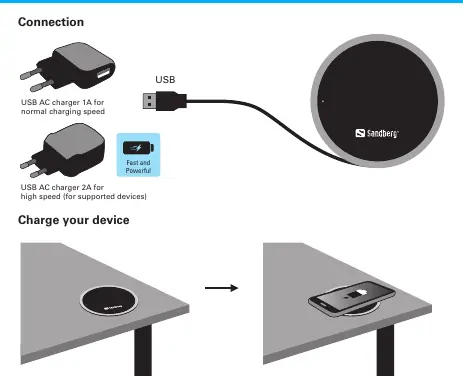
- Normal charging speed: Use a USB AC charger with at least 1A output.
- High charging speed: Use a USB AC charger with 2A output (for supported devices).
Once connected, simply place your Qi-compatible device on top of the charger to begin charging.
Support and Warranty
Sandberg provides a five-year warranty on this product. Please read the warranty terms and register your new product at www.sandberg.it/warranty. For technical support, visit http://helpdesk.sandberg.it. For information on handling electronic waste, see www.sandberg.it/weee.
Official resources from the manual
Manufacturer information
Sandberg A/S
Practical help
Common problems
Slow charging speed
Ensure you are using a USB AC charger with at least 2A output for high-speed charging; 1A chargers will only provide normal charging speed.
Before use
- Verify desk surface thickness is suitable for mounting.
- Ensure you have a hole saw tool for installation.
- Select a USB AC power adapter (1A for normal, 2A for fast charging).
- Register your product at the Sandberg website for warranty purposes.
Specs in practice
- 1A USB Charger
- Provides normal charging speed for the wireless charger.
- 2A USB Charger
- Required to enable high-speed charging for supported devices.
Images and diagrams
- Installation diagram shows the sequence of drilling the desk, inserting the charger, and tightening the locking nut from below.
- Connection diagram illustrates connecting the USB cable to a power adapter and placing the mobile device on the charger surface.
Model compatibility
- High-speed charging is only available for supported devices.

Manual page author
David Miller
Documentation analyst
Organizes user manual content into clear summaries, with attention to model details, product context, and everyday usability.