Power / Solar Chargers
User Guide for Sandberg Solar Charger 200W QC3.0+PD+DC
Quick guide for the Sandberg Solar Charger 200W QC3.0+PD+DC. Learn how to position the panel for optimal charging, connect devices via USB and DC ports, and understand output specifications.
Quick answers from the manual
Quick answer
- The Sandberg Solar Charger 200W converts sunlight into power via DC, USB-C, and USB ports. Position the panels directly towards the sun for maximum efficiency. p. 2, 3
Key actions
- Positioning the panel p. 2
- Charging devices p. 3
Problems and fixes
Unstable charging in weak sunlight
Connect a powerbank to stabilize the charging process.
p. 3Show 2 more answers Show less
Technical specifications
| Parameter | Value | Meaning | Pages |
|---|---|---|---|
| DC Output | 19.8V/10.10A | 200W Max | p. 4 |
| USB-C Output | 5V/3A - 20V/3A | p. 4 |
Where to find it in the PDF
- Front Cover p. 1
- Angling Instructions p. 2
- Charging Instructions p. 3
- Warranty and Specs p. 4
Table of contents
Manual images
Click an image to enlargeQuick guide from the manual
The Sandberg Solar Charger 200W is a portable solar panel designed to charge various electronic devices using sunlight. For optimal performance, it is essential to position the solar panel at the most direct angle towards the sun as possible.
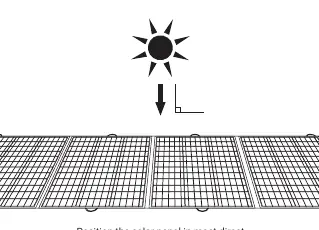
Device Overview
The charger features a control unit with four distinct output ports to accommodate different devices:
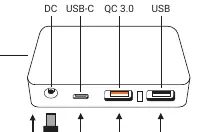
- DC Output: For high-power devices.
- USB-C Output: Supports up to 60W, suitable for laptops.
- QC 3.0 USB-A: Quick Charge 3.0 port for compatible mobile devices.
- USB-A: Standard USB output.
Charging Options
The device supports three primary charging configurations:
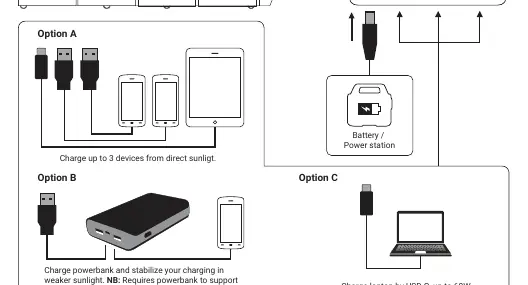
- Option A: Direct charging of up to 3 devices simultaneously using the available USB ports.
- Option B: Charging a powerbank to stabilize the charging process in weaker sunlight. Note: This requires a powerbank that supports simultaneous power input and output.
- Option C: Charging a laptop via the USB-C port (up to 60W).
Technical Specifications
The charger provides the following power outputs:
- DC Output: 19.8V/10.10A (200W Max)
- USB-C Output: 5V/3A, 9V/2A, 12V/3A, 15V/3A, 20V/3A (60W Max)
- QC 3.0 USB-A Output: 5V/3A, 9V/2A, 12V/1.5A (18W Max)
- USB-A Output: 5V/3A (15W Max)
Warranty and Support
This product includes a five-year warranty. For support, visit http://helpdesk.sandberg.world. Please register your product at www.sandberg.world/warranty. For information on handling electronic waste, refer to www.sandberg.world/weee.
Official resources from the manual
Manufacturer information
Sandberg A/S
Practical help
Common problems
Charging is unstable or slow in weak sunlight
Connect a powerbank to the charger to stabilize the power flow. Ensure your powerbank supports simultaneous power input and output.
Before use
- Ensure the solar panel is positioned at the most direct angle towards the sun.
- Identify the correct port for your device (DC, USB-C, QC 3.0, or USB).
- If using a powerbank to stabilize charging, verify it supports simultaneous input/output.
Show more Show less
Specs in practice
- USB-C Output
- Up to 60W, suitable for laptops and fast-charging devices.
Images and diagrams
- The control unit includes DC, USB-C, QC 3.0, and USB ports.
- Option A: Charge up to 3 devices directly.
- Option B: Use a powerbank to stabilize charging.
- Option C: Charge a laptop via USB-C.
Model compatibility
- USB-C output supports up to 60W.
- QC 3.0 port supports up to 18W.
- DC output supports up to 200W.

Manual page author
David Miller
Documentation analyst