Power / Batteries Chargers
Sandberg Powerbank USB-C PD 100W User Guide
Comprehensive user guide for the Sandberg Powerbank USB-C PD 100W, covering charging instructions, device usage, technical specifications, and warranty information.
Table of contents
Manual images
Jump to the sectionProduct Overview
The Sandberg Powerbank USB-C PD 100W is a high-capacity portable battery designed to provide fast and reliable power for a wide range of devices, including laptops, tablets, and smartphones. With its advanced Power Delivery (PD) technology, it ensures efficient charging for compatible hardware. The powerbank features a sleek, durable design and an integrated digital display that shows the remaining battery percentage, allowing you to monitor power levels easily.
Charging the Powerbank
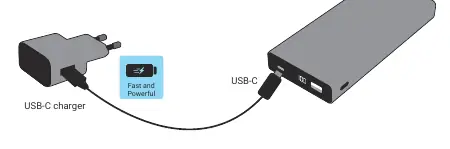
To ensure optimal performance, it is recommended to fully charge the powerbank before its first use. Connect a compatible USB-C charger to the USB-C port on the powerbank. The digital display will indicate the charging progress. Using a high-wattage USB-C charger will significantly reduce the time required to reach a full charge, thanks to the powerbank's support for fast input charging.
Charging Your Devices
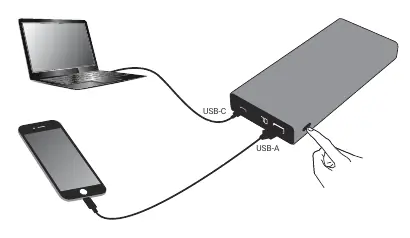
The Sandberg Powerbank is equipped with multiple output ports to accommodate various devices. To charge your electronics, connect your device's charging cable to either the USB-C or USB-A port on the powerbank. The USB-C port is ideal for power-hungry devices like laptops, while the USB-A port is suitable for smartphones and smaller accessories. Once connected, press the power button on the side of the unit to initiate the charging process. The display will remain active while the device is charging, providing real-time feedback on the powerbank's remaining capacity.
Safety and Maintenance
To maintain the longevity and safety of your powerbank, avoid exposing it to extreme temperatures, moisture, or direct sunlight for extended periods. Do not attempt to disassemble or modify the unit, as this may cause damage or safety hazards. Keep the ports clean and free of debris. If the powerbank is not in use for an extended period, it is advisable to charge it at least once every few months to maintain battery health.
Warranty and Support
Your Sandberg product comes with a five-year warranty, reflecting the company's commitment to quality. For any technical issues or questions, please visit the official Sandberg support portal. It is recommended to register your product online to facilitate any potential warranty claims. For information regarding the proper disposal of electronic waste, please refer to the guidelines provided on the Sandberg website to ensure environmentally responsible recycling.
Manufacturer information
Sandberg A/S
Practical help
Common problems
Powerbank does not charge devices
Ensure the power button has been pressed after connecting the device and check that all cables are securely plugged in.
Slow charging speed
Ensure you are using a high-quality cable and that the device is connected to the appropriate port (USB-C for high-power devices).
Before use
- Unpack the powerbank and verify all components are present.
- Check the powerbank for any physical damage.
- Fully charge the powerbank using a USB-C charger before the first use.
- Ensure you have the correct cables for your specific devices.
Specs in practice
- USB-C Output
- Provides up to 88W of power, suitable for charging laptops and high-performance devices.
- USB-A Output
- Provides up to 12W (5V/2.4A) for standard mobile devices.
Images and diagrams
- The charging diagram shows the powerbank connected to a wall charger via the USB-C port.
- The device usage diagram illustrates connecting a laptop to the USB-C port and a phone to the USB-A port simultaneously.
Model compatibility
- Compatible with most USB-C and USB-A powered devices.
- Supports Power Delivery (PD) for fast charging compatible laptops and phones.

Manual page author
Michael Turner
Technical manual editor
Reviews PDF manuals for structure, safety notes, and practical product details so readers can find the right information quickly.