Power / Batteries Chargers
Sandberg In Car Wireless Charger IR 10W User Guide
Learn how to install, connect, and operate your Sandberg In Car Wireless Charger IR 10W with this quick guide. Includes mounting options, LED status indicators, and charging requirements.
Table of contents
Product Overview
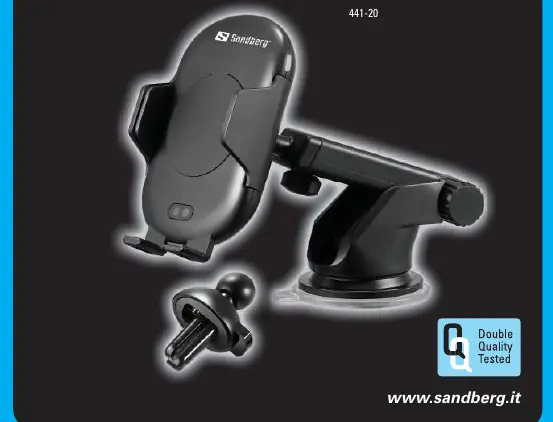
The Sandberg In Car Wireless Charger IR 10W (441-20) is an automatic, sensor-driven wireless charging mount designed for vehicles. It features an infrared (IR) sensor that automatically opens the side clamps when a smartphone is detected, allowing for easy, one-handed placement and removal of your device.
Mounting Options
The charger comes with two mounting solutions to suit different vehicle interiors:
- Arm holder: A suction-based mount suitable for windshields or dashboards.
- Air vent holder: A clip-on mount designed to attach directly to the vehicle's air conditioning vents.
Operation and Charging
To begin using the charger, connect it to a power source using the provided cable. Note: To achieve full-speed 10W charging, you must use a QC 3.0 (Quick Charge) compatible power adapter. Once powered, place your smartphone near the IR sensor; the clamps will open automatically to receive the device. Once placed, the charger will initiate wireless charging.
LED Status Indicators
The device uses an LED light to communicate its current status:
- Solid Red: Standby mode, the charger is ready.
- Slowly Flashing Blue: Normal wireless charging operation is in progress.
- Flashing Red: Error detected. Ensure the phone is positioned correctly and that the power source is sufficient.
Support and Warranty
Sandberg provides a five-year warranty on this product. For technical support, visit http://helpdesk.sandberg.it. For warranty registration and terms, visit www.sandberg.it/warranty. For information regarding the disposal of electronic waste, please refer to www.sandberg.it/weee.
Official resources from the manual
Manufacturer information
Sandberg A/S
Practical help
Common problems
Red light is flashing
This indicates an error. Check if the smartphone is properly aligned with the charging coil and ensure the power source is a QC 3.0 compatible adapter.
Before use
- Ensure you have a QC 3.0 compatible car charger adapter for full-speed charging.
- Choose the appropriate mount (Arm holder or Air vent holder) for your vehicle.
- Connect the USB cable securely to the charger and the power source.
- Verify the LED light turns solid red, indicating the device is in standby mode.
Specs in practice
- 10W Wireless Charging
- The maximum power output supported by the device for compatible smartphones.
Images and diagrams
- The IR sensor is located on the front face of the charger to trigger the automatic clamps.
- The LED indicator is positioned on the side of the unit to provide visual feedback on charging status.
- The charging port is located at the bottom of the device for cable connection.
Model compatibility
- Requires a QC 3.0 power source for full-speed performance.
- Compatible with smartphones supporting wireless charging.

Manual page author
David Miller
Documentation analyst
Organizes user manual content into clear summaries, with attention to model details, product context, and everyday usability.