Power / Portable Power Stations
User Manual for Technaxx 21W Solar Charging Case TX-207
Quick guide for the Technaxx 21W Solar Charging Case TX-207. Learn how to set up, use, and maintain your portable solar charger for optimal performance.
Quick answers from the manual
Quick answer
- The Technaxx TX-207 is a foldable 21W solar charger with two USB-A ports. Unfold it, place it in direct sunlight at a 90-degree angle, and connect your devices using the USB ports. p. 2
Key actions
- Unfold and position in direct sunlight p. 2
First start
- Ensure the panel is at a 90-degree angle to the sun for best performance. p. 2
Show 4 more answers Show less
Problems and fixes
Low charging speed
Ensure the panel is not shaded and is angled correctly towards the sun.
p. 2Maintenance and reset
- Clean regularly with a moist cloth; do not use solvents. p. 2
Technical specifications
| Parameter | Value | Meaning | Pages |
|---|---|---|---|
| Max. Power | 21W | Maximum output | p. 2 |
Where to find it in the PDF
- English User Manual p. 2
Table of contents
Quick guide from the manual
The Technaxx 21W Solar Charging Case TX-207 is a portable, foldable solar charger designed for outdoor use. To achieve the best performance, place the panel in direct sunlight at a 90-degree angle. Avoid shaded areas such as trees or walls, as these significantly reduce power output. The device features two USB-A ports for charging smartphones and power banks.
Product Overview
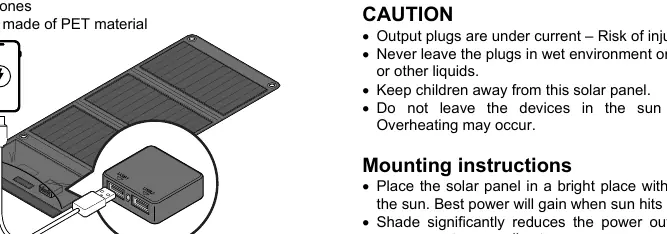
The unit consists of a foldable solar panel array with a built-in pocket containing the USB output ports. It is constructed with a PET fabric cover and includes mounting tabs for securing the panel to tents or other structures using cords.
Setup and Installation
- Positioning: Place the solar panel in a bright, sunny location. A southern exposure is generally preferable.
- Angle: For maximum efficiency, ensure the sun hits the panel at a 90-degree angle.
- Mounting: Use the integrated mounting tabs to secure the panel with cords or attach it to tent rods if necessary.
Usage
Unfold the solar panel completely and expose it to direct sunlight. Connect your devices (smartphones, power banks) to the USB-A ports located in the pocket. Note that the maximum current of 3.5A is shared between the two ports when both are in use.
Safety Precautions
- Do not immerse the product in water or other liquids.
- Keep the device away from children.
- Do not leave the connected devices in direct sunlight while charging, as this may cause overheating.
- Never connect the solar panel directly to house power.
- Ensure all plugs are kept dry; do not use in wet environments.
- Do not modify the solar panel or attempt to repair it yourself.
Cleaning and Maintenance
Always disconnect all cables and cover the solar panel before cleaning to avoid electric shock. Clean the equipment regularly with a moist cloth. Do not use cleaning agents or solvents. Ensure that no water enters the plugs or the electrical components.
Technical Specifications
- Max. Power: 21W
- Max. Voltage: 6V
- Max. Current: 3.5A
- Efficiency: >19%
- Operating Temperature: +10°C to +40°C
- Output: 2x USB-A
Support
For technical support, you can contact Technaxx via phone at 01805 012643 (available Mon-Fri, 9 am to 1 pm & 2 pm to 5 pm) or via email at [email protected].
Manufacturer information
Technaxx Deutschland GmbH & Co. KG
Practical help
Common problems
Low power output
Ensure the panel is at a 90-degree angle to the sun and free from shade (trees, walls).
Overheating during charging
Do not leave the connected devices in direct sunlight while charging; keep them in the shade.
Before use
- Unfold the solar panel completely.
- Ensure the USB plugs are dry.
- Check for any damage to the panel or cables.
- Position the panel in a bright, sunny location.
Show more Show less
Specs in practice
- Max. Power (21W)
- The maximum energy output the panel can generate under ideal conditions.
- Max. Current (3.5A)
- The total current available across both USB ports combined.
- Operating Temperature
- The safe temperature range (+10°C to +40°C) for operating the device.
Images and diagrams
- The solar panel features mounting tabs for securing with cords or tent poles.
- The USB output pocket contains two USB-A ports for charging devices.
Model compatibility
- Compatible with smartphones and power banks via USB-A.
- Not for direct connection to house power.

Manual page author
Michael Turner
Technical manual editor