Electronics / Cameras
Sandberg USB Webcam Flex 1080P HD
Quick guide for the Sandberg USB Webcam Flex 1080P HD, covering setup, mounting options, and connection instructions for plug-and-play use.
Table of contents
Manual images
Jump to the sectionProduct Overview
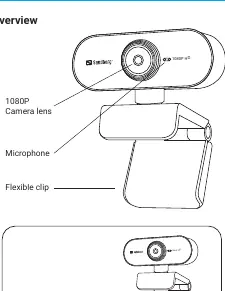
The Sandberg USB Webcam Flex 1080P HD is a high-quality, versatile camera designed for clear video communication. The device features a high-definition 1080P camera lens and an integrated microphone, ensuring both visual and audio clarity during calls. Its design includes a flexible, foldable clip that allows for easy adjustment and secure placement on various surfaces.
Connection
The webcam is designed for simplicity and ease of use. It operates as a driver-less device, meaning it is compatible with most chat applications immediately upon connection. To set up the camera, simply plug the integrated USB cable into an available USB port on your computer. The system should automatically recognize the device, allowing you to start video calls or recordings without the need for manual driver installation.
Mounting
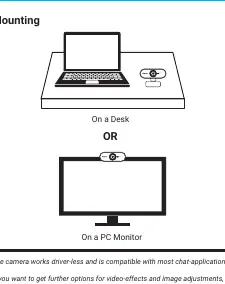
The flexible clip design provides two primary mounting options to suit your workspace. You can place the camera directly on your desk surface for a stable, low-angle view. Alternatively, the clip is designed to securely attach to the top edge of a PC monitor or laptop screen, providing a professional eye-level perspective for video conferencing. The foldable nature of the clip makes it easy to adjust the angle or store the camera when not in use.
Advanced Features and Support
While the camera functions perfectly as a plug-and-play device, users seeking additional functionality can access further options for video effects and image adjustments through the manufacturer's online resources. The product is backed by a five-year warranty, reflecting the manufacturer's commitment to quality. For any technical issues or questions, users are encouraged to visit the official support helpdesk. Proper disposal of the device should be handled in accordance with local electronic waste regulations to ensure environmental safety.
Manufacturer information
Sandberg A/S
Practical help
Common problems
Camera not detected
Ensure the USB cable is firmly connected to a working USB port on your computer.
Before use
- Unpack the webcam
- Identify a suitable USB port on your computer
- Determine if you will mount it on a desk or monitor
- Ensure your chat application is installed
Images and diagrams
- The overview diagram highlights the camera lens, microphone, and the flexible, foldable clip mechanism.
- The connection diagram illustrates the simple USB plug-and-play interface.
- The mounting diagrams show the two positions: standing on a desk or clipped to a monitor.
Model compatibility
- Works driver-less with most chat applications.
- Compatible with standard USB ports.

Manual page author
Michael Turner
Technical manual editor
Reviews PDF manuals for structure, safety notes, and practical product details so readers can find the right information quickly.