Electronics / Cameras
Sandberg USB Webcam 1080P Saver User Guide
Quick setup and operation guide for the Sandberg USB Webcam 1080P Saver, covering connection, mounting, and focus adjustment.
Table of contents
Manual images
Jump to the sectionOverview
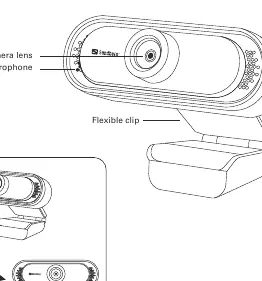
The Sandberg USB Webcam 1080P Saver is a high-quality, user-friendly camera designed for clear video communication. The device features a compact, foldable design, making it highly portable and easy to store when not in use. The integrated flexible clip allows for versatile mounting options, ensuring the camera can be securely positioned on various surfaces to suit your workspace requirements.
Connection
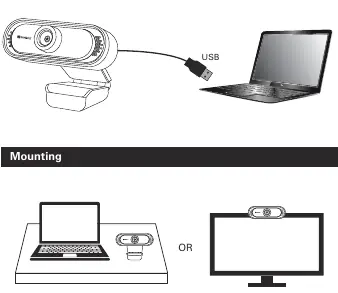
Setting up the webcam is straightforward and does not require complex software installations. Simply connect the integrated USB cable to an available USB port on your computer or laptop. The device is designed for plug-and-play functionality, meaning your operating system should automatically recognize the camera once it is plugged in. Ensure that the USB connector is fully inserted into the port for a stable connection.
Mounting
The webcam offers flexible mounting solutions to accommodate different setups. You can place the camera directly on your desk surface for a low-angle view, or use the flexible clip to attach it securely to the top edge of your PC monitor or laptop screen. The clip is designed to provide a stable grip, keeping the camera steady during video calls or recordings. Adjust the angle of the camera by tilting the hinge to achieve the desired field of view.
Function
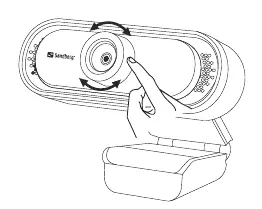
The Sandberg USB Webcam 1080P Saver includes a manual focus adjustment feature to ensure your image remains sharp. To adjust the focus, gently rotate the ring around the camera lens until the image on your screen appears clear and crisp. This allows you to fine-tune the clarity based on your distance from the camera. The built-in microphone captures clear audio, making it an ideal solution for online meetings, streaming, or video chats. For maintenance, keep the lens clean from dust and fingerprints using a soft, dry cloth. When the device reaches the end of its life, please dispose of it according to local electronic waste regulations to help protect the environment.
Manufacturer information
Sandberg A/S
Practical help
Before use
- Ensure the USB port on your computer is functional
- Check that the camera lens is clean
- Verify the camera is securely mounted
- Ensure the USB cable is fully plugged in
Images and diagrams
- The camera features a foldable clip for easy storage and mounting
- The USB cable connects directly to your computer
- The camera can be mounted on a desk or a monitor
- The lens ring is used for manual focus adjustment
Model compatibility
- Compatible with standard USB ports

Manual page author
David Miller
Documentation analyst
Organizes user manual content into clear summaries, with attention to model details, product context, and everyday usability.