Computers / Storage
Seagate Exos 10E2400 SAS Hard Drive User Manual
Quick guide for the Seagate Exos 10E2400 SAS hard drive. Includes installation, performance specifications, power management, reliability features, and security settings for standard and self-encrypting models.
Table of contents
Manual images
Click an image to enlargeQuick guide from the manual
The Seagate Exos 10E2400 SAS drive is a high-performance storage device designed for enterprise environments. This manual covers installation, performance characteristics, reliability, and security features for both standard and Self-Encrypting Drive (SED) models. Ensure your system supports SAS-compatible backplanes and that cooling requirements are met to maintain drive longevity.
Installation
The drive is designed for plug-and-play installation in systems with SAS-compatible backplanes. If using a non-backplane system, use high-quality cables not exceeding 10 meters. Mount the drive using four M3 x 0.5 metric screws with a maximum torque of 4.5 in-lb. The drive can be mounted in any orientation, though horizontal and vertical are preferred. Ensure adequate airflow to keep the drive within specified temperature limits (41°F to 131°F operating).
Performance and Power Management
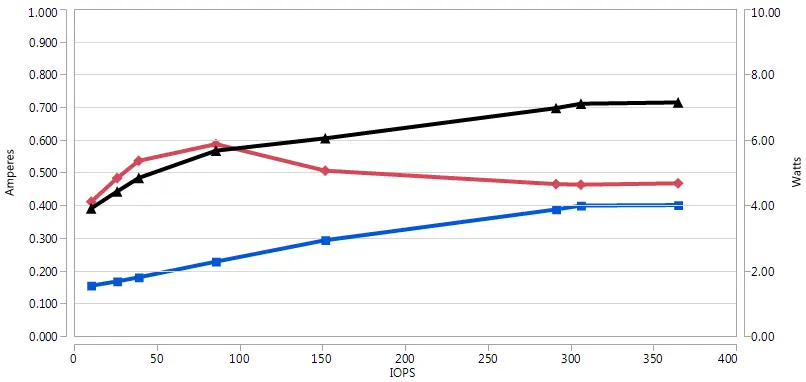
The drive features PowerChoice technology for programmable power management. Modes include Idle_A, Idle_B, Idle_C, Standby_Y, and Standby_Z, offering varying levels of power savings. Power conditions can be managed via the Power Condition mode page or the START STOP UNIT command. The drive also supports Fast Format for transitioning between 512E and 4KN configurations.
Reliability and Diagnostics
The drive includes S.M.A.R.T. (Self-Monitoring Analysis and Reporting Technology) to predict failures and Drive Self Test (DST) for system-level validation. No routine preventive maintenance is required. If a drive fails a self-test, it should be removed from service.
Security Features
SED models provide data encryption at rest using AES 256-bit keys. Security is managed through two security providers: Admin SP and Locking SP. Access is controlled via passwords (SID/MSID for Admin, BandMasterX/EraseMaster for Locking). Cryptographic erase is available to instantly render data unrecoverable for repurposing or scrapping.
Interface Requirements
The drive supports SAS-3 specifications and dual-port operation. It supports various SCSI commands for configuration, diagnostics, and data management. Signal ground and HDA ground are connected; if isolation is required, the system integrator must provide nonconductive mounting.
Support
For product support, compliance information, firmware downloads, or warranty services, visit the Seagate support website at https://www.seagate.com/support. For data recovery services, visit http://www.seagate.com/services-software/recover/resources/.
Official resources from the manual
Manufacturer information
Seagate Technology LLC
Practical help
Common problems
Drive not ready
Check if the motor is spinning, verify configuration tables, or ensure no other process (like a format or DST) is currently running.
Performance issues
Verify cooling and airflow, check cache settings, or ensure the interface link rate is correctly negotiated.
Security/Encryption access denied
Ensure correct credentials are used (SID/MSID for Admin SP, or BandMasterX/EraseMaster for Locking SP).
Before use
- Verify drive model and configuration (512E/4KN or 512N)
- Ensure host system supports SAS interface
- Check cooling and airflow requirements
- Mount drive using M3 x 0.5 screws (max torque 4.5 in-lb)
- Ensure proper grounding
Images and diagrams
- Figure 9: Recommended mounting orientations
- Figure 13: Airflow patterns for cooling
- Figure 14: Physical interface connector location
Model compatibility
- Compatible with SAS-compatible backplanes
- Supports 512E/4KN and 512N configurations
- SED models require security initialization

Manual page author
Emily Carter
User documentation editor
Prepares concise manual descriptions and highlights the most useful setup, operation, and maintenance information for readers.