Computers / Storage
User Manual for StarTech.com M2-USB-C-NVME-SATA SSD Enclosure
Quick guide for the StarTech.com M2-USB-C-NVME-SATA SSD enclosure. Learn about tool-free installation, drive compatibility, technical specifications, and usage instructions for this high-performance storage adapter.
Table of contents
Quick Guide
The StarTech.com M2-USB-C-NVME-SATA is a tool-free external enclosure designed for M.2 NVMe (PCIe) and SATA (AHCI) SSDs. It supports USB 3.2 Gen 2 (10Gbps) speeds and is compatible with various drive lengths. Installation is driverless and requires no tools, utilizing a thermal pad and fastener pegs to secure the drive.
Product Overview
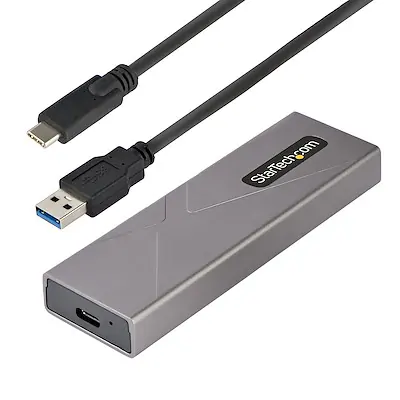
This enclosure is designed for mobility with a durable aluminum housing that acts as a heatsink. It includes two host cables (USB-C to USB-C and USB-C to USB-A) to ensure compatibility with most computers, including those with USB-A, USB-C, or Thunderbolt 3/4 ports.
Installation
The enclosure features a tool-less design for easy drive installation:
- Open the enclosure housing.
- Insert your M.2 NVMe or SATA SSD into the connector.
- Secure the drive using the included SSD fastener pegs.
- Apply the thermal pad to assist with heat dissipation.
- Close the enclosure and connect it to your computer using the appropriate included cable.
Compatibility
Drive Support: Supports M.2 PCIe NVMe (M-Key) and M.2 SATA (B+M-Key) drives. Supported lengths are 2230, 2242, 2260, and 2280mm. Note: Not compatible with 22110mm drives.
OS Support: Compatible with Windows, Mac, Chrome, Linux, Ubuntu, and iOS (iPhone 15 and up).
Technical Specifications
- Interface: USB 3.2 Gen 2 (10Gbps)
- Power Source: USB-Powered (5V DC)
- Operating Temperature: 0°C to 40°C (32°F to 104°F)
- Dimensions: 4.1 x 1.4 x 0.6 in (105 x 35 x 14 mm)
- Weight: 1.8 oz (52.0 g)
Official resources from the manual
Practical help
Common problems
TRIM support issues
Windows 7 and earlier versions do not support TRIM with USB storage devices.
Drive size incompatibility
The enclosure is not compatible with 22110mm M.2 drives.
Before use
- Verify your M.2 drive is either NVMe (M-Key) or SATA (B+M-Key).
- Ensure your drive length is 2230, 2242, 2260, or 2280mm.
- Select the appropriate host cable (USB-C to USB-C or USB-C to USB-A) based on your computer's port.
- Ensure the thermal pad is installed to prevent overheating.
Specs in practice
- 2230/2242/2260/2280
- Supported M.2 drive lengths in millimeters.
Model compatibility
- Compatible with Thunderbolt 3/4 host computers.
- Not compatible with 22110mm M.2 drives.
- Supports iOS (iPhone 15 [Plus/Pro/Max] and up).

Manual page author
David Miller
Documentation analyst
Organizes user manual content into clear summaries, with attention to model details, product context, and everyday usability.