Furniture / Storage Cabinets
Sealey APMS64, APMS65, APMS68 Modular Storage Cabinet User Guide
Quick guide for Sealey APMS64, APMS65, and APMS68 modular storage cabinets. Includes safety instructions, assembly steps, and technical specifications for proper installation.
Table of contents
Quick guide from the manual
This document provides assembly and safety instructions for the Sealey APMS64, APMS65, and APMS68 modular storage cabinets. Ensure the unit is placed on level, solid ground (preferably concrete) and that the work area is clean and well-lit. Do not overload the shelves, step on them, or move the cabinet while it contains items.
Safety
- Ensure compliance with local Health & Safety and workshop regulations.
- Use only on level, solid ground.
- Keep children and unauthorized persons away from the work area.
- Do not use outdoors or in damp/wet areas prone to condensation.
- Clean only with distilled water; do not use solvents or detergents.
Assembly
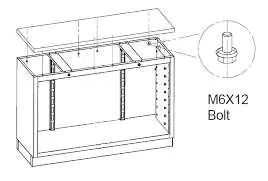
The assembly process involves connecting modular components using the provided fixings. Use protective gloves during assembly. Refer to the diagrams for the correct placement of M6x12 bolts and washers to secure the cabinet frames and panels.
Technical Specifications
- APMS64: 1360 x 460 x 910mm (includes 5 small drawers, 1 medium drawer, 1 large drawer, and cupboard).
- APMS65: 680 x 280 x 350mm (two-door wall cabinet).
- APMS68: 1360 x 280 x 350mm (modular wall cabinet).
Maintenance and Disposal
The product is designed for long-term use with proper care. When the unit reaches the end of its service life, sort all materials and dispose of them at a recycling center in accordance with local environmental regulations.
Manufacturer information
Sealey Group
Practical help
Common problems
Surface damage or protective coating degradation
Do not use solvents or detergents for cleaning; use only distilled water.
Instability or tipping
Ensure the cabinet is placed on level, solid ground, preferably concrete.
Difficulty moving the cabinet
Do not attempt to move the storage system while items are stored inside.
Before use
- Verify the floor is level and solid (concrete recommended).
- Ensure the work area is clean and well-lit.
- Wear protective gloves during assembly.
- Check that all modular components are correctly aligned.
- Ensure all M6x12 bolts are tightened securely.
Specs in practice
- APMS64 Overall Size
- 1360 x 460 x 910mm (Width x Depth x Height).
- APMS65 Overall Size
- 680 x 280 x 350mm (Width x Depth x Height).
- APMS68 Overall Size
- 1360 x 280 x 350mm (Width x Depth x Height).
Images and diagrams
- Fig 1: Shows the basic assembly of the cabinet frame using M6x12 bolts.
- Fig 2-4: Illustrate the connection of modular components and wall mounting configurations.
Model compatibility
- APMS65 is designed for use with APMS51, APMS52, APMS57, APMS59, and APMS64 floor cabinets.
- APMS65 can be used with the APMS50BP Back Panel for larger modular systems.

Manual page author
Michael Turner
Technical manual editor
Reviews PDF manuals for structure, safety notes, and practical product details so readers can find the right information quickly.