Sports / Fitness
User Manual for Ninebot KickScooter F2 Series
Quick guide for the Ninebot KickScooter F2, F2 Plus, and F2 Pro. Includes setup, operation, maintenance schedules, and technical specifications.
Table of contents
Quick guide from the manual
This document provides essential information for the Ninebot KickScooter F2, F2 Plus, and F2 Pro models. Users must install the Segway-Ninebot app to activate the scooter, obtain firmware updates, and access safety instructions. The scooter features three speed modes (ECO, D, S) and a Walk Mode. Always ensure the scooter is activated via the app before use.
Operation and Controls
Power Button: Press to turn on; press and hold for 3 seconds to turn off. When on, press once to toggle headlight/rear light, and double-press to switch speed modes.
Direction Indicators: Use the left/right switch on the handlebar to signal turns. Press the switch again to turn off.
Parking Mode: If the starting speed is set below 1.86 mph (3 km/h), the scooter enters Parking mode (P) upon power-on. Exit by squeezing the brake lever or accelerating above 1.86 mph.
Cruise Mode: Enable via the app. It activates when the throttle is held for more than 5 seconds (only at speeds above 3.1 mph).
Maintenance Schedule
Regular maintenance is the owner's responsibility. Key tasks include:
- Mainframe: Wipe clean with a soft, wet cloth.
- Tires: Inflate to 42-48 psi and check for cracks or wear.
- Screws: Periodically tighten handlebar, stem, folding mechanism, and disc brake base screws to specified torques (e.g., stem top: 10±0.5 N·m).
- Functional Checks: Regularly test brakes, lights, throttle, and folding mechanism.
Refer to the detailed maintenance tables in the manual for specific intervals (3, 6, 12, and 36 months or corresponding mileage).
Safety and Compliance
The product is certified to ANSI/CAN/UL-2272. The battery complies with UN/DOT 38.3 and ANSI/CAN/UL-2271. Ensure a minimum distance of 20cm from the body during operation to comply with FCC/IC radiation exposure limits.
Manufacturer information
Segway
Practical help
Common problems
Scooter won't accelerate (displays 'P')
The scooter is in Parking mode. Squeeze the brake lever once or accelerate to over 1.86 mph (3 km/h) to exit.
Battery level is low
If the first battery bar is red, charge the scooter immediately.
Brake is too tight or loose
Use a 4 mm Allen key to loosen the caliper screw, adjust the brake line length, and retighten.
Before use
- Install the Segway-Ninebot app.
- Activate the KickScooter via the app.
- Check tire pressure (42-48 psi).
- Ensure all screws are tightened to specified torques.
- Check battery level on the dashboard.
Specs in practice
- IP Rating (IPX5)
- The scooter is protected against water jets, but not immersion.
- Theoretical Range
- Tested with full battery, 165 lbs load, 77°F, at 9.9 mph on pavement.
Images and diagrams
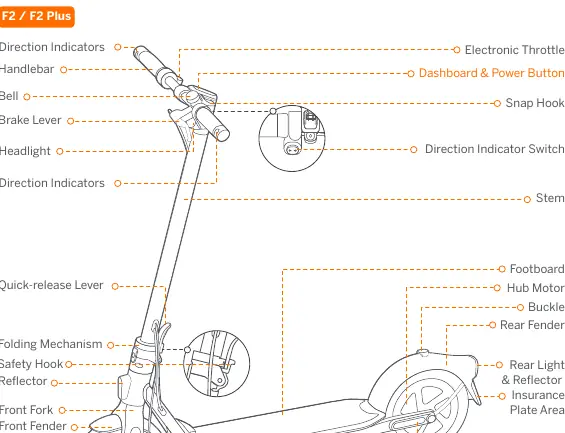
- The diagram identifies key components including the electronic throttle, brake lever, folding mechanism, and charging port.
- The dashboard displays speed, battery level, Bluetooth status, and cruise mode indicator.
Model compatibility
- The Segway-Ninebot app is required for full functionality and firmware updates.
- Cruise mode is only available at speeds above 3.1 mph (5 km/h).

Manual page author
Michael Turner
Technical manual editor
Reviews PDF manuals for structure, safety notes, and practical product details so readers can find the right information quickly.