Electronics / Audio
SENA 10R Bluetooth Headset Quick Start Guide
A concise guide for the SENA 10R Bluetooth headset, covering button operations, pairing, intercom setup, and troubleshooting.
Table of contents
Product Overview
The SENA 10R is a compact Bluetooth communication system designed for motorcycle riders. It allows for hands-free mobile phone calls, music streaming, and intercom communication with other riders. The device is managed via the Sena Utility App or the Sena Device Manager software available at sena.com.
Basic Operation
The device is controlled using a combination of button taps, holds, and presses. The Center Button, along with the (+) and (-) buttons, are used to navigate all functions.
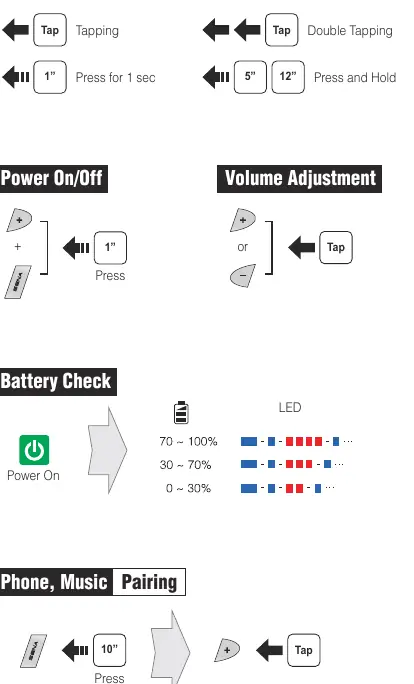
- Power On/Off: Press the Center Button and the (+) Button simultaneously for 1 second to power on (solid blue LED) or power off (solid red LED).
- Volume Adjustment: Tap the (+) or (-) button during audio playback or calls.
- Battery Check: Upon powering on, the LED indicates the battery level: 70-100% (solid blue), 30-70% (flashing blue), or 0-30% (flashing red).
Pairing and Connectivity
To pair with a mobile phone, press the Center Button for 10 seconds until the LED flashes red and blue. Select 'Sena 10R' in your phone's Bluetooth settings and enter '0000' if prompted for a PIN. For intercom pairing, press the Center Button on both headsets for 5 seconds until the LEDs flash red, then tap the Center Button on one of the units.
Intercom and Music
Intercom communication is initiated by tapping the Center Button. You can connect with up to three friends using specific tap sequences: one tap for the 1st friend, double tap for the 2nd, and triple tap for the 3rd. Music playback is controlled by pressing the Center Button for 1 second to play/pause, and holding the (+) or (-) buttons for 1 second to skip tracks.
Troubleshooting
If the device behaves unexpectedly, perform a Fault Reset by gently pressing the pin-hole reset button located below the (+) button. For a complete system wipe, use the Factory Reset option found within the configuration menu.
Official resources from the manual
Manufacturer information
SENA
Practical help
Common problems
Device not responding
Perform a Fault Reset by pressing the pin-hole button located below the (+) button.
Intercom connection failure
Ensure both headsets are in pairing mode (flashing red LED) and tap the Center Button on only one of the units to complete the link.
Phone pairing issues
Ensure the headset is in pairing mode (10-second press) and use the PIN '0000' if requested by your smartphone.
Before use
- Download the Sena Utility App or Sena Device Manager from sena.com.
- Charge the device fully until the LED turns blue.
- Check battery status upon power-on to ensure sufficient charge.
- Verify the headset is in the correct pairing mode for the intended device (Phone vs. Intercom).
Specs in practice
- Center Button
- The primary control for power, call management, and intercom initiation.
- Pin-hole Reset
- A hardware-level reset button used to force a restart if the software freezes.
- LED Indicators
- Visual feedback for battery status, pairing mode, and power state.
Images and diagrams
- The quick reference table provides a summary of button commands for basic functions, mobile phone usage, intercom, and music control.
- Button operation diagrams illustrate the difference between a tap, double tap, 1-second press, and long press.
Model compatibility
- Compatible with Android and iOS via the Sena Utility App.
- Firmware updates and configuration settings require a PC or Apple computer with Sena Device Manager.

Manual page author
Michael Turner
Technical manual editor
Reviews PDF manuals for structure, safety notes, and practical product details so readers can find the right information quickly.