Electronics / Audio
SENA 10R Low Profile Motorcycle Bluetooth Communication System User Guide
Comprehensive user guide for the Sena 10R motorcycle Bluetooth communication system, covering installation, pairing, intercom features, and troubleshooting.
Table of contents
Manual images
Jump to the sectionProduct Overview
The Sena 10R is a low-profile, lightweight Bluetooth stereo headset and intercom system designed for motorcyclists. It supports Bluetooth 4.1 and provides full-duplex intercom communication, hands-free mobile phone calls, GPS navigation instructions, and stereo music streaming.
Key Features
- Bluetooth intercom range up to 900 meters (980 yards) in open terrain.
- Four-way intercom conferencing.
- Universal Intercom for connecting with non-Sena headsets.
- Advanced Noise Control and Sidetone features.
- Music sharing capabilities.
- Smartphone app support for iOS and Android.
- Firmware upgradeable via Sena Device Manager.
Installation
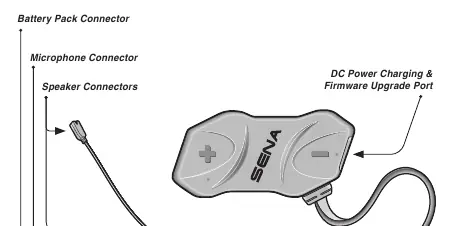
The 10R is designed for helmet mounting. The main unit and battery pack are installed using either hook-and-loop fasteners or double-sided adhesive tape. The system includes a wired boom microphone (for open-face helmets) and a wired microphone (for full-face helmets). Ensure all cables are securely connected to the main unit and excess wire is tucked behind the helmet padding.

Getting Started
The device is operated via three buttons: (+), (-), and the Center Button. Power on/off is achieved by pressing the Center and (+) buttons simultaneously. Charging is performed via the micro-USB port; a full charge takes approximately 2.5 hours. Battery level can be checked via LED flashes or voice prompts during startup.
Pairing and Intercom
The 10R supports pairing with mobile phones, GPS devices, and other headsets. Intercom pairing is performed by holding the Center Button for 5 seconds. The system uses a 'Last-Come, First-Served' queue for intercom friends. Group Intercom allows for instant multi-way conferencing with up to three recently paired headsets.
Configuration and Maintenance
Advanced settings, such as VOX sensitivity, Audio Multitasking, and HD Voice, can be configured via the Sena Motorcycles App or Sena Device Manager. If the device malfunctions, a fault reset can be performed using the pin-hole button, or a full factory reset can be initiated through the configuration menu. For support and software updates, visit www.sena.com.
Official resources from the manual
Manufacturer information
SENA
Practical help
Common problems
Intercom busy signal (low tone double beep)
The intercom friend is out of range, already in a conference, or on a phone call. Try again later.
Intercom disconnected due to range
The 10R will automatically attempt to reconnect every 8 seconds. Tap the Center Button to stop the reconnection attempt.
Device not working properly
Perform a fault reset by inserting a paper clip into the pin-hole reset button below the (+) button.
Before use
- Ensure the main unit and battery pack are firmly attached to the helmet.
- Check that all cables (speakers, microphone, battery) are securely connected to the main unit.
- Charge the unit fully (approx. 2.5 hours) using an approved charger.
- Download the Sena Motorcycles App for easier configuration.
- Pair your mobile phone and other devices before your first ride.
Specs in practice
- Bluetooth 4.1
- The wireless standard used for connectivity, supporting HFP, A2DP, and AVRCP profiles.
- Audio Multitasking
- Allows simultaneous audio from two sources (e.g., GPS instructions overlaid on intercom).
- Advanced Noise Control
- Reduces background wind and road noise during intercom conversations.
Images and diagrams
- The 10R uses three buttons: (+) for volume/track forward, (-) for volume/track back, and a Center Button for calls, intercom, and configuration.
- Three cables connect to the main unit: the longest for speakers, the shortest for the microphone, and the second longest for the battery pack.
Model compatibility
- Universal Intercom allows connection with non-Sena headsets that support the Bluetooth Hands-Free Profile (HFP).
- HD Voice and HD Intercom are only active when Audio Multitasking is disabled.
- Some automotive GPS systems may not support turn-by-turn voice instructions via Bluetooth.

Manual page author
Emily Carter
User documentation editor
Prepares concise manual descriptions and highlights the most useful setup, operation, and maintenance information for readers.