Electronics / Audio
SENA LATITUDE S2 Smart Snow Helmet User Guide
Comprehensive user guide for the SENA LATITUDE S2 Smart Snow Helmet, covering setup, Mesh Intercom operation, smartphone integration, and troubleshooting.
Table of contents
Manual images
Jump to the sectionAbout the LATITUDE S2
The SENA LATITUDE S2 is a premium smart snow helmet equipped with an advanced communication system. It features Mesh Intercom 3.0 technology, providing robust connectivity, improved sound quality, and extended talk time for group communication. The helmet is designed for seamless integration with smartphones via Bluetooth 5.2, allowing for hands-free calls, voice assistant activation, and music streaming. With integrated speakers and Advanced Noise Control, it delivers professional studio-quality audio even in challenging outdoor environments.
Getting Started
Before using your helmet, download the Sena Outdoor app from the Google Play Store or the Apple App Store. This app is essential for configuring device settings, managing speed dial presets, and performing Over-the-Air (OTA) firmware updates. Ensure your helmet is fully charged before the first use; a full charge takes approximately 2.5 hours via the USB-C port.
Mesh Intercom Operation
The LATITUDE S2 offers two primary communication modes: Open Mesh and Group Mesh. Open Mesh allows for communication with virtually unlimited users across 6 available channels. Group Mesh enables the creation of private conversation groups for up to 24 participants. You can easily toggle between these modes, mute your microphone, or send a Mesh Reach-Out request to nearby friends to invite them into your communication network.
Smartphone Integration
Pairing your smartphone is straightforward. Upon first power-on or after a factory reset, the helmet automatically enters pairing mode. Once connected, you can manage phone calls, use voice commands, and control music playback directly from the helmet's intuitive button interface. The system also supports Audio Multitasking, allowing you to listen to music while maintaining an active intercom conversation, with automatic volume adjustment for clarity.
Maintenance and Troubleshooting
To ensure longevity, keep the helmet clean and use only approved USB chargers to prevent battery damage. If the device becomes unresponsive, a fault reset can be performed by pressing the multi-function and Mesh Intercom buttons simultaneously for 8 seconds. For a complete system refresh, a factory reset is available to restore all default settings. Always ensure the firmware is kept up to date via the Sena Outdoor app to benefit from the latest features and performance improvements.
Manufacturer information
SENA
Practical help
Common problems
Device is on but not responding
Perform a fault reset by pressing the multi-function and Mesh Intercom buttons simultaneously for 8 seconds.
Mesh grouping failed
Ensure all participants are within range and try the grouping process again; grouping must complete within 30 seconds.
Cannot toggle between Open and Group Mesh
If you have never participated in a group mesh, the toggle function is unavailable.
Before use
- Download the Sena Outdoor app
- Charge the helmet fully (2.5 hours)
- Ensure the USB-C cable is disconnected before use
- Check that the microphone sponge is properly installed
- Verify firmware version via the app
Specs in practice
- Mesh Intercom 3.0
- Latest communication technology for robust, multi-user group connections.
- Bluetooth 5.2
- Wireless standard for stable smartphone connectivity and audio streaming.
- Advanced Noise Control
- Technology that reduces background noise for clearer intercom and phone audio.
Images and diagrams
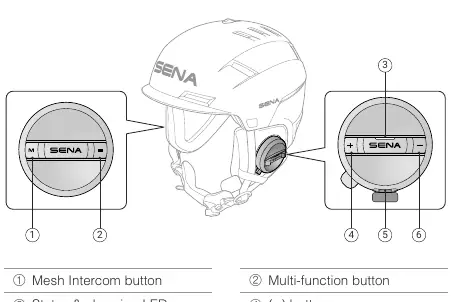
- The helmet features a Mesh Intercom button on the left side and a multi-function button on the right.
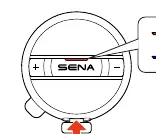
- The status LED indicates charging (red) and fully charged (blue) states.
- The top vent slider allows for manual opening and closing of airflow.
Model compatibility
- Supports backward compatibility with Mesh 2.0 via the Sena Outdoor app.
- Compatible with third-party USB chargers approved by FCC, CE, or IC.

Manual page author
Emily Carter
User documentation editor
Prepares concise manual descriptions and highlights the most useful setup, operation, and maintenance information for readers.