Electronics / Audio
Sena 10C Bluetooth Motorcycle Headset with Camera Quick Start Guide
Quick start guide for the Sena 10C Bluetooth motorcycle headset and integrated camera system, covering installation, operation, pairing, and troubleshooting.
Table of contents
Manual images
Jump to the sectionProduct Overview
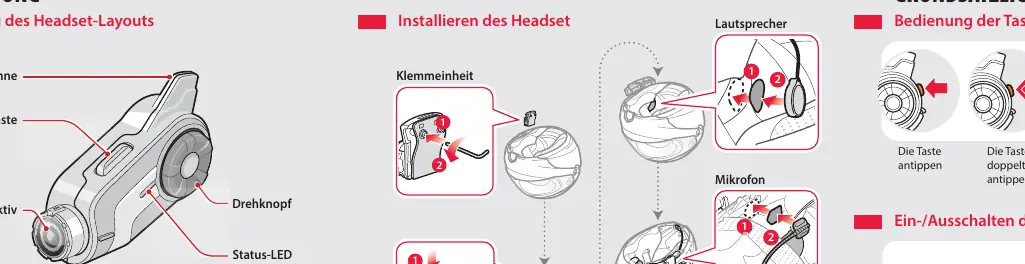
The Sena 10C is a versatile Bluetooth communication system for motorcyclists, featuring an integrated camera. The device layout includes an antenna, camera button, lens, jog dial, status LED, micro-HDMI port, microSD card slot, and charging/firmware update port. Users can control the device using the jog dial and phone button, which support single taps, double taps, and long presses.
Basic Operation
To turn the headset on or off, hold the jog dial and the phone button simultaneously for one second. You will hear ascending or descending beeps and voice prompts. Volume can be adjusted by rotating the jog dial. The battery level can be checked by observing the status LED when powering on or by holding the jog dial and phone button for at least three seconds to hear a voice prompt indicating the battery status.
Pairing and Phone Features
Pairing with mobile devices for phone and music is initiated by holding the phone button for five seconds until the LED flashes and you hear the voice prompt. Once paired, you can answer, end, or reject calls using the phone button. Music playback can be controlled by rotating and holding the jog dial to skip tracks or play/pause.
Intercom and Camera
The 10C supports two-way intercom communication with other headsets. The integrated camera allows for video recording and photo capture. Video tagging is supported, allowing users to mark specific moments during recording. The device also includes an FM radio with station scanning and preset management.
Settings and Troubleshooting
Configuration can be performed directly via the headset, using the Sena Device Manager on a computer, or through the Sena Smartphone App. If the device malfunctions, a factory reset can be performed by holding the phone button for 12 seconds and tapping the jog dial. A physical reset button is also located on the back of the unit for hardware-level troubleshooting.
Manufacturer information
SENA
Practical help
Common problems
Device not functioning correctly
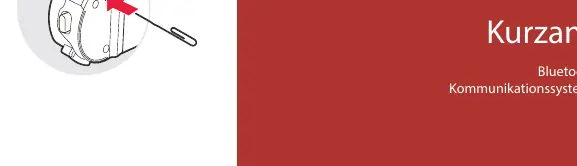
Press the reset button located in the pinhole on the back of the headset using a pointed object.
Need to restore factory settings
Hold the phone button for 12 seconds, then tap the jog dial.
Before use
- Ensure the microSD card is inserted
- Charge the battery fully using the AC adapter or USB
- Install the clamp unit and speakers onto the helmet
- Pair the headset with your mobile phone
- Check battery status via the LED indicator
Images and diagrams
- The layout diagram identifies the antenna, camera button, lens, and jog dial.
- The installation section shows how to mount the clamp unit and speakers to the helmet.
- The button operation section explains tap, double-tap, and hold gestures.
- The camera section illustrates how to start/stop recording and take photos.
- The reset section points to the physical pinhole reset button on the rear.
Model compatibility
- Compatible with Android and iPhone via the Sena Smartphone App.
- Supports connection to PC/Mac via USB for Sena Device Manager.

Manual page author
David Miller
Documentation analyst
Organizes user manual content into clear summaries, with attention to model details, product context, and everyday usability.