Electronics / Audio
Sena 10S Motorcycle Bluetooth Communication System
Comprehensive user guide for the Sena 10S Bluetooth communication system, covering installation, pairing, intercom features, music sharing, and configuration settings.
Table of contents
Manual images
Jump to the sectionProduct Overview
The Sena 10S is a high-performance motorcycle Bluetooth communication system featuring Bluetooth 4.1 technology. It allows for hands-free mobile phone calls, wireless stereo music streaming, GPS navigation voice instructions, and full-duplex intercom conversations with up to four riders. The device is water-resistant and supports firmware upgrades via the Sena Device Manager.
Installation
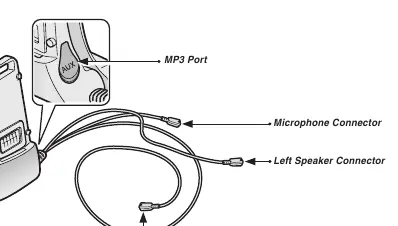
The 10S can be mounted to a helmet using the included clamp unit or the glued surface mounting adapter. Sena recommends the clamp unit for a secure fit. The system includes two types of microphones (wired boom and wired) to accommodate different helmet types, such as open-face or full-face helmets. Ensure all cables are securely connected to the clamp unit and excess wire is tucked behind the helmet padding.
Getting Started
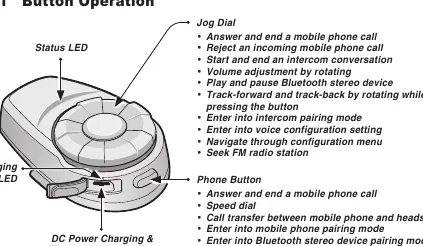
The device is operated primarily via the Jog Dial and the Phone Button. Power on/off is achieved by pressing both buttons simultaneously. The system provides intuitive voice prompts for status updates. Charging is performed via the micro USB port, with a full charge taking approximately 2.5 hours.
Pairing and Intercom
The 10S supports pairing with mobile phones, GPS units, and other Bluetooth headsets. For intercom, it supports multi-way communication up to 1.6 kilometers in open terrain. The system uses a 'Last-Come, First-Served' pairing queue. It also features a Universal Intercom function to connect with non-Sena Bluetooth headsets.
Configuration and Features
Users can customize settings such as Audio Boost, VOX phone/intercom, and Sidetone through the voice configuration menu. The device also includes a built-in FM radio with station scan and save functions. Advanced Noise Control helps reduce background noise during intercom conversations.
Maintenance and Safety
Keep the device free of dust and avoid extreme temperatures. The internal battery is non-replaceable; use only approved chargers. Always comply with local laws regarding the use of communication devices while riding. If the unit malfunctions, a fault reset can be performed using the pin-hole button, or a factory reset can be initiated through the configuration menu.
Manufacturer information
SENA
Practical help
Common problems
Intercom connection failure
Ensure the intercom friend is within range and not currently engaged in another conference or phone call. If the connection drops, the 10S will attempt to reconnect every 8 seconds.
Device not working properly
Perform a fault reset by inserting a paper clip into the pin-hole reset button on the unit for one second.
Universal Intercom multipoint issues
If a non-Sena headset is connected as a Universal Intercom, multipoint devices like GPS may be disconnected. Turn off the non-Sena headset to restore multipoint functionality.
Before use
- Ensure the main unit is securely attached to the clamp unit until you hear a click.
- Verify that the microphone is positioned near your mouth.
- Charge the device fully using the provided USB cable (approx. 2.5 hours).
- Pair your mobile phone or GPS device using the appropriate pairing mode.
- Check that all cables are connected to the correct ports on the clamp unit.
Specs in practice
- Bluetooth 4.1
- Supports Headset, Hands-Free (HFP), A2DP, and AVRCP profiles for versatile connectivity.
- Intercom Range
- Up to 1.6 kilometers (1.0 mile) in open terrain.
- Advanced Noise Control
- Reduces background noise during intercom conversations.
Images and diagrams
- The clamp unit features three ports: one for the microphone, one for the left speaker, and one for the right speaker.
- The Jog Dial is used for volume, track control, and intercom initiation.
- The Phone Button is used for call management, pairing, and FM radio control.
Model compatibility
- Universal Intercom allows connection with non-Sena headsets that support the Bluetooth Hands-Free Profile (HFP).
- Group Intercom is supported only between 10S and 20S models.
- The SMH5 model cannot participate in three-way or four-way conference intercoms with the 10S.

Manual page author
Emily Carter
User documentation editor
Prepares concise manual descriptions and highlights the most useful setup, operation, and maintenance information for readers.