Electronics / Audio
SENA DWO 1-Lite Motorcycle Intercom User Guide
Comprehensive user guide for the SENA DWO 1-Lite motorcycle intercom, covering installation, pairing, operation, and troubleshooting.
Table of contents
Manual images
Jump to the sectionProduct Overview
The SENA DWO 1-Lite is a high-performance Bluetooth headset designed specifically for motorcycle riders. It allows you to enjoy music, communicate via intercom with your riding buddies, and receive GPS navigation instructions seamlessly. With integrated Bluetooth technology, HD Intercom capabilities, and an intuitive LCD display, the DWO 1-Lite provides a minimal and freeing communication experience on the road.
Installation
The headset can be mounted to your helmet using either the provided clamp or the glued surface mounting adapter. Choose the method that best fits your helmet type. Ensure the speakers are positioned correctly inside the helmet for optimal audio quality. If the speakers feel too close to your ears, you can attach the included speaker sponges. The microphone should be positioned close to your mouth, with the fin side facing outward for clear voice transmission.
Getting Started
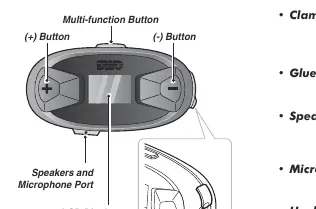
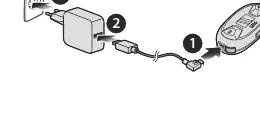
The device features a multi-function button, along with dedicated plus and minus buttons for volume and navigation. The LCD display provides real-time information, including battery status, active functions, and pairing status. To power the device on or off, press and hold the plus and minus buttons simultaneously. Charging is simple via the USB-C port, with a full charge taking approximately 2.5 hours.
Pairing and Connectivity
To use the DWO 1-Lite with your smartphone or other Bluetooth devices, you must perform a pairing process. The headset supports phone pairing, second mobile phone pairing, and intercom pairing with up to three other Sena headsets. Pairing modes can be accessed by holding specific button combinations, and the device will guide you through the process with voice prompts. The intercom system uses a 'Last-Come, First-Served' queue for managing multiple connections.
Operation and Settings
The DWO 1-Lite offers various functions, including phone call management, speed dialing, and stereo music playback. You can configure advanced settings, such as voice prompts and factory resets, through the built-in configuration menu. The headset also supports firmware upgrades via the Cycle Gear Bluetooth Device Manager, ensuring your device stays up to date with the latest features and improvements.
Troubleshooting
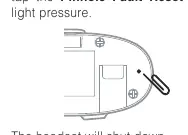
If you encounter issues with your headset, a fault reset can be performed by using a paperclip to press the pinhole reset button on the back of the unit. For a complete refresh, a factory reset is available through the configuration menu, which will restore all settings to their original state.
Manufacturer information
SENA
Practical help
Common problems
Headset not working properly
Perform a fault reset by inserting a paperclip into the pinhole reset button on the back of the unit.
Uncomfortable speaker pressure
Attach the provided speaker sponge to the front of the speaker to increase distance from your ears.
Need to clear all previous connections
Use the 'Delete All Pairings' option in the configuration menu.
Before use
- Ensure the headset is fully charged (approx. 2.5 hours).
- Choose the appropriate mounting method (clamp or adhesive adapter).
- Install speakers and microphone correctly inside the helmet.
- Verify the microphone fin is facing outward.
- Pair the headset with your smartphone via Bluetooth.
- Download the Cycle Gear Bluetooth Device Manager for firmware updates.
Specs in practice
- Intercom Range
- Up to 1 km (0.6 mi) in open terrain.
- Charging Time
- Approximately 2.5 hours for a full charge.
- Input Voltage
- Compatible with 5V input USB-charged devices only.
Images and diagrams
- The main unit features a multi-function button, plus/minus buttons, and an LCD screen.
- The charging port is located on the side of the main unit.
- The intercom pairing follows a 'Last-Come, First-Served' logic for up to three friends.
- The microphone fin must face away from the lips for optimal audio.
Model compatibility
- Compatible with 3rd party USB chargers approved by FCC, CE, or IC.
- Supports pairing with up to three other Sena headsets.
- Requires Cycle Gear Bluetooth Device Manager for PC-based configuration.

Manual page author
David Miller
Documentation analyst
Organizes user manual content into clear summaries, with attention to model details, product context, and everyday usability.