Home Appliances / Small Kitchen Appliances
User Manual for Sencor SRM 0600WH Rice Cooker
Quick guide for the Sencor SRM 0600WH rice cooker. Learn how to operate, clean, and maintain your device, including water-to-rice ratios and safety precautions.
Table of contents
Quick guide from the manual
The Sencor SRM 0600WH is a fully-automatic rice cooker designed for indoor domestic use. It is intended for cooking rice and steaming food. Key operational limits include a maximum capacity of 3 level measuring cups of rice and a maximum water level of 0.6 L. The appliance features a 'Keep Warm' function that activates automatically after cooking, which can maintain temperature for up to 6 hours, though it is recommended not to exceed 3 hours to maintain flavor.
Description of the rice cooker
The device consists of the following main components:
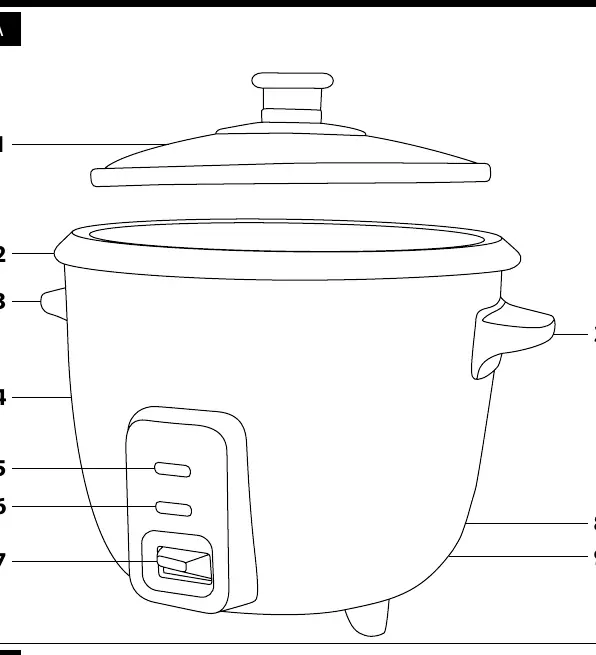
- A1: Glass lid with handle and steam release hole
- A2: Removable inner bowl with non-stick finish
- A3: Handle
- A4: Outer pot
- A5: KEEP WARM indicator light
- A6: COOK indicator light
- A7: Switch for changing between KEEP WARM and COOK modes
- A8: Power cord
- A9: Power switch
- B1: Rice and water measuring cup
- B2: Stirring spoon
Using the rice cooker
- Preparation: Wash the removable bowl, lid, measuring cup, and spoon in warm water with detergent. Dry thoroughly.
- Measuring: Use the supplied measuring cup to measure rice. Rinse the rice in a strainer before placing it into the inner bowl.
- Water Ratio: Add cold water according to the following guide:
- 1 cup of rice: Add water up to the 1–1½ CUP mark.
- 2 cups of rice: Add water up to the 2–2½ CUP mark.
- 3 cups of rice: Add water up to the 3 CUP mark.
- Cooking: Place the bowl into the outer pot and cover with the lid. Connect to power and set the power switch (A9) to position I. The KEEP WARM light will turn on. Slide the switch (A7) downwards to start the COOK mode. The COOK light will turn on.
- Completion: Cooking takes approximately 30 minutes. The device will automatically switch to KEEP WARM mode.
Cleaning and maintenance
Always allow the appliance to cool down completely before cleaning. Disconnect from the power socket.
- Removable bowl, lid, cup, and spoon: Wash in warm water with dishwashing detergent. Rinse and dry. Do not wash the removable bowl in a dishwasher.
- Outer pot: Clean using a lightly damp cloth and wipe dry.
- Prohibitions: Do not use abrasive cleaning products, steel wool, petrol, or solvents. Never submerge the rice cooker, power cord, or plug in water.
Safety warnings
- Do not use the appliance with an empty inner bowl.
- Do not place items on the lid during operation.
- Ensure sufficient air circulation around the appliance.
- Do not point the steam exhaust towards heat-sensitive materials or people.
- Do not use metal utensils to stir rice to avoid damaging the non-stick coating.
- If the power cord is damaged, do not use the appliance and contact an authorized service center.
Manufacturer information
Sencor
Practical help
Common problems
Rice drying out
Do not keep the rice warm for longer than 3 hours.
Non-stick coating damage
Do not use metal kitchen utensils to stir the rice; use the provided spoon.
Boiling water spraying out
Ensure the water level does not exceed the 0.6 L mark on the inside wall of the bowl.
Appliance not turning on
Ensure the power switch (A9) is in position I and the power cord is properly connected.
Before use
- Remove all packaging materials.
- Wash the removable bowl, lid, measuring cup, and spoon in warm water with detergent.
- Ensure the outer surface of the inner bowl and the inner area of the rice cooker are clean and dry.
- Check that the nominal voltage matches your power socket.
- Place the appliance on an even, dry, stable, and heat-resistant surface.
Specs in practice
- Rated power input
- 300 W
Images and diagrams
- A1: Glass lid with steam release
- A2: Removable inner bowl
- A5/A6: Indicator lights for Keep Warm and Cook modes
- A7: Mode switch
- B1: Measuring cup with rice and water scales
Model compatibility
- Indoor use only.
- Do not use an extension cord.
- Do not use on heat-sensitive surfaces.
- Do not use in industrial environments.

Manual page author
Michael Turner
Technical manual editor
Reviews PDF manuals for structure, safety notes, and practical product details so readers can find the right information quickly.