Tools / Generators
User Manual for Sencor SKS 0804BK Coffee Scale
Quick guide for the Sencor SKS 0804BK coffee scale. Learn how to use the weighing and timer modes, set the tare function, adjust gravitational acceleration, and troubleshoot common issues.
Table of contents
Manual images
Jump to the sectionQuick guide from the manual
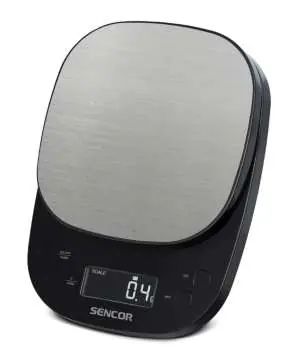
The Sencor SKS 0804BK is a digital coffee scale designed for household use. It features both a weighing mode and a built-in timer. The device requires 3x 1.5V AAA batteries for operation. Always place the scale on a flat, stable surface to ensure accurate measurements.
Safety Instructions
- Do not use for commercial purposes or for weighing animals.
- Use only on a flat, smooth, hard, and stable surface.
- Do not immerse the scale in water or other liquids.
- Remove batteries if the scale will not be used for an extended period.
- Do not exceed the maximum weighing capacity of 2 kg.
Device Description
The scale consists of the following components:
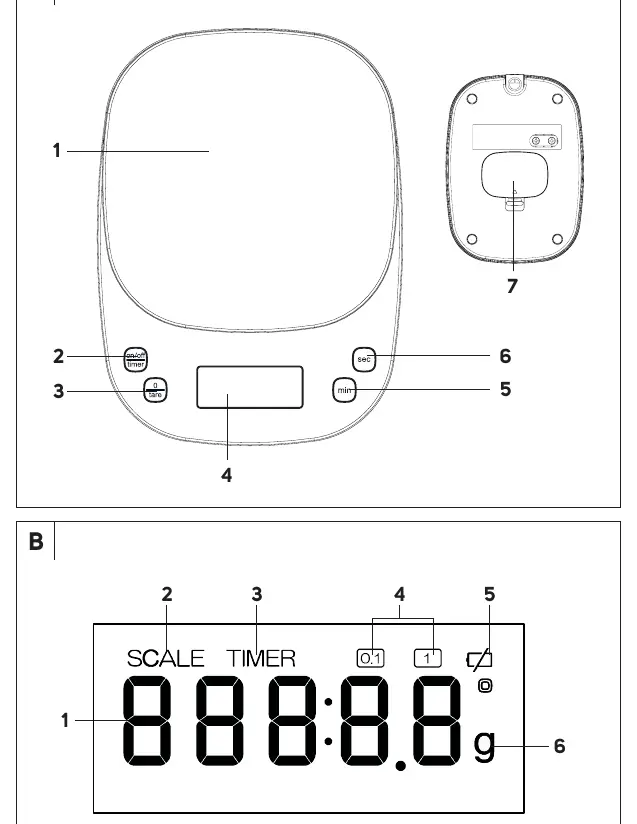
- Weighing area: The surface where items are placed.
- On/off/timer button: Used to power the device, switch between modes, and confirm settings.
- 0/tare button: Used to reset the display, start/stop the timer, or reset the timer value.
- Min/Sec buttons: Used to set the timer duration.
- Battery compartment: Located on the bottom of the device.
Display Indicators
The display provides the following information:
- Numeric display: Shows weight or time.
- SCALE icon: Indicates weighing mode.
- TIMER icon: Indicates timer mode.
- Weight unit division icons: Indicates the current measurement unit.
- Low battery symbol: Indicates that batteries need replacement.
Using the Scale
- Place the scale on a flat, stable surface.
- Press the on/off/timer button briefly to turn the scale on. Wait until 0.0 appears.
- Place ingredients in the center of the weighing area.
- To use the Tare function: Place an empty container on the scale, press 0/tare to reset to zero, then add ingredients.
Timer Mode
- Press the on/off/timer button until the TIMER icon and 000:00 appear on the display.
- Use the min and sec buttons to set the desired duration.
- Press the 0/tare button to confirm and start the timer.
- When the time is reached, an alarm will sound for 2 minutes. Press any button to stop the alarm.
Gravitational Acceleration Setting
The scale is calibrated for the Czech Republic (default value 7). To adjust for your location:
- With the scale off, long press the on/off/timer button.
- Short press 0/tare to increase the value (long press to speed up).
- Press on/off/timer to confirm and turn off the scale.
Cleaning and Maintenance
Clean the scale using a soft sponge slightly dampened in warm water. Wipe dry with a clean cloth. Do not use abrasive cleaners, thinners, or wire cloths. Never immerse the scale in water.
Manufacturer information
Sencor
Practical help
Common problems
Low battery symbol appears on display
Replace the batteries with 3 new 1.5V AAA batteries.
Scale does not turn on
Check if batteries are flat or inserted with incorrect polarity.
Symbol EEEE appears on display
Maximum weighing capacity (2 kg) has been exceeded. Remove items immediately.
Before use
- Insert 3x 1.5V AAA batteries observing correct polarity.
- Place the scale on a flat, stable surface.
- Ensure the weighing area is clean and clear of objects.
- Check if the scale is in the correct mode (Scale vs Timer).
Specs in practice
- Weight capacity
- Maximum load is 2 kg.
- Minimum weight
- The scale detects weights starting from 0.3 g.
- Weighing accuracy
- ±0.2 g for 0-200 g; ±2 g for 200-1000 g; ±3 g for 1001-2000 g.
Images and diagrams
- Diagram A identifies the weighing area, buttons (on/off/timer, 0/tare, min, sec), display, and battery compartment.
- Diagram B identifies the display icons for Scale mode, Timer mode, weight units, and low battery warning.

Manual page author
Emily Carter
User documentation editor
Prepares concise manual descriptions and highlights the most useful setup, operation, and maintenance information for readers.