Lighting / Fixtures
User Manual for Shada 100049X Rechargeable Table Lamp
Quick guide for the Shada 100049X rechargeable table lamp. Learn how to charge, adjust color temperature, use the touch dimmer, and maintain your lamp safely.
Table of contents
Manual images
Click an image to enlargeQuick guide from the manual
The Shada 100049X is a rechargeable table lamp featuring touch-sensitive controls for color temperature adjustment and dimming. It is rated IP54, making it suitable for both indoor and outdoor use. Please note that a USB charger is not included in the package.
Charging the lamp
Before first use, ensure the lamp is fully charged. Follow these steps:
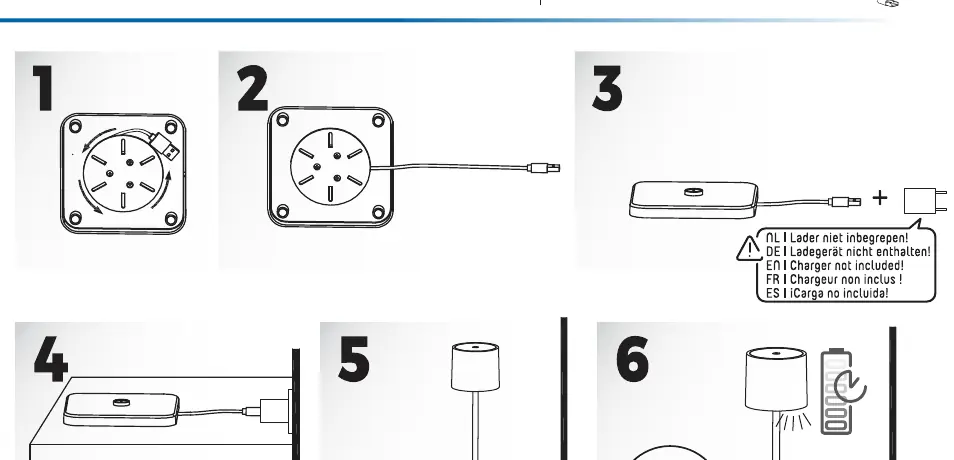
- Connect the provided USB cable to the lamp's charging port.
- Connect the other end of the cable to a compatible USB power adapter (not included).
- The lamp will indicate charging status. Ensure the connection is secure.
Operation and controls
The lamp is operated via a touch-sensitive area on the top of the shade:
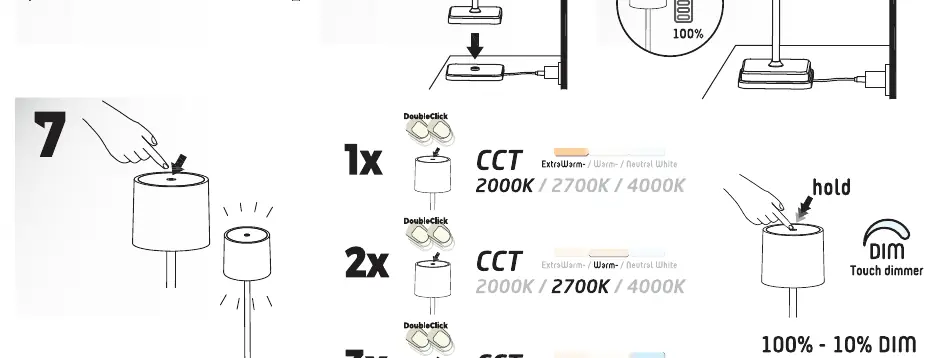
- Color Temperature (CCT): Double-click the touch area to cycle through the three available color temperatures: 2000K, 2700K, and 4000K.
- Dimming: Hold your finger on the touch area to adjust the brightness. The lamp will dim smoothly between 100% and 10% brightness.
Safety and maintenance
- Cleaning: Use a soft, damp cloth to clean the exterior. Do not use abrasive cleaning agents or scouring pads. Do not use a microfiber cloth if it causes damage.
- Safety: Do not disassemble the device. If the lamp is damaged, do not use it. This device is a Class III appliance, operating on low voltage (SELV).
- Usage: Keep out of reach of children. Ensure the lamp is placed on a stable surface.
Technical specifications
- IP Rating: IP54 (protected against dust and splash water).
- Power: 1.5W.
- Light Output: 175 lm.
- Appliance Class: Class III.
Manufacturer information
Shada B.V.
Practical help
Common problems
Lamp does not turn on
Ensure the battery is charged. Connect the lamp to a power source using a compatible USB charger.
Lamp does not charge
Verify the USB cable is properly connected to both the lamp and the power adapter. Ensure the power adapter is functional.
Before use
- Ensure you have a compatible USB power adapter (not included).
- Charge the lamp fully before the first use.
- Check that the lamp is placed on a stable, flat surface.
- Verify the environment is suitable for IP54 rated equipment.
Images and diagrams
- Page 1 illustrates the charging sequence (steps 1-6) and the touch control gestures (step 7) for CCT and dimming.
Model compatibility
- Suitable for indoor and outdoor use due to IP54 rating.
- Requires an external USB charger (not included).

Manual page author
David Miller
Documentation analyst
Organizes user manual content into clear summaries, with attention to model details, product context, and everyday usability.