Optics / Binoculars & Monoculars
User Manual for Sharper Image Refresh 01X Rechargeable Fan
Comprehensive user guide for the Sharper Image Refresh 01X Rechargeable Fan. Includes instructions for charging, operation, cleaning, storage, and troubleshooting to ensure optimal performance and safety.
Table of contents
Manual images
Click an image to enlargeQuick guide from the manual
The Sharper Image Refresh 01X is a rechargeable fan designed for indoor use. Before first use, ensure the device is fully charged using the provided AC adaptor. The fan features a single control button for power and speed adjustment, and an indicator light to monitor battery status.
Product Information
The product includes the following components:
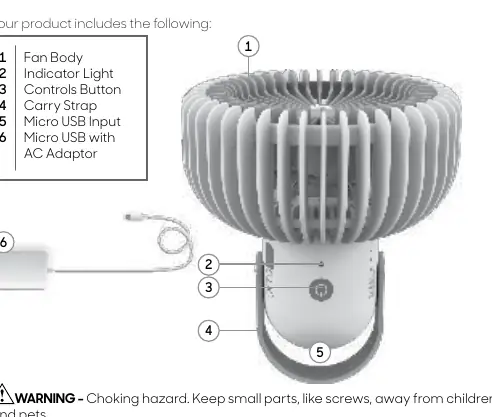
- Fan Body
- Indicator Light
- Controls Button
- Carry Strap
- Micro USB Input
- Micro USB with AC Adaptor
Getting Started
To prepare the fan for use:
- Remove the product from all packaging.
- Insert the micro USB plug into the micro USB input on the fan.
- Connect the AC adaptor to a power source. Use only the Refresh 01X AC adaptor provided with your product.
How to Use
The indicator light located near the controls button provides status updates:
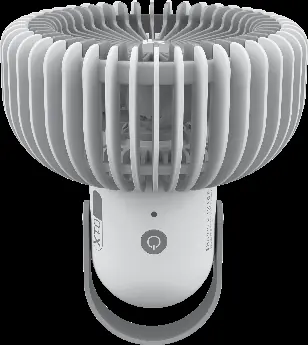
- Solid Green: Product fully charged, ready for use.
- Fading Green: Product charging, above 70% charged.
- Fading Red: Product charging, low charge.
- Flashing Red: Critically low, needs to be charged.
Power and Speed Control:
- Press the power button to turn the unit on and off.
- Press the button repeatedly to cycle through fan speeds: Low, Medium, and High.
Warning: Do not hang the product.
Cleaning
The fan has no user-serviceable parts and cannot be opened. To clean:
- Power off and unplug the unit.
- Dust or wipe the fan with a damp cloth.
- Use the brush attachment on a household vacuum cleaner to remove accumulated dust.
Storage
For off-season storage:
- Charge the product to a 70% state (Fading green LED).
- Unplug the product and bundle the cord loosely.
- Cover or place back in the retail carton to prevent dust accumulation.
- Store in a cool, dry indoor location (recommended room temperature 60-90°F / 16-32°C).
Caution: Do not store or use in extreme temperatures below -4°F (-20°C) or above 140°F (60°C).
Troubleshooting
If you encounter issues, check the following:
- Unit fails to power on: Ensure it is plugged in, charged, and a speed setting is selected. Check if the outlet is worn or damaged.
- No indicator light: Battery may be critically low. Plug into a power source and wait 1 hour to check if the light functions.
- Weak airflow: Ensure the unit is set to the highest setting and the airflow path is not blocked.
- Fan is hot or bulging: Stop use immediately, unplug, and contact customer service.
Safety Instructions
Supervision is required for children 12 and younger. Do not operate outdoors, near water, or near high-temperature heat sources. Do not use with a dimmer control switch. Do not attempt to repair the unit yourself. Contact Sharper Image Consumer Service at 833-800-8669 or [email protected] for assistance.
Manufacturer information
Sharper Image
Practical help
Common problems
Unit fails to power on
Ensure the unit is plugged in, charged, and a speed setting is selected. Try a different outlet.
No indicator light
Battery may be critically low. Plug into a power source and wait 1 hour to see if the light activates.
Weak airflow
Ensure the fan is set to the highest speed and there are no obstructions blocking the airflow.
Fan is hot or bulging
Stop use immediately, unplug, and contact customer service. The lithium battery may be damaged.
Before use
- Remove all packaging materials
- Charge the fan fully before first use
- Ensure the AC adaptor is the one provided with the product
- Check that the wall outlet is in good condition
Specs in practice
- Solid Green LED
- Battery is fully charged
- Fading Green LED
- Charging, battery level above 70%
- Fading Red LED
- Charging, battery level is low
- Flashing Red LED
- Battery is critically low, requires immediate charging
Images and diagrams
- 2: Indicator Light
- 3: Controls Button
- 4: Carry Strap
- 5: Micro USB Input
- 6: Micro USB with AC Adaptor
Model compatibility
- Use only the provided Refresh 01X AC Adaptor
- Do not use with external power banks or battery packs
- Do not use with solid-state speed devices like dimmer switches

Manual page author
Emily Carter
User documentation editor
Prepares concise manual descriptions and highlights the most useful setup, operation, and maintenance information for readers.