Home Appliances / Fans
User Manual for Somogyi CLF 10-BK Battery Powered Clip-on Fan
Quick guide for the Somogyi CLF 10-BK battery-powered clip-on fan. Learn how to charge, operate, replace the battery, and maintain your device for optimal performance.
Table of contents
Manual images
Click an image to enlargeQuick guide from the manual
The Somogyi CLF 10-BK is a portable, battery-powered clip-on fan designed for indoor use. It features three speed settings, an adjustable head, and a rechargeable Li-ion battery. The device can be clipped onto surfaces up to 25mm thick or placed on a table. Always ensure the mesh guard is in place before operation.
Product Description
The fan includes the following components:
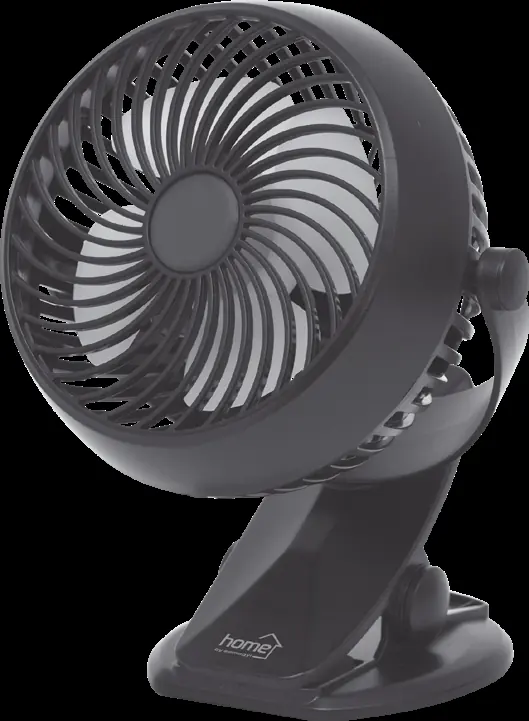
- Adjustable fan head: Can be adjusted in any direction.
- Clip-on base: Suitable for shelves up to 25mm thick.
- Microswitch: Used to select between 3 fan speeds.
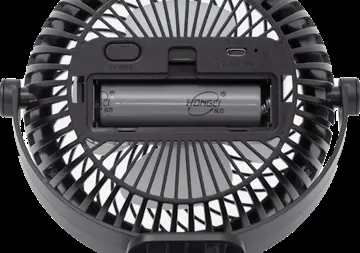
- Replaceable battery: 1800mAh, Li-ion 18650.
- Micro USB charging socket: For charging the device.
- Indicator LED: Shows charging status (red/green) and operation status (blue).
Operation and Charging
To charge the fan, connect the supplied USB cable to a 5V USB adapter (minimum 1000mA) and plug the other end into the micro USB charging socket. During charging, the LED will illuminate red; it will turn green once charging is complete. You can operate the fan while it is charging. Use the switch to cycle through the three speed settings.
Battery Replacement
Only adults should replace the battery. Ensure the battery compartment lid is securely fastened after replacement. Observe correct polarity when inserting the battery. If the product is not used for a long period, remove the battery. Do not use equivalent or non-compatible batteries, as this may cause an explosion hazard.
Cleaning and Maintenance
To ensure optimal performance, clean the fan at least once a month or whenever it becomes dirty:
- Switch off the appliance before cleaning.
- Use a slightly damp cloth to clean the exterior.
- Do not use aggressive cleaning agents.
- Ensure no water enters the interior or electrical components.
Troubleshooting
If the fan does not turn on, check the following:
- Ensure the battery is charged.
- Check the position of the switch.
Safety Warnings
- Use only in dry, indoor conditions. Protect from humidity (e.g., bathrooms, swimming pools).
- Do not use the fan without the mesh guard fixed in place.
- If you notice unusual noise or a burning smell, switch off and unplug immediately.
- Do not touch the appliance or power cord with wet hands.
- Keep out of reach of children.
Disposal
Waste equipment must be collected and disposed of separately from household waste as it may contain hazardous components. Dispose of the product at a facility specializing in electronic waste collection. Batteries must not be handled with regular household waste; dispose of them at a designated collection center.
Manufacturer information
Somogyi Elektronic Kft.
Practical help
Common problems
Fan does not turn on
Charge the battery or check the switch position.
Before use
- Ensure the device was not damaged during shipping.
- Use a USB adapter rated at least 1000mA, 5V.
- Ensure the mesh guard is fixed in place.
- Check battery polarity when inserting.
- Ensure the device is used in dry, indoor conditions.
Specs in practice
- Charging time
- ~3 hours.
- Operating time
- 3 to 6 hours depending on speed.
- Clip capacity
- Max 25mm.
Images and diagrams
- 1. Adjustable fan head
- 2. Clip-on base
- 3. Microswitch
- 4. Replaceable battery
- 5. Micro USB charging socket
Model compatibility
- Indoor use only.
- Protect from humid environments (bathroom, swimming pool).

Manual page author
Emily Carter
User documentation editor
Prepares concise manual descriptions and highlights the most useful setup, operation, and maintenance information for readers.