Home Appliances / Fans
User Manual for Somogyi TWFR 100B Tower Fan
Quick guide for the Somogyi TWFR 100B tower fan. Includes assembly instructions, operating modes, remote control usage, cleaning, and troubleshooting.
Table of contents
Quick guide from the manual
This tower fan is designed for indoor use. It features touch controls, a remote control, three speed settings, and three operating modes (Normal, Natural, Night). It also includes an oscillation function and a timer. Safety Warning: This product contains a button battery. Keep out of reach of children. If swallowed, it can cause severe internal burns and death within 2 hours. Seek medical attention immediately if ingestion is suspected.
Assembly and installation
1. Remove packaging carefully.
2. Prepare the two-piece base and the 4 supplied screws.
3. Join the two halves of the base at the joining points and press them together.
4. Place the base on the bottom of the fan, ensuring the power cable sits in the groove on the top side of the base.
5. Secure the base to the fan using the 4 screws.
6. Place the fan on a solid, level surface away from heat and open flames.
7. Insert a 3V (CR2025) button cell into the remote control, ensuring correct polarity.
8. Connect to a 230V / 50Hz power outlet.
Operating the fan
You can control the fan using the touch buttons on the unit or the remote control.
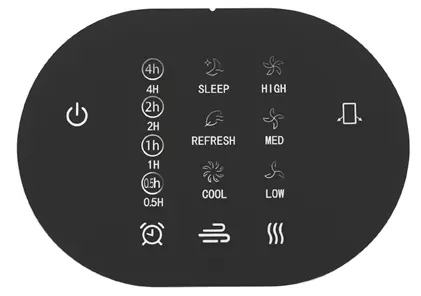
- Power: Switch the fan on or off. It starts in Normal (COOL) mode at low speed.
- Timer: Set the automatic switch-off time from 0.5 to 7.5 hours in 0.5-hour increments.
- Modes: Select between Normal (COOL), Natural wind (REFRESH), and Night (SLEEP).
- Speed: Choose between Low (LOW), Medium (MED), or High (HIGH) speeds.
- Oscillation: Toggle the left-right oscillation movement.
Cleaning and maintenance
Clean the fan at least once a month depending on usage.
- Switch off and unplug the device before cleaning.
- Use a slightly damp cloth to clean the exterior.
- Do not use aggressive cleaning agents.
- Ensure no water enters the appliance or electrical components.
Troubleshooting
If the fan does not turn on, check the mains power supply. If the fan does not respond to the remote control, check the condition of the remote control batteries.
Technical specifications
- Power supply: 220-240 V~ / 50-60 Hz / 45 W
- Remote battery: 1 x 3 V (CR2025)
- Dimensions: 245 x 790 x 245 mm
- Weight: 2.7 kg
Manufacturer information
Somogyi Elektronic Kft.
Practical help
Common problems
Fan does not turn on
Check the mains power supply.
Fan does not respond to remote
Check the condition of the remote control batteries.
Before use
- Ensure the device was not damaged during transport
- Place on a solid, level surface
- Keep away from heat sources and open flames
- Ensure the plug is easily accessible
- Insert CR2025 battery into remote with correct polarity
Specs in practice
- Power supply
- 220-240 V~ / 50-60 Hz / 45 W
- Remote battery
- 1 x 3 V (CR2025) button cell
Images and diagrams
- Figure 1: Overview of the fan and remote control
- Figure 2: Control panel and remote control buttons
- Figure 3: Base assembly steps
Model compatibility
- For indoor use only
- Not for use in bathrooms or near water
- Not for use in confined spaces < 5 m2

Manual page author
David Miller
Documentation analyst
Organizes user manual content into clear summaries, with attention to model details, product context, and everyday usability.