Baby / Sleep Aids
User Manual for Shenzhen C5 3-in-1 Wireless Charger
Quick guide for the Shenzhen C5 3-in-1 wireless charger. Learn how to set up, charge your devices, and troubleshoot common issues like slow charging or alignment problems.
Table of contents
Quick guide from the manual
To ensure optimal performance of your Shenzhen C5 3-in-1 wireless charger, please use a power adapter that supports 9V/3A input. Using a lower-power adapter (such as 5V/2A) will result in slow charging or device instability. Always ensure your devices are correctly aligned with the charging areas and free of metal objects or magnetic attachments.
Product Overview
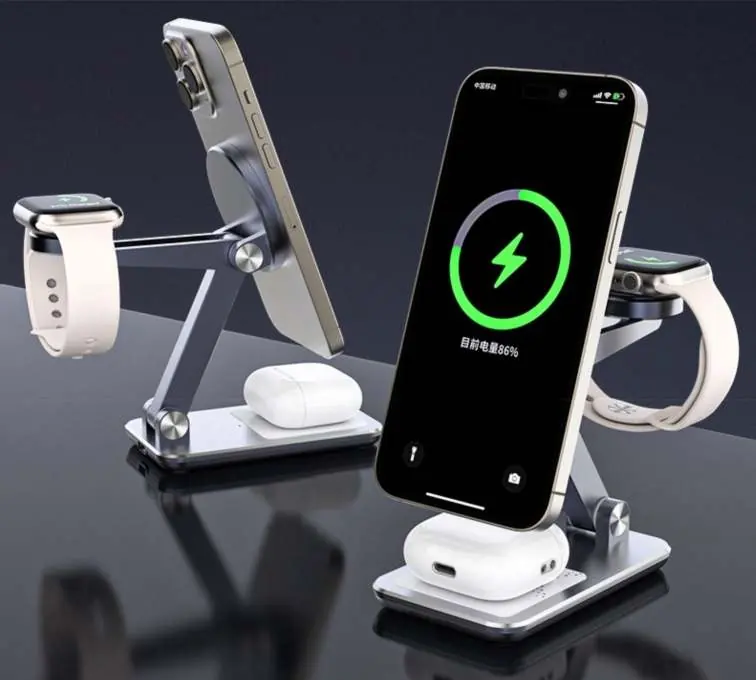
The C5 is a multi-device charging station designed to charge a smartphone, earbuds, and a smartwatch simultaneously. It features a vertical stand for the phone, a dedicated mount for the watch, and a base pad for earbuds.
Usage Instructions
- Connect the provided Type-C cable to the charger and a compatible power adapter.
- Ensure the power adapter is plugged into a wall outlet.
- Place your smartphone, earbuds, and watch on their respective charging areas.
- The indicator light will turn on when the device is powered.
- If the phone is charging normally, the indicator light will remain on. If there is an issue, the light may flash.
Technical Specifications
- Product Model: C5
- Input: 9V/3A
- Mobile Output: 5W / 7.5W / 10W / 15W
- Headphone Output: 5W (MAX)
- Watch Output: 3W (MAX)
Troubleshooting
- Phone not charging: Ensure the phone is properly aligned with the charging induction area. Check for metal objects or debris between the phone and the charger.
- Slow charging: Verify that your power adapter supports 9V/3A. Using a 5V/2A adapter will cause slow charging.
- Device keeps restarting: The power supply is insufficient. Ensure you are using a qualified adapter that meets the 9V/3A requirement.
Precautions
- Do not place metal objects or magnetic cards on the charging surface.
- Avoid using the device in high-temperature, humid, or corrosive environments.
- Do not disassemble the product. If repair is needed, contact professional maintenance personnel.
- Keep the device away from water and fire.
Practical help
Common problems
Phone not charging
Check if the phone is aligned with the charging induction area and ensure there are no metal objects or debris interfering with the connection.
Slow charging
Ensure you are using a 9V/3A power adapter. Using a 5V/2A adapter will result in slow charging speeds.
Device keeps restarting
The power supply is insufficient. Ensure your power adapter meets the 9V/3A requirement.
Before use
- Use the provided Type-C cable.
- Ensure your power adapter supports 9V/3A input.
- Remove any metal objects, magnetic attachments, or thick cases from the back of the phone.
- Place the charger on a stable, flat surface.
Specs in practice
- Mobile Output
- Supports variable wattage (5W/7.5W/10W/15W) depending on the device's requirements.
- Watch Output
- Fixed at 3W maximum.
- Headphone Output
- Fixed at 5W maximum.
Images and diagrams
- The charger features three distinct areas: a vertical stand for the phone, a top mount for the watch, and a base pad for earbuds.
Model compatibility
- Requires a 9V/3A power adapter for full functionality.

Manual page author
Michael Turner
Technical manual editor
Reviews PDF manuals for structure, safety notes, and practical product details so readers can find the right information quickly.