Electronics / Camera Software
User Manual for Sigma 15mm F1.4 DC | Contemporary Lens Correction Profile
Quick guide for installing and applying the Sigma 15mm F1.4 DC | Contemporary lens correction profile in Adobe Photoshop and Lightroom Classic. Includes installation paths for Windows and macOS and setup steps.
Table of contents
Quick guide from the manual
This document provides instructions for installing and applying the interim Lens Correction Profile for the Sigma 15mm F1.4 DC | Contemporary lens for CANON RF Mount. This profile is intended for use with Adobe Photoshop Desktop Edition and Adobe Lightroom Classic.
Supported Software
Ensure your software is updated to the latest version before proceeding:
- Adobe Photoshop Desktop Edition
- Adobe Lightroom Classic
Installation
Close all applications on your computer before starting the download process.
- Download the Zip file from the official Sigma support website.
- Unzip the file to obtain the .lcp file (SIGMA15mmF14DCC026_RAW_CANON_RF.lcp).
- Copy the .lcp file to the designated folder based on your operating system.
Installation for Windows
The directory path is: C:\Users\username\AppData\Roaming\Adobe\CameraRaw\LensProfiles\1.0
Note: You may need to enable "Show hidden items" in Windows Explorer to access the AppData folder.
Installation for macOS
The directory path is: Macintosh HD/User/user name/Library/Application Support/Adobe/CameraRaw/LensProfiles/1.0
Note: The Library folder is hidden by default. In Finder, click the icon in the upper right corner of the menu bar, select "View Options", and check "Show Library folder".
Applying the Lens Correction Profile
The profile is not applied automatically. Follow these steps in your editing software:
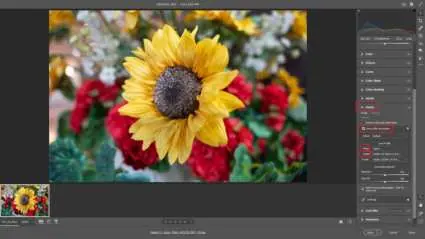
- In the edit panel on the right side of the dialog box, go to Lens > Profile.
- Check the "use profile correction" checkbox.
- Select "Sigma" from the pull-down menu.
- Select the appropriate lens from the "Image Input Device Model Name" pull-down menu.
Cautions
- This is an interim version and may result in over-correction or under-correction of vignetting depending on the camera body.
- There is no automatic matching function; you must select the profile manually.
- Lens correction profiles are not required for L-Mount lenses.
Practical help
Common problems
Profile not applied automatically
You must manually select the profile in the software's Lens > Profile panel.
Cannot find the installation folder
The folder is hidden by default. Enable 'Show hidden items' in Windows Explorer or 'Show Library folder' in macOS Finder.
Before use
- Close all applications on your computer before starting the download.
- Ensure Adobe Photoshop or Lightroom Classic is updated to the latest version.
- Verify you own the Sigma 15mm F1.4 DC | Contemporary for CANON RF Mount.
- Download the Zip file from the official Sigma support website.
Images and diagrams
- The manual includes a screenshot showing the 'use profile correction' checkbox and the pull-down menus for selecting the Sigma lens profile.
Model compatibility
- Only for Sigma 15mm F1.4 DC | Contemporary for CANON RF Mount.
- Not required for L-Mount lenses.

Manual page author
Michael Turner
Technical manual editor
Reviews PDF manuals for structure, safety notes, and practical product details so readers can find the right information quickly.