Tools / Power Tools
User Manual for SKIL PWRCORE 20 20V Dual Port Charger QC5359B-02
Quick guide for the SKIL PWRCORE 20 20V Dual Port Charger (QC5359B-02). Includes charging instructions, LED indicator meanings, troubleshooting, and safety guidelines.
Quick answers from the manual
Quick answer
- The SKIL QC5359B-02 is a 20V dual-port charger. To charge, insert a compatible SKIL battery into the slot. A flashing green light indicates charging, while a solid green light indicates a full charge. p. 10, 12
Key actions
- Charging a battery p. 12
- Cleaning the charger p. 14
First start
- Plug the charger into a 120V power supply. All indicators will flash once to confirm self-inspection. p. 12
Problems and fixes
Battery pack will not charge
Check outlet power, ensure battery is fully inserted, clean contacts, or check temperature.
p. 14Maintenance and reset
- If the battery pack cannot accept a charge, clean the contacts with a cotton swab and alcohol or replace the battery pack. p. 12
Technical specifications
| Parameter | Value | Meaning | Pages |
|---|---|---|---|
| Rated input | 120V a.c., 60Hz, 2x150W | Power requirements | p. 10 |
Where to find it in the PDF
- Safety Instructions p. 3, 4
- Operating Instructions p. 12
Table of contents
Manual images
Click an image to enlargeQuick guide from the manual
This manual provides essential safety and operating instructions for the SKIL QC5359B-02 20V Dual Port Charger. Before using the charger, ensure you read all safety warnings. The charger is designed to charge compatible SKIL rechargeable batteries within a specific temperature range. Always inspect the charger, cable, and plug for damage before each use.
Getting to know your charger
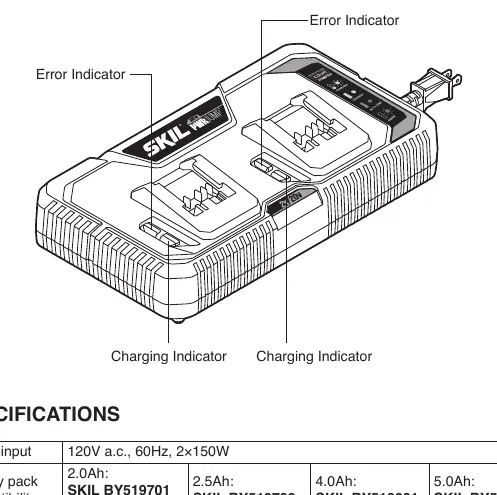
The charger features two charging ports, each with its own charging indicator and error indicator. The device is designed to charge one or two battery packs simultaneously.
Operating instructions
How to charge the battery pack:
- Connect the charger to a 120V, 60Hz power supply. All indicators will flash once to confirm self-inspection.
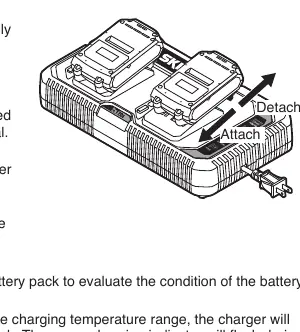
- Align the raised ribs on the charger with the slot on the battery pack.
- Insert the battery pack into the charger.
- The charger will evaluate the battery condition. If the temperature is within the required range (41°F – 95°F), charging will begin automatically.
- The green charging indicator will flash during the charging process.
- Once fully charged, the green indicator will remain solid. Remove the battery pack and disconnect the charger from the power supply.
Note: Do not leave the battery pack on the charger for more than 24 hours. If the battery is too hot or cold, the red error indicator will remain steady; remove the battery and allow it to reach room temperature.
Charger display indicators
- Self-inspection completed: Both indicators flash once.
- Normal Charging: Green indicator flashes.
- Fully Charged: Green indicator is steady.
- Hot/Cold Battery: Red error indicator is steady.
- Error: Red error indicator flashes or is off.
Maintenance and cleaning
Always remove the battery pack from the charger before cleaning. Use compressed dry air to clean the charger vents. Wipe the housing with a damp cloth. Do not use cleaning agents or solvents like gasoline, ammonia, or chlorinated solvents, as these can damage plastic parts. Store the charger indoors in a place inaccessible to children.
Troubleshooting
If the battery pack does not charge:
- Confirm the charger is plugged into a functioning outlet.
- Ensure the battery pack is inserted completely.
- Clean the contacts of the charger or battery pack with a cotton swab and alcohol.
- If the battery is too hot or cold, allow it to reach room temperature.
- If the issue persists, contact an Authorized SKIL Service Station.
Manufacturer information
SKIL
Practical help
Common problems
Battery pack will not charge
Check if the charger is plugged in, ensure the battery is fully inserted, clean the contacts, or check if the battery is too hot/cold.
Charger self-inspection fails
Check for power at the outlet, try a different outlet, or contact an Authorized SKIL Service Station.
Before use
- Check the charger, cable, and plug for any signs of damage.
- Ensure the battery pack case is not cracked.
- Verify the battery pack is a compatible SKIL model.
- Ensure the charging environment is within 41°F – 95°F (5°C – 35°C).
- Keep the charger away from flammable materials.
Specs in practice
- Recommended charging temperature
- 41°F – 95°F (5°C – 35°C)
- Recommended storage temperature
- 32°F – 104°F (0°C – 40°C)
Images and diagrams
- The charger diagram identifies the location of the charging indicators and error indicators for both ports.
Model compatibility
- Compatible with SKIL 2.0Ah (BY519701, BY519702), 2.5Ah (BY519703), 4.0Ah (BY519601), and 5.0Ah (BY519603) battery packs.

Manual page author
Michael Turner
Technical manual editor
Reviews PDF manuals for structure, safety notes, and practical product details so readers can find the right information quickly.