Tools / Drills
SKIL 12V Brushless Impact Wrench IW6744A-00 User Manual
Quick guide for the SKIL 12V Brushless Impact Wrench (IW6744A-00). Includes setup, operation modes, maintenance, and troubleshooting steps.
Table of contents
Manual images
Click an image to enlargeImportant Information from the Manual
This manual provides essential safety, operation, and maintenance instructions for the SKIL 12V Brushless Impact Wrench (Model IW6744A-00). Always read the full safety warnings before operating the tool. Ensure the direction-of-rotation selector is in the center-lock position when the tool is not in use or during transport to prevent accidental starting.
Getting to Know Your Impact Wrench
The tool features several key components:
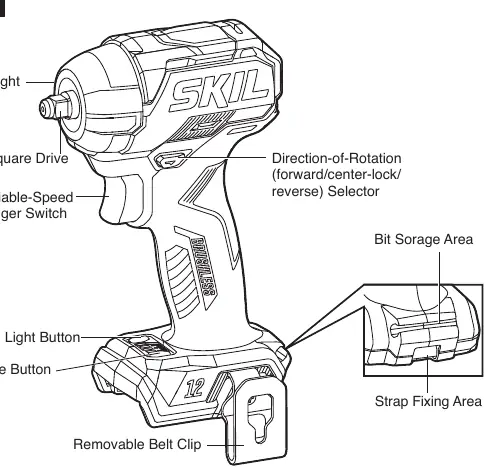
- LED Light: Located on the head of the tool for illumination.
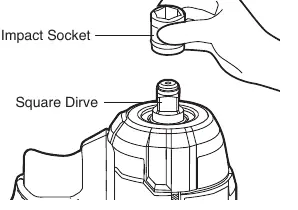
- Square Drive: 3/8-inch drive for attaching impact sockets.
- Variable-Speed Trigger Switch: Controls the speed of the tool.
- Direction-of-Rotation Selector: Sets the tool to forward, reverse, or center-lock.
- Mode Button: Used to toggle between different work modes.
- Belt Clip: Removable clip for transport.
Operating Instructions
Battery Pack: To attach, align the raised rib on the battery pack with the groove on the tool and slide it on until it snaps into place. To detach, press the battery-release button and pull the pack out.
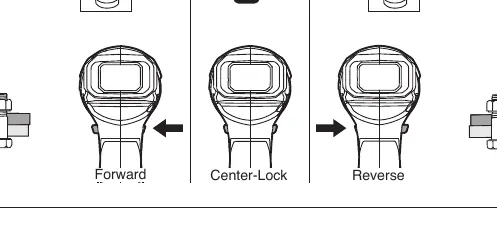
Direction Control: Move the selector to the far left for forward rotation (tightening) and to the far right for reverse rotation (loosening). Always lock the switch in the center position when not in use.
LED Light: The light turns on automatically when the trigger is squeezed. You can also turn it on manually using the LED light button or mode button. Brightness can be toggled between Low and High when the motor is not running.
Work Modes
The tool features four work modes that adjust rotation speed, impact rate, and torque:
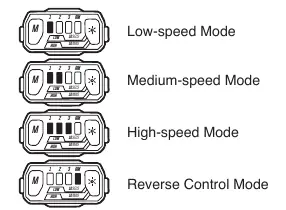
- Low-Speed Mode: For tightening small diameter fasteners requiring fine control.
- Medium-Speed Mode: For general mechanical repairs.
- High-Speed Mode: For high torque and speed applications like assembling steel frames.
- Reverse Control Mode: For loosening bolts/nuts with an auto-stop function to prevent fasteners from falling out.
Maintenance and Cleaning
Always remove the battery pack before performing any maintenance. Keep the tool clean and free of foreign matter. Use compressed dry air for cleaning, but wear safety goggles. Avoid using solvents like gasoline or ammonia, as they can damage plastic parts. Store the tool indoors in a place inaccessible to children.
Troubleshooting
If the tool does not work, check the following:
- Battery charge: Ensure the battery pack is charged.
- Overload/Heat: If the tool is overloaded or too hot, turn it off and allow it to cool.
- Installation: Confirm the battery pack is properly locked into the tool.
- Switch: If the switch is burned out, contact an authorized SKIL service center.
If the LED light flashes rapidly, the tool is either overloaded or too hot. Release the trigger and allow the tool to cool under airflow.
Manufacturer information
SKIL
Practical help
Common problems
Tool does not work
Check if the battery is depleted, the tool is overloaded, the battery is too hot, or the battery is not installed correctly.
LED light flashes rapidly
The tool is overloaded or too hot. Release the trigger and allow the tool to cool.
Before use
- Ensure the battery pack is fully charged.
- Check for any damaged or missing parts.
- Wear appropriate eye protection.
- Set the direction-of-rotation selector to the center-lock position.
- Ensure the correct impact socket is securely attached.
Specs in practice
- Rated Voltage
- 12V d.c. - The power requirement for the tool.
- No-load Speed
- 0-1700 / 0-2200 / 0-2500 RPM - The rotational speed without resistance.
Images and diagrams
- Fig 1: Overview of the tool controls and features.
- Fig 3: Direction-of-rotation selector positions (Forward, Center-Lock, Reverse).
- Fig 6: Work mode indicators and settings.
- Fig 9: How to install and remove the impact socket.
Model compatibility
- Use only specified SKIL battery packs: BY500101, BY519901, BY519801.
- Use only specified SKIL chargers: QC535701, SC536501.

Manual page author
Emily Carter
User documentation editor
Prepares concise manual descriptions and highlights the most useful setup, operation, and maintenance information for readers.