Wearables / Watches
Skmei 0890C LED Watch
Quick guide for the Skmei 0890C binary LED watch. Learn how to read the binary time display and configure the hour, minute, month, and date settings.
Table of contents
Quick guide from the manual
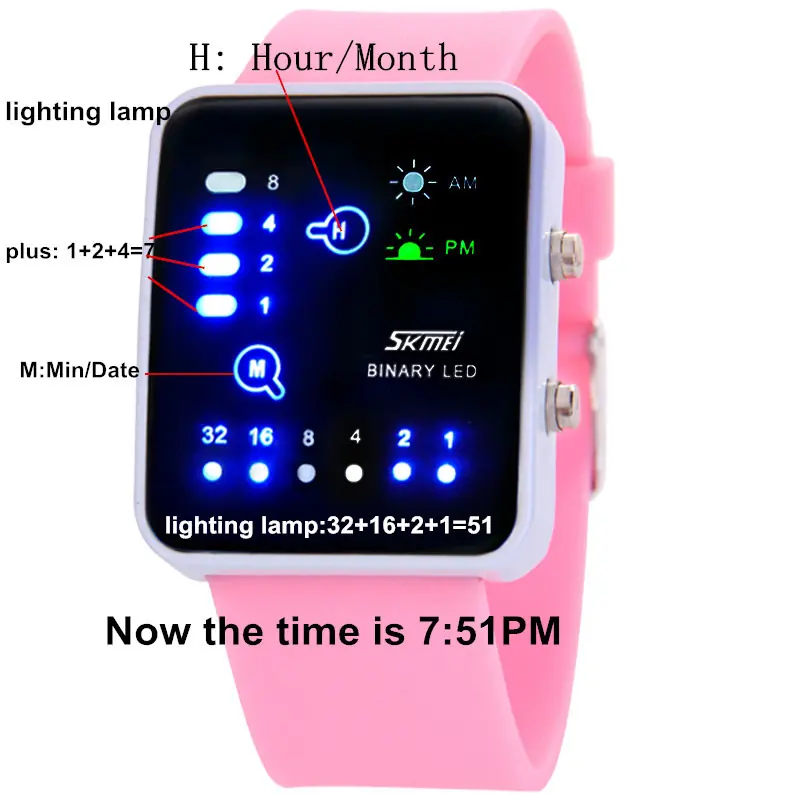
The Skmei 0890C is a binary LED watch. To read the time, you must sum the values of the illuminated LED lights. The watch automatically turns off after 6 seconds of inactivity to conserve battery.
Features
- LED display for Hour, Minute, Month, and Date.
- 12-hour display format.
Key functions
Use the MODE key to navigate the display:
- Press once: Displays the current time.
- Press twice: Displays the current month and date.
Setting the time
Ensure the watch is in LED off mode before beginning these steps.
Setting Hour and Minute
- Press the MODE key once.
- Press and hold the SET key for 3 seconds to enter setting mode. The Hour lamp will flash.
- Press the MODE key to adjust the Hour.
- Press the SET key once. The Minute lamp will flash.
- Press the MODE key to adjust the Minute.
Setting Month and Date
- Press the MODE key twice.
- Press and hold the SET key for 3 seconds to enter setting mode. The Month lamp will flash.
- Press the MODE key to adjust the Month.
- Press the SET key once. The Date lamp will flash.
- Press the MODE key to adjust the Date.
Light guide
The watch uses specific indicators to distinguish between time and date modes:
- Time mode: Either the AM or PM light is illuminated.
- Date mode: Both the AM and PM lights are illuminated simultaneously.
Manufacturer information
Guangdong SKMEI Watch Manufacturing Co., Ltd.
Practical help
Common problems
Watch display turns off
The watch automatically turns off after 6 seconds of inactivity to save power. Press the MODE key to wake it up.
Cannot read the time
The watch uses a binary system. Add the values of the illuminated dots (e.g., 32+16+2+1=51) to determine the current time or date.
Before use
- Ensure the watch is in LED off mode before starting settings.
- Understand the binary reading method (summing illuminated dots).
- Identify the MODE and SET keys on the side of the watch.
Specs in practice
- Binary Display
- Time and date are shown by summing the illuminated LED values (32, 16, 8, 4, 2, 1).
- 12 Hour Format
- The watch displays time in a 12-hour cycle with dedicated AM/PM indicators.
Images and diagrams
- The display uses rows of dots with values (32, 16, 8, 4, 2, 1). Sum the lit dots to read the current time or date.

Manual page author
Michael Turner
Technical manual editor
Reviews PDF manuals for structure, safety notes, and practical product details so readers can find the right information quickly.