Tools / Measuring Tools
Operating instructions for SOLA RED DIGITAL, REDM DIGITAL, and RED LASER DIGITAL
Comprehensive operating guide for SOLA RED DIGITAL, REDM DIGITAL, and RED LASER DIGITAL. Includes setup, calibration procedures, operation modes, maintenance, and troubleshooting.
Table of contents
Manual images
Click an image to enlargeQuick guide from the manual
This document provides operating instructions for the SOLA RED DIGITAL, REDM DIGITAL, and RED LASER DIGITAL measurement instruments. Before using the device, ensure you have read the safety instructions, installed the batteries correctly, and performed the necessary calibration. Always keep the manual near the device.
Description
The devices feature acrylic glass block vials and a gradient module. The RED LASER DIGITAL model additionally includes a laser output aperture, a magnetic adapter for accessories, and a laser warning label.
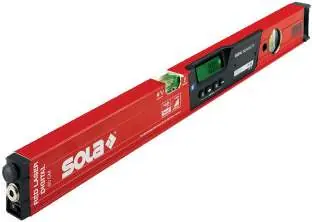
Getting started
Before initial use, install the batteries:
- Open the battery compartment cover using an appropriate screwdriver.
- Insert the batteries, ensuring the poles are in the correct position.
- Close the battery compartment cover securely.
- Use only 1.5 V AAA batteries. Remove batteries if the device will not be used for an extended period.
Operation
Switching on and off
Press the On/Off switch/Display light button to turn the gradient module on. To switch off, press and hold the same button for at least 2 seconds.
Display and settings
- Display light: Press the On/Off switch/Display light button to toggle the backlight.
- Acoustic signal: Press the On/Off switch for acoustics to enable a signal at 0° and 90°. The frequency increases as the device approaches the standard position.
- Hold function: Press once to freeze the current measurement on the display.
- ABS/INC modes: Press and hold the Hold function button for more than 2 seconds to toggle between Absolute (ABS) and Incremental (INC) modes.
- Measurement units: Press the Display switch to cycle between °, mm/m, %, and in/ft.
- Resolution: Press the Hold function and On/Off switch simultaneously to choose between 0.00° or 0.0° resolution.
Calibration and adjustment
Regular calibration is essential for accuracy. The process involves three stages:
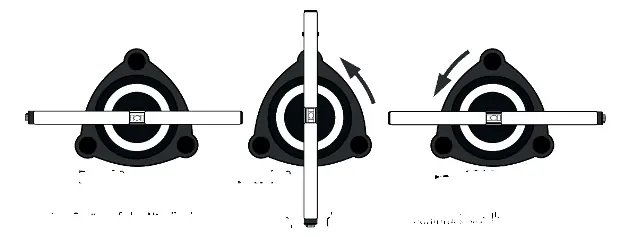
Calibration stage 1 (0°)
- Place the device on a horizontal plane.
- Briefly press the On/Off and Mode buttons.
- Display shows -1-. Press On/Off briefly; -1- flashes for 5 seconds.
- Display shows -2-. Rotate the device 180°.
- Press On/Off briefly; -2- flashes for 5 seconds. Calibration stage 1 is complete.
Calibration stage 2 (180°)
- Place the device 'on its head' on a horizontal plane.
- Briefly press the On/Off and Mode buttons.
- Display shows -1-. Press On/Off briefly; -1- flashes for 5 seconds.
- Display shows -2-. Rotate the device 180°.
- Press On/Off briefly; -2- flashes for 5 seconds. Calibration stage 2 is complete.
Calibration stage 3 (90°)
- Place the device on a vertical plane.
- Briefly press the On/Off and Mode buttons.
- Display shows -1-. Press On/Off briefly; -1- flashes for 5 seconds.
- Display shows -2-. Turn the device 180°.
- Press On/Off briefly; -2- flashes for 5 seconds. The device is now fully calibrated.
Maintenance, storage and transportation
- Cleaning: Wipe with a soft, damp cloth. Do not use aggressive cleaning agents or solvents. Do not immerse in water.
- Storage: Store within specified temperature limits. Check accuracy after prolonged storage.
- Transport: Always use the original packaging or an equivalent container. Switch off the device before transport.
Troubleshooting
- Device on, no display: Battery flat, inserted incorrectly, or device/switch faulty. Replace or reinsert batteries.
- No laser beam: Battery flat. Replace batteries.
- Display frozen: Program error. Remove batteries, wait one minute, and reinsert.
- Laser lines blink: Battery flat. Replace batteries.
- Display lit but no laser: Ambient temperature too high/low or laser control faulty. Allow to acclimatize or contact dealer.
Practical help
Common problems
Device is switched on, but the screen is not illuminated.
Check if batteries are flat or inserted incorrectly. Replace or reinsert batteries.
Display is frozen or jumps.
This indicates a program error. Remove the batteries, wait one minute, and reinsert them.
Laser lines blink in one-second intervals.
The batteries are flat. Replace them with new 1.5 V AAA batteries.
Device is on, but the laser beam is not visible.
The device may be outside the operating temperature range. Allow the device to acclimatize.
Before use
- Check that batteries are installed correctly.
- Ensure the device is not damaged before use.
- Perform a calibration check (see Chapter 8) before use.
- Ensure the device is within the operating temperature range (-10°C to +50°C for gradient module).
- Do not point the laser at people when switching on.
Specs in practice
- Gradient module battery
- Requires 3 x 1.5 V AAA batteries.
- Laser battery
- Requires 2 x 1.5 V AAA batteries.
- Laser class 2
- Visible laser point; eye is protected by blink reflex in case of accidental exposure.
Images and diagrams
- Calibration stages require rotating the device 180° on horizontal and vertical planes.
- Levelling base adjustment requires using both screws for slight corrections.
Model compatibility
- Use only original SOLA equipment and accessories.
- Do not use third-party accessories or additional equipment.

Manual page author
Emily Carter
User documentation editor
Prepares concise manual descriptions and highlights the most useful setup, operation, and maintenance information for readers.