Home / Security
User Manual for Solight 1L77 Wireless Doorbell
Quick guide for the Solight 1L77 wireless doorbell. Learn how to pair buttons, adjust volume, select melodies, install the transmitter, and replace the battery.
Quick answers from the manual
Quick answer
- To pair the button, plug the doorbell into a 230V socket, wait for the 'Ding Dong' melody, and press the transmitter button within 120 seconds. p. 1
Key actions
- Pairing buttons p. 1
- Deleting paired buttons p. 2
First start
- Plug the doorbell into a 230V AC socket and wait for the pairing melody. p. 1
Problems and fixes
Receiver does not ring
Check distance and signal interference (metal objects, concrete walls).
p. 2Maintenance and reset
- To delete paired buttons, unplug the doorbell for 60s, plug it back in, and hold button 5 on the transmitter. p. 2
Technical specifications
| Parameter | Value | Meaning | Pages |
|---|---|---|---|
| Range | 180m | In open space | p. 1 |
| Melodies | 36 | Selectable melodies | p. 1 |
Where to find it in the PDF
- Description and Pairing p. 1
- Settings and Installation p. 2
Table of contents
Manual images
Click an image to enlargeQuick guide from the manual
The Solight 1L77 is a wireless doorbell system consisting of a transmitter (button) and a receiver (doorbell). It operates on a 433.92 MHz frequency with a range of up to 180m in open space. The system supports pairing multiple buttons (up to 15) and multiple bells (up to 8). The doorbell requires a 230V AC connection, while the button is battery-powered.
Description of the device
Doorbell (Receiver):
- LED indicator
- Volume control button
- Melody selection button
Button (Transmitter):
- Ring button
- Clear pairing button
- Space for name badge
- Base
Pairing the button with the bell
- Plug the doorbell into a 230V AC/50 Hz socket.
- Wait for the melody "Ding Dong" to sound, indicating the device is in pairing mode.
- Within 120 seconds, press the button on the transmitter.
- A successful pairing is confirmed by the "Ding Dong" melody.
To pair multiple buttons, repeat the process for each one. To delete paired buttons from memory, unplug the doorbell for at least 60 seconds, plug it back in, open the transmitter, and press and hold the clear pairing button (button 5).
Settings
Ringtone and Volume:
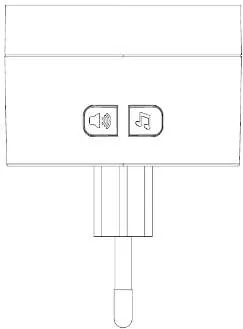
- Press the melody selection button (button 3) on the doorbell to cycle through the 36 available melodies.
- Press the volume button (button 2) to select the desired volume level (4 stages: 90dB, 65dB, 40dB, or 0dB flashing only).
Installation
- Test the range and reliability of the device in the chosen location before permanent installation.
- The button is weatherproof, but it is recommended to place it in a protected area, such as a recess in the wall.
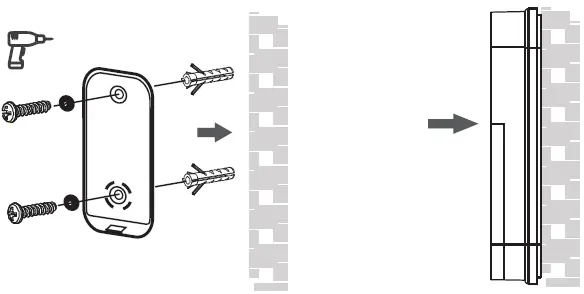
- Attach the installation pad to the surface using double-sided tape or screws (use dowels if screwing).
- Place the button on the attached rear part.
Note: Do not place the button directly on metal objects or materials containing metal (e.g., steel posts, metal-framed doors), as this may interfere with operation.
Maintenance
Replacing the transmitter battery:
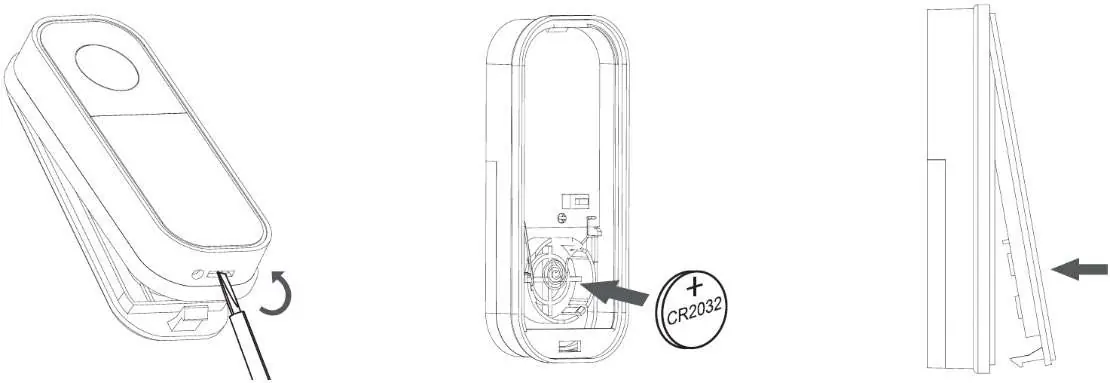
- Open the transmitter cover using a flathead screwdriver.
- Insert a new CR2032 battery, ensuring correct polarity as shown on the plate inside the device.
- Reattach the cover.
Troubleshooting
If the receiver does not ring repeatedly after pressing the transmitter button, check the following:
- Ensure the distance between the transmitter and receiver is not too large.
- Check for strong sources of signal interference between the transmitter and receiver, such as radio/wireless networks, large metal objects, or reinforced concrete walls.
Technical specifications
- Transmission frequency: 433.92 MHz
- Transmitter range: 180m in open space
- Ringer volume: 4 stages (90, 65, 40, 0dB)
- Number of melodies: 36
- Doorbell power supply: 230V AC
- Button power supply: 1x 3V (CR2032) battery
- Operating temperature (doorbell): 0 °C to +35 °C
- Operating temperature (button): -10 °C to +50 °C
Practical help
Common problems
Receiver does not ring
Check the distance between the transmitter and receiver. Ensure there are no strong sources of signal interference like metal objects, reinforced concrete walls, or other wireless networks.
Pairing fails
Ensure the doorbell is in pairing mode (melody 'Ding Dong' sounds) and press the transmitter button within the 120-second window.
Before use
- Test the range and reliability in the chosen location before permanent installation.
- Ensure the doorbell is plugged into a 230V AC socket.
- Check that the transmitter battery (CR2032) is installed.
- Avoid mounting the button on metal surfaces.
Specs in practice
- Transmission frequency
- 433.92 MHz
- Ringer volume
- 4 stages: 90, 65, 40, 0dB (flashing only)
- Waterproof protection
- IP44 rating for the button
Images and diagrams
- The transmitter button features a ring button, a clear pairing button, and a space for a name badge.
- The doorbell receiver includes volume and melody selection buttons.
Model compatibility
- Compatible with up to 15 buttons per doorbell.
- One button can be paired with up to 8 bells.
- Solight 1L74T can be used as a replacement button.

Manual page author
Emily Carter
User documentation editor
Prepares concise manual descriptions and highlights the most useful setup, operation, and maintenance information for readers.