Hvac / Air Conditioners
Somogyi 0760S Mechanical Indoor Timer Clock User Guide
Quick guide for the Somogyi 0760S mechanical indoor timer. Learn how to set the time intervals, operate the device, and follow safety precautions for proper usage.
Table of contents
Manual images
Jump to the sectionQuick guide from the manual
The Somogyi 0760S is a mechanical indoor timer designed to automate the switching of electrical devices. The device features a 30-minute interval setting mechanism. It is intended for indoor use only and must be operated by adults or under supervision.
Operation and Programming
To set the timer, follow these steps:
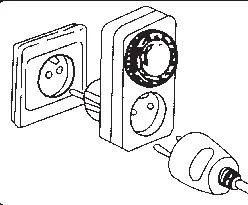
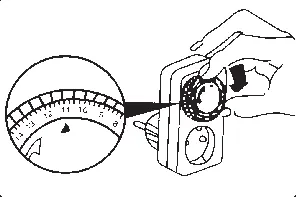
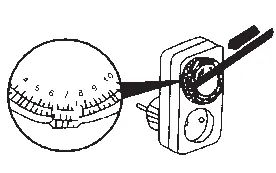
- Use a pen or similar object to push down the black spikes corresponding to the desired operation time. Each spike represents a 30-minute interval.
- Rotate the outer dial until the arrow symbol points to the current time.
- Plug the timer into a wall outlet and connect your electrical device to the timer's socket.
- Use the side switch to override the program if necessary; the device will turn on immediately when the switch is in the upper position.
Safety and Maintenance
- The device is only voltage-free when unplugged from the power source.
- Do not use the timer if it is damaged.
- Do not use aggressive chemicals for cleaning.
- Keep the device away from liquids and do not insert objects into the socket openings.
- Do not attempt to disassemble or repair the device yourself; contact a professional.
- Ensure the connected device's power consumption does not exceed 16A.
Disposal
This device must be disposed of separately from household waste as it contains hazardous components. Please follow local regulations for electronic waste disposal.
Manufacturer information
Somogyi Elektronic Kft.
Practical help
Common problems
Timer does not switch on/off at the desired time
Ensure the current time is correctly set by aligning the arrow with the dial. Check that the black spikes are pushed down for the intended active periods.
Device is not working
Verify that the timer is fully plugged into a wall outlet and that the connected appliance is switched on.
Before use
- Ensure the device is for indoor use only.
- Check that the connected appliance does not exceed 16A power consumption.
- Verify the device is not damaged before plugging it in.
- Ensure the timer is set to the correct current time before operation.
Specs in practice
- 30-minute interval
- Each black spike on the dial represents a 30-minute block of time.
- 16A max load
- The maximum current the timer can handle for connected appliances.
Images and diagrams
- The dial features black spikes that must be pushed down to set the active time.
- The arrow symbol on the dial is used to synchronize the timer with the current time.
- The side switch allows for manual override of the programmed settings.
Model compatibility
- Designed for indoor use only.
- Compatible with standard wall outlets and appliances up to 16A.

Manual page author
Emily Carter
User documentation editor
Prepares concise manual descriptions and highlights the most useful setup, operation, and maintenance information for readers.