Home Appliances / Cooktops Hobs
User Manual for Somogyi HG R 01WH and HG R 02WH Portable Electric Hot Plate
Quick guide for the Somogyi HG R 01WH and HG R 02WH portable electric hot plates. Includes installation, safety, cleaning, and troubleshooting instructions.
Table of contents
Manual images
Click an image to enlargeQuick guide from the manual
This manual provides instructions for the Somogyi HG R 01WH (single plate) and HG R 02WH (double plate) portable electric hot plates. Before first use, ensure the device is undamaged, clean the surface, and perform the initial heating cycle. Always operate under supervision and keep away from water and children.
Safety instructions
- For indoor use only in dry places.
- Do not use near bathtubs, basins, showers, swimming pools, or saunas.
- Do not place food directly on the surface; use appropriate cookware.
- Do not use glassware on the hot plate.
- Operate only under constant supervision.
- Do not use with programmable timers or remote-controlled systems.
- Keep the power cable away from hot surfaces and do not let it hang over table edges.
- If any irregular operation (noise, burnt odor) is detected, unplug immediately.
Installation
- Remove all packaging and check for damage.
- Clean the hot plate surface with a damp sponge and mild detergent, then wipe dry.
- Place the device on a solid, horizontal surface.
- Maintain minimum installation distances as shown in the product diagram.
- Connect to a standard grounded 230 V~ / 50 Hz wall outlet.
First use
Before using the hot plate for the first time, set the stage switch to the maximum stage (5) and wait for 10 minutes. Switch off the heater by rotating the switch to the 0 position. The appliance is then ready for use.
Operation
- Set the stage switch to one of the selectable 1-5 stages.
- The thermostat indicator light will illuminate while heating and turn off when the set temperature is reached.
- Due to the iron core, the plates retain heat; you can lower the setting during cooking to save energy.
- After use, set the switch to 0 and unplug the device.
Cleaning and maintenance
- Switch off and unplug the device before cleaning.
- Allow the appliance to cool down for at least 30 minutes.
- Clean the surface with a damp sponge and mild detergent, then wipe dry.
- Do not immerse the device in liquid.
- Dust off the ventilation openings.
Troubleshooting
- Hot plate not warm enough: Check the power supply and the stage switch settings.
- Hot plate discolored: This is not a malfunction and does not affect use.
Technical specifications
Power supply: 230 V~ / 50 Hz
HG R 01WH: 1500 W, 1.8 kg
HG R 02WH: 1000 W + 1500 W, 3.3 kg
Manufacturer information
Somogyi Elektronic Kft.
Practical help
Common problems
The hot plate isn't warm enough.
Check the power supply and the settings of the stage switch.
The hot plate is discolored.
This is not a mistake and does not affect use.
Before use
- Remove all packaging materials.
- Check for any transport damage.
- Clean the hot plate surface with a damp sponge and mild detergent.
- Ensure the device is placed on a solid, horizontal surface.
- Ensure the power cable is unwound completely.
- Perform the initial 10-minute heating cycle at stage 5.
Specs in practice
- Stage switch
- Controls the heating intensity from 1 to 5.
- Thermostat light
- Indicates heating status; turns off when the set temperature is reached.
- Power supply
- Requires a standard grounded 230 V~ / 50 Hz wall outlet.
Images and diagrams
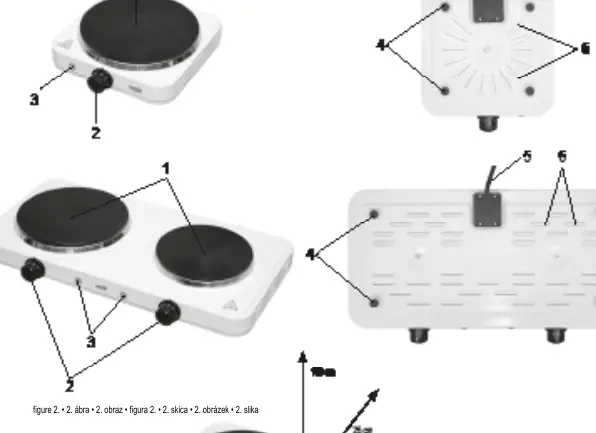
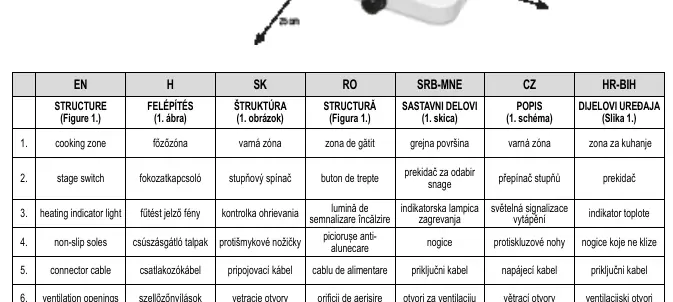
- Figure 1 shows the structure: 1. Cooking zone, 2. Stage switch, 3. Heating indicator light, 4. Non-slip soles, 5. Connector cable, 6. Ventilation openings.
Model compatibility
- Only use dishes permitted by the manufacturer for hot plate use.
- Do not use glassware on the hot plate.

Manual page author
David Miller
Documentation analyst
Organizes user manual content into clear summaries, with attention to model details, product context, and everyday usability.