Electronics / Cameras
Operating Instructions for Sony E 18-135mm F3.5-5.6 OSS Lens
Quick guide for the Sony E 18-135mm F3.5-5.6 OSS lens. Learn how to attach the lens, use the lens hood, adjust focus modes, and troubleshoot common issues like vignetting or flash shadows.
Table of contents
Manual images
Click an image to enlargeQuick Guide from the Manual
This lens is designed for Sony E-mount cameras. Before using, ensure you have removed the front and rear lens caps. Always hold the camera and lens firmly when carrying. Avoid pointing the lens directly at the sun or bright light sources to prevent internal damage or fire.
Identifying the Parts
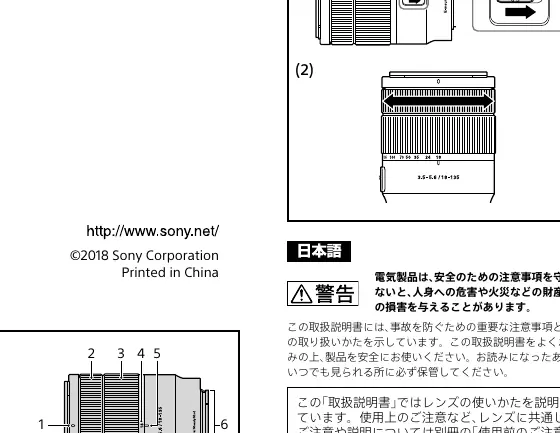
- Lens hood index: Used for aligning the lens hood.
- Focusing ring: Used for manual focus.
- Zooming ring: Used to adjust focal length.
- Focus mode switch: Toggle between AF (Auto Focus) and MF (Manual Focus).
- Mounting index: Used for aligning the lens with the camera body.
Attaching and Detaching the Lens
To attach:
- Remove the rear and front lens caps and the camera body cap.
- Align the white index on the lens barrel with the white mounting index on the camera.
- Insert the lens into the camera mount and rotate it clockwise until it locks.
To detach:
- Hold down the lens release button on the camera.
- Rotate the lens counterclockwise until it stops, then detach it.
Using the Lens Hood
It is recommended to use the lens hood to reduce flare and ensure maximum image quality.
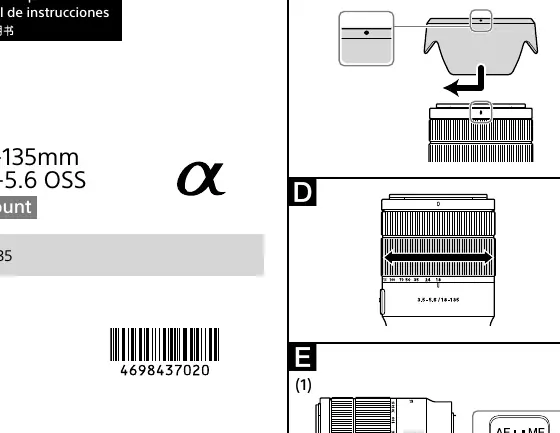
- Align the red line on the lens hood with the red line on the lens.
- Insert the lens hood into the lens mount and rotate it clockwise until it clicks into place.
- Ensure the red dot on the lens hood is aligned with the red line on the lens.
Note: Remove the lens hood when using a built-in or external flash to avoid blocking the light.
Zooming and Focusing
Zooming: Rotate the zooming ring to the desired focal length.
Focusing: Use the focus mode switch on the lens to select AF or MF. For AF photography, both the camera and lens should be set to AF. In MF mode, turn the focusing ring to adjust the focus while looking through the viewfinder.
Usage Precautions
- Flash: When using a flash, remove the lens hood and shoot at least 1 meter away from the subject.
- Vignetting: If the corners of the screen appear darker than the center, close the aperture by 1 to 2 stops.
- Sunlight: Do not leave the lens exposed to direct sunlight to prevent internal damage.
Specifications
- Product Name: E 18-135mm F3.5-5.6 OSS (SEL18135)
- Focal Length: 18-135mm
- Minimum Focus: 0.45m (1.48 ft)
- Filter Diameter: 55mm
- Weight: Approx. 325g
- Shake Compensation: Yes
Manufacturer information
Sony Group Corporation
Practical help
Common problems
Shadow appears at the bottom of the image when using flash.
Remove the lens hood or adjust the focal length/shooting distance.
Corners of the screen are darker than the center (Vignetting).
Close the aperture by 1 to 2 stops.
Lens hood shadow appears in recorded images.
Ensure the lens hood is rotated until it clicks into place.
Before use
- Remove front and rear lens caps.
- Remove camera body cap.
- Align white mounting index on lens with camera.
- Rotate lens clockwise until it locks.
- Ensure focus mode switch is set to desired mode (AF/MF).
Specs in practice
- Focal Length
- 18-135mm range for versatile shooting from wide-angle to telephoto.
- Minimum Focus
- 0.45m (1.48 ft) is the closest distance from the image sensor to the subject.
- Filter Diameter
- 55mm size required for compatible filters.
Images and diagrams
- The lens barrel features a white mounting index for easy alignment with the camera body.
- The focus mode switch allows quick toggling between Auto Focus and Manual Focus.
- The lens hood uses a red line index for proper attachment.
Model compatibility
- Designed specifically for Sony E-mount cameras.
- Cannot be used on A-mount cameras.

Manual page author
Emily Carter
User documentation editor
Prepares concise manual descriptions and highlights the most useful setup, operation, and maintenance information for readers.