Electronics / Cameras
Operating Instructions for Sony E PZ 16-50mm F3.5-5.6 OSS II Lens
Quick guide for the Sony E PZ 16-50mm F3.5-5.6 OSS II lens. Learn how to attach, detach, zoom, focus, and maintain your lens for optimal performance.
Table of contents
Manual images
Click an image to enlargeQuick Guide for Sony E PZ 16-50mm F3.5-5.6 OSS II
This guide provides essential information for operating your Sony E-mount lens. Always refer to the separate "Precautions before using" document for general safety information before using this lens.
Notes on Use
- Sunlight: Do not leave the lens exposed to the sun or bright light sources, as this may cause internal malfunction, smoke, or fire due to light focusing.
- Handling: A rattling sound when shaking the lens or camera is normal and does not indicate a malfunction.
- Video Recording: Zoom operation sounds may be recorded during video shooting. Use the zoom lever to minimize noise.
- Flash Usage: If the lens blocks the flash, causing a shadow at the bottom of the image, adjust the focal length or shooting distance.
- Vignetting: If screen corners appear darker than the center, close the aperture by 1 to 2 stops.
Identifying Parts
The lens features the following controls:
- Zoom/Focus ring: Used for manual zooming or focusing.
- Zoom lever: Used for power zooming.
- Mounting index: Used for aligning the lens with the camera body.
- Lens contacts: Do not touch these.
Attaching and Detaching the Lens
Always hold the lens by its mounting body, not by the zoom/focus ring or other controls.
Attaching
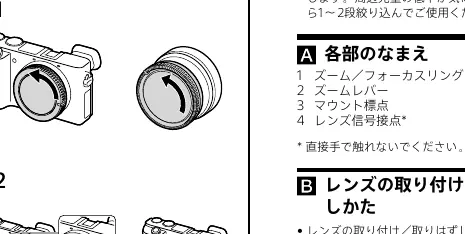
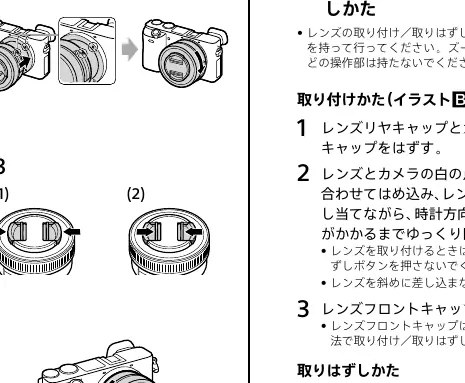
- Remove the rear lens cap and the camera body cap.
- Align the white index on the lens barrel with the white index on the camera mount.
- Insert the lens into the camera mount and rotate it clockwise until it locks. Do not press the lens release button while mounting.
- Remove the front lens cap.
Detaching
- Attach the front lens cap.
- While holding down the lens release button on the camera, rotate the lens counterclockwise until it stops, then detach it.
Zooming
You can zoom using two methods:
- Zoom lever: Slide the lever to the desired focal length. Move it with your finger lightly to prevent wrong operation.
- Zoom/Focus ring: Rotate the ring to the desired focal length. This is recommended for muting operation noise during video recording.
Focusing
The lens supports three focusing methods:
- Auto focus: Press the shutter button halfway down.
- DMF (Direct manual focus): After auto-focusing, rotate the zoom/focus ring to fine-tune the focus.
- Manual focus: Rotate the zoom/focus ring to focus manually.
Specifications
- Product Name: E PZ 16-50mm F3.5-5.6 OSS II (SELP16502)
- Focal Length: 16-50mm (24-75mm equivalent in 35mm format)
- Minimum Focus: 0.25-0.3m (0.82-0.99 ft)
- Filter Diameter: 40.5mm
- SteadyShot: Yes
Manufacturer information
Sony Group Corporation
Practical help
Common problems
Rattling sound when shaking the lens
This is normal behavior due to internal components and does not indicate a malfunction.
Shadow at the bottom of the picture when using flash
The lens is blocking the flash. Adjust the focal length or shooting distance before taking the photo.
Dark corners in images (Vignetting)
Close the aperture by 1 to 2 stops to reduce this phenomenon.
Before use
- Ensure the camera is turned off before attaching or detaching the lens.
- Remove both the front and rear lens caps.
- Align the white mounting index on the lens with the camera mount.
- Rotate the lens clockwise until it clicks into place.
- Do not hold the lens by the zoom/focus ring when attaching or detaching.
Specs in practice
- Focal Length
- 16-50mm (24-75mm equivalent in 35mm format) for APS-C sensors.
- Minimum Focus
- 0.25-0.3m (0.82-0.99 ft) from the image sensor to the subject.
- Filter Diameter
- 40.5mm, required for attaching filters.
Images and diagrams
- Illustration A identifies the zoom/focus ring, zoom lever, mounting index, and lens contacts.
- Illustration B demonstrates the alignment of the white index and the rotation required to lock the lens onto the camera.
Model compatibility
- Designed exclusively for Sony E-mount cameras.
- Not compatible with A-mount cameras.

Manual page author
Michael Turner
Technical manual editor
Reviews PDF manuals for structure, safety notes, and practical product details so readers can find the right information quickly.