Electronics / Camera Lenses
Operating Instructions for Sony FE 14mm F1.8 GM Lens
A comprehensive guide for the Sony FE 14mm F1.8 GM lens. Learn how to attach the lens, adjust focus and aperture, use the focus hold button, and install rear filters.
Table of contents
Quick guide from the manual
This guide provides essential information for operating the Sony FE 14mm F1.8 GM lens. Always ensure the camera is turned off before attaching or detaching the lens. Be aware that this lens is designed for E-mount cameras and is not compatible with A-mount systems. When shooting, avoid exposing the lens to direct sunlight to prevent internal damage.
Identifying the Parts
The lens features several key controls:
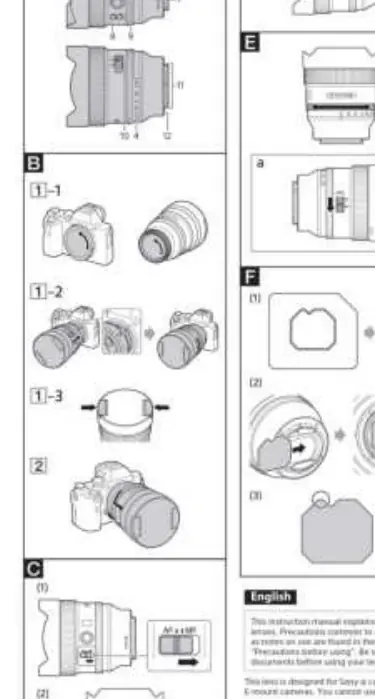
- Fixed lens hood: Cannot be removed.
- Focusing ring: Used for manual focus adjustments.
- Aperture ring: Allows manual control of the aperture.
- Focus-mode switch: Toggles between AF (Auto Focus) and MF (Manual Focus).
- Focus-hold button: Used to lock focus during AF operation.
- Aperture click switch: Located on the side, set to OFF for silent aperture adjustment during movie recording.
- Rear filter holder: Located in the mount opening for sheet-type filters.
Attaching and Detaching the Lens
To attach:
- Remove the rear lens cap and the camera body cap.
- Align the white index on the lens barrel with the white index on the camera mount.
- Insert the lens into the mount and rotate it clockwise until it locks.
- Remove the front lens cap.
To detach:
- Attach the front lens cap.
- Hold down the lens release button on the camera.
- Rotate the lens counterclockwise until it stops, then detach it.
Focusing
The focus mode can be switched using the switch on the lens barrel. For AF photography, ensure both the camera and lens are set to AF. In MF mode, rotate the focusing ring to adjust the focus manually. If your camera has an AF/MF control button, you can use it to temporarily switch focus modes while the button is pressed.
Using the Focus Hold Button
Press the focus hold button during AF operation to cancel AF and lock the focus. Release the button to resume AF. Note that this button may not function with all camera models.
Adjusting the Exposure
You can adjust the aperture using the aperture ring. Aligning the ring to 'A' allows the camera to set the exposure. To adjust manually, rotate the ring to the desired f-stop when the camera is in M or A mode. For movie recording, set the aperture click switch to OFF to prevent the sound of the ring from being recorded.
Attaching Filters
This lens uses a rear filter holder. To install a filter:
- Use the provided filter template to trace the shape onto a sheet-type filter (gelatin film) and cut it out.
- Insert the cut filter into the rear filter holder from the specified direction.
Note: Be careful not to scratch the filter or leave fingerprints. Use tweezers if necessary.
Notes on Use and Safety
- Sunlight: Do not leave the lens exposed to the sun or bright light sources, as this can cause internal damage or fire.
- Moisture: The lens is not waterproof. Keep it dry.
- Vignetting: If corners appear dark, close the aperture by 1 to 2 stops.
- Condensation: If moving from a cold to a warm environment, place the lens in a plastic bag to prevent condensation.
- Cleaning: Use a lens blower to remove dust and a soft, clean cloth. Do not use organic solvents like thinner or benzine.
Manufacturer information
Sony Group Corporation
Practical help
Common problems
Vignetting (dark corners in images)
Close the aperture by 1 to 2 stops to reduce this phenomenon.
Lens rattles when shaken
This is normal due to internal components and does not indicate a malfunction.
Condensation on the lens
Place the lens in a plastic bag when moving from a cold to a warm environment until it reaches the surrounding temperature.
Before use
- Ensure the camera is turned off before attaching the lens.
- Remove both the front and rear lens caps.
- Align the white index on the lens with the white index on the camera mount.
- Check that the lens is securely locked in place.
- Verify the focus mode switch is set to the desired mode (AF or MF).
Specs in practice
- Focal length
- 14mm (21mm equivalent on APS-C cameras).
- Minimum focus
- 0.25m (0.82 ft) from the image sensor.
- Maximum magnification
- 0.1x.
- Filter diameter
- Uses a rear filter holder with a template for sheet-type filters.
Images and diagrams
- The lens features a focus mode switch, focus hold button, and aperture ring on the barrel.
- The rear filter holder is accessed via the mount opening.
Model compatibility
- Designed for Sony E-mount cameras.
- Not compatible with A-mount cameras.
- Compatible with 35mm format image sensors.

Manual page author
David Miller
Documentation analyst
Organizes user manual content into clear summaries, with attention to model details, product context, and everyday usability.