Lighting / Fixtures
Sunco 5/6" LED 15W Downlight Disk User Manual
Quick guide for the Sunco 5/6" LED 15W Downlight Disk. Includes installation instructions for surface mount and retrofit, safety warnings, specifications, and troubleshooting tips.
Table of contents
Manual images
Click an image to enlargeQuick guide from the manual
This manual provides installation and safety instructions for the Sunco 5/6" LED 15W Downlight Disk. Before beginning, ensure the circuit breaker is turned off. This fixture is suitable for damp locations but is not compatible with 3rd party sensors, photo controls, occupancy sensors, or timing devices.
What's in the box
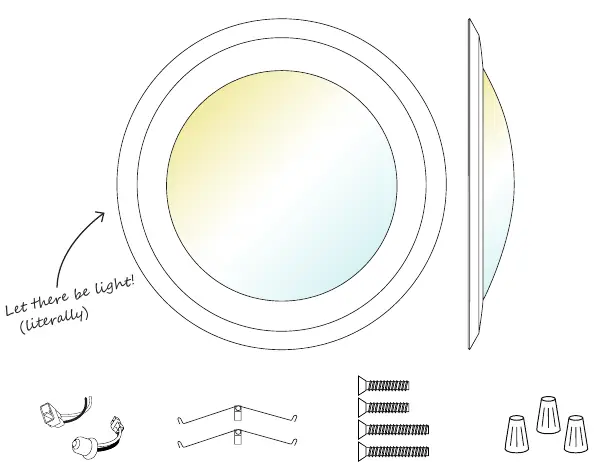
- Downlight Disk
- TP24/E26 connector
- Spring clips
- Mounting screws (Short/Long)
- Wire nuts
Safety information
- Turn off the circuit breaker before installation.
- Installation should be performed by a person familiar with the construction and operation of the product.
- Proper grounding is required.
- Do not alter, relocate, or remove wiring during installation.
- Keep the fixture away from corrosive substances.
- Suitable for damp locations (-4°F to 104°F). Not for use where directly exposed to water.
- Clean regularly; do not use harsh solvents.
Surface mount installation
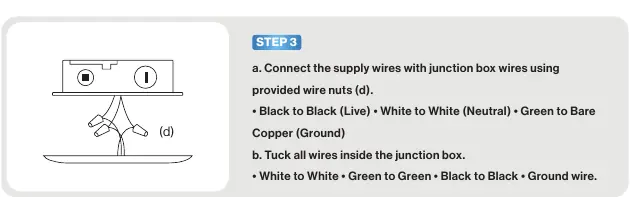
- Turn off the circuit breaker and remove the previous fixture.
- Remove the lens by twisting it clockwise.
- Connect supply wires to junction box wires using provided wire nuts: Black to Black (Live), White to White (Neutral), Green to Bare Copper (Ground).
- Tuck all wires inside the junction box.
- Determine the appropriate mounting screw length based on junction box size.
- Align mounting screws with keyhole slots and tighten until secure. Do not over-tighten.
- Insert the lens back into place by twisting counterclockwise.
- Turn on the circuit breaker to test the light.
Retrofit installation
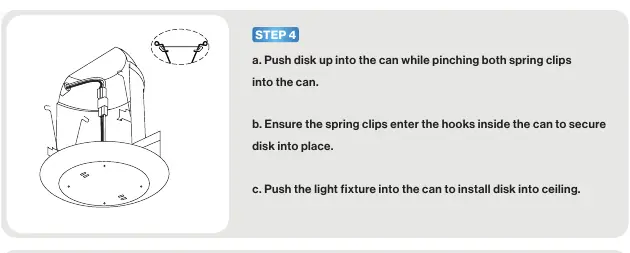
- Turn off the circuit breaker and remove the previous fixture. Allow time for the fixture to cool.
- Remove the lens by twisting clockwise.
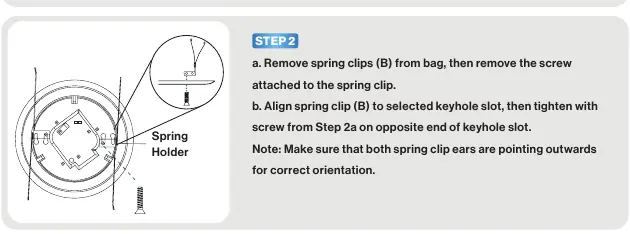
- Attach spring clips to the fixture using the provided screws. Ensure spring clip ears point outwards.
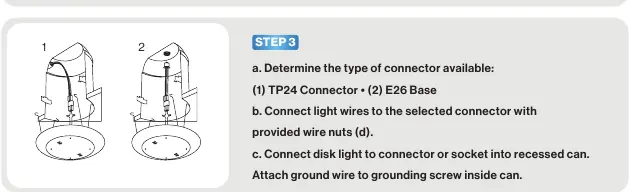
- Determine the connector type (TP24 or E26) and connect the light wires using wire nuts.
- Connect the disk light to the connector or socket inside the recessed can. Attach the ground wire to the grounding screw inside the can.
- Push the disk up into the can while pinching both spring clips until they enter the hooks inside the can.
- Insert the lens back into place by twisting counterclockwise.
- Turn on the circuit breaker to test the light.
Specifications
- Voltage: 120 V
- Wattage: 15 W
- Lumens: 1050 lm
- Beam Angle: 113.8°
- Moisture Rating: Damp Rated
- CRI: 90+
- Average Lifetime: 50,000 Hours
- Dimmable: Yes
Troubleshooting
If the light is not turning on, double-check if the fixture is properly connected and the circuit breaker hasn't been tripped. If the light is not bright enough, check for proper wattage and ensure the fixture is unobstructed. For flickering or buzzing issues, verify dimmer compatibility, ensure wiring connections are secure, and check that the circuit is not overloaded.
Practical help
Common problems
Light isn't turning on
Double check if the fixture is properly connected and the circuit breaker hasn't been tripped.
Light isn't bright enough
Check for proper wattage and ensure the fixture is unobstructed.
Light flickering
Check that wiring connections are secure, verify dimmer compatibility, and ensure the circuit is not overloaded.
Fixture buzzing
Verify dimmer switch compatibility and ensure the light is connected to a surge protector securely.
Before use
- Turn off the circuit breaker.
- Verify the installation location is suitable (damp locations, -4°F to 104°F).
- Check for shipping damage.
- Ensure you have the correct connector (TP24 or E26).
- Confirm compatibility (not for use with 3rd party sensors, timers, or photo controls).
Specs in practice
- Moisture Rating
- Damp Rated, suitable for humid areas but not direct water exposure.
Images and diagrams
- Wiring: Black to Black (Live), White to White (Neutral), Green to Bare Copper (Ground).
- Spring Clips: Must be attached with ears pointing outwards for retrofit installation.
Model compatibility
- Not compatible with 3rd party sensors.
- Not compatible with photo controls.
- Not compatible with occupancy sensors.
- Not compatible with timing devices.

Manual page author
Emily Carter
User documentation editor
Prepares concise manual descriptions and highlights the most useful setup, operation, and maintenance information for readers.