Lighting / Controllers Dimmers
SuperLightingLED DL 4-Channel 0-1-10V DMX512 Decoder User Guide
A comprehensive user guide for the SuperLightingLED DL 4-Channel 0-1-10V DMX512 Decoder. Includes installation instructions, wiring diagrams, DMX configuration, stand-alone mode settings, and troubleshooting steps.
Table of contents
Quick Guide
The SuperLightingLED DL 4-Channel DMX512 Decoder is designed to convert DMX512 signals into 0-10V or 1-10V analog signals for dimmable LED drivers. It supports RDM functionality, stand-alone RGB/RGBW modes, and manual dimming modes. The device features a digital display and buttons for configuration. If no DMX signal is detected, the unit can operate in stand-alone modes.
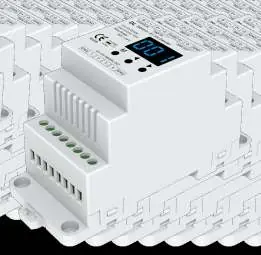
Technical Parameters
- Input Voltage: 12-24VDC
- Input Signal: DMX512
- Output Signal: 0/1-10V analog
- Output Current: 4CH, 20mA/CH
- Operating Temperature: -30°C to +55°C
- IP Rating: IP20
Installation and Wiring
The device is designed for DIN rail mounting (TS-35/7.5 or TS-35/15). When wiring, ensure the DMX Master is connected to the DMX IN port. The 0/1-10V signal output connects to the dimmable drivers. Note that the number of LED drivers connected to each channel should not exceed 20 pieces, and the maximum wire length from the dimmer to the LED driver should not exceed 30 meters.
System Configuration
To enter system parameter settings, long press the M and < keys for 2 seconds. Use the M key to switch between items:
- Decode Mode: Select 1-channel (d-1), 2-channel (d-2), or 4-channel (d-4) decode.
- 0/1-10V Output: Switch between 0-10V (0-0) or 1-10V (1-0).
- Output Brightness Curve: Select linear (C-L) or logarithmic (C-E).
- Default Output Level: Set default 0-100% level (d00 to dFF) when no DMX signal is present.
- Automatic Blank Screen: Enable (bon) or disable (boF).
Long press the M key for 2 seconds or wait 10 seconds to exit.
DMX Mode
Short press the M key until the display shows 001-512 to enter DMX mode. Use the < or > keys to set the DMX decode address. The decoder occupies 4 DMX addresses. If a DMX signal is detected, the unit enters this mode automatically.
Stand-alone Modes
These modes are active only when the DMX signal is disconnected or lost.
RGB/RGBW Mode
Short press the M key until P01-P24 is displayed. Use < or > to change the dynamic mode. Long press M for 2 seconds to adjust speed, brightness, and W channel brightness.
Dimmer Mode
Short press the M key until L-1 to L-8 is displayed. Use < or > to select the mode. Long press M for 2 seconds to adjust the brightness of each channel independently.
Factory Reset
To restore factory default parameters, long press the < and > keys simultaneously for 2 seconds until the display shows "RES".
Practical help
Common problems
No light output
Check the power supply and ensure all connections are secure.
Wrong color output
Verify the 0-10V output wire connections and ensure the DMX decode address is set correctly.
Before use
- Verify input voltage is 12-24VDC.
- Ensure DMX signal source is compatible with DMX512 protocol.
- Check that the number of LED drivers per channel does not exceed 20.
- Ensure wire length from dimmer to LED driver is under 30 meters.
- Confirm DIN rail type (TS-35/7.5 or TS-35/15).
Specs in practice
- Logarithmic vs Linear Curve
- Logarithmic (C-E) provides a smoother dimming experience for human eyes compared to Linear (C-L).
Images and diagrams
- The wiring diagram illustrates the connection from a DMX Master to the Decoder's DMX IN port.
- It shows the 0/1-10V signal output connecting to multiple Dimmable Drivers.
- The diagram highlights the connection of the LED strip to the Dimmable Driver output (V+ and DIM+).
Model compatibility
- Compatible with DMX512 standard protocols.
- Works with 0-10V or 1-10V dimmable LED drivers.
- Supports RDM intercommunication with DMX master consoles.

Manual page author
David Miller
Documentation analyst
Organizes user manual content into clear summaries, with attention to model details, product context, and everyday usability.