Electronics / Camera Accessories
User Manual for Telesin 1.3M Selfie Stick Tripod with Remote Control
Quick guide for the Telesin 1.3M Selfie Stick Tripod with Remote Control (TE-RCSS-003). Learn how to pair the remote, operate photo and recording modes, charge the device, and understand technical specifications.
Table of contents
Quick guide from the manual
This document provides instructions for the Telesin 1.3M Selfie Stick Tripod with Remote Control (Model: TE-RCSS-003). Key operations include pairing the remote via Bluetooth, using the remote for photo and video capture, and maintaining the device battery through proper charging.
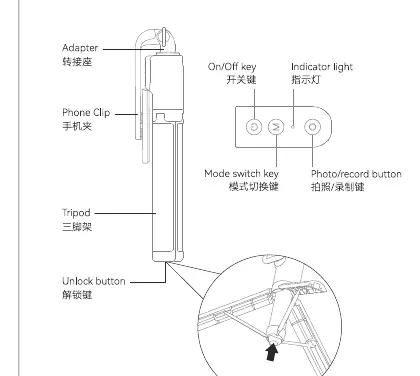
Remote Control Operation
To operate the remote control, follow these steps:
- On/Off: Long press the on/off button for 3 seconds to switch the remote on or off.
- Pairing: Long press the mode key for 3 seconds to enter pairing mode. The indicator light will turn green and flash, indicating it is ready to pair with your device.
- Connection: Open the Bluetooth settings on your phone or camera, search for the device (labeled TC-RCSS), and select it to pair.
Photo and Recording
Once connected, use the remote control buttons to manage your camera:
- Photo Mode: Click the photo button to take a picture.
- Recording Mode: Click the photo button to start recording, and click it again to stop.
- Mode Switching: In phone pairing mode, click the photo key to take pictures; click the photo key again to start recording. Long press the photo key for 2 seconds to end recording.
Charging
The remote control requires periodic charging:
- When charging, the indicator light shows a solid red color.
- The light turns off when the device is fully charged.
- Charging time is approximately 1 hour.
Technical Specifications
The following specifications apply to the TE-RCSS-003 model:
- Model: TE-RCSS-003
- Weight: 320g
- Remote Battery: 3.7V / 60mAh
- Input: 5V / 100mA
- Operating Temperature: 0-40 degrees Celsius
- Charging Time: Approximately 1 hour
Practical help
Common problems
Remote control will not pair with the device.
Ensure the remote is in pairing mode by long-pressing the mode key for 3 seconds until the indicator light flashes green.
Remote is unresponsive.
Check if the remote is charged. If the battery is depleted, charge it using the provided cable for approximately 1 hour.
Before use
- Ensure the remote control is fully charged.
- Enable Bluetooth on your smartphone or camera.
- Verify the remote is in pairing mode (flashing green light).
- Select the correct device name (TC-RCSS) in your Bluetooth settings.
Specs in practice
- Remote Battery
- 3.7V / 60mAh capacity, rechargeable via USB.
- Charging Time
- Approximately 1 hour to reach full charge.
Images and diagrams
- The remote control diagram illustrates the On/Off button, Mode switch key, and Photo/Record button.
- The tripod diagram shows the phone clip, adapter, and tripod legs assembly.
Model compatibility
- Designed for use with devices supporting Bluetooth remote shutter functionality.
- Ensure the device is within range for stable Bluetooth connection.

Manual page author
Emily Carter
User documentation editor
Prepares concise manual descriptions and highlights the most useful setup, operation, and maintenance information for readers.