Hvac / Heat Pumps
TESY 11S Indirectly Heated Storage Water Tank User Guide
Comprehensive user guide for TESY 11S indirect storage water tanks, covering installation, connection, maintenance, and safety procedures.
Table of contents
Manual images
Jump to the sectionQuick guide from the manual
This document provides essential instructions for the installation, operation, and maintenance of TESY indirectly heated storage water tanks. Proper installation by a qualified technician is mandatory for warranty validity. The appliance is designed for heating potable water in closed systems with a maximum pressure of 0.6 MPa (6 bar).
Device Description
Depending on the model, the storage tank may feature one or two built-in heat exchangers (serpentines). Key components include a temperature indicator (T), sensor ports (TS1, TS2, TS3), an optional electric heater port (EE), and a recirculation port (R). A side flange is provided for inspection, cleaning, and optional electric heater installation.
Installation and Connection
The tank is delivered on a transport pallet. If the floor is level and humidity is low, the pallet may remain. Otherwise, follow these steps:
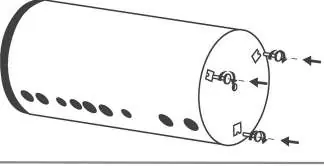
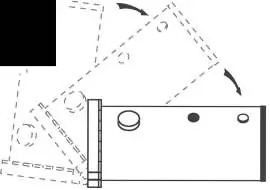

- Place the tank in a horizontal position on a protective mat.
- Unscrew the three bolts securing the pallet.
- Mount the adjustable feet.
- Set the tank vertically and level it using the feet.
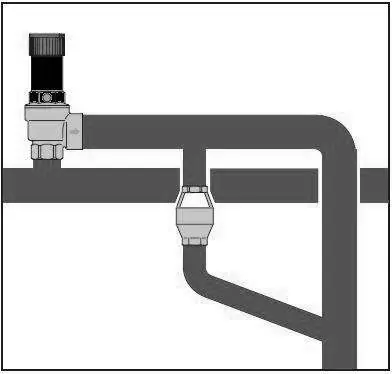
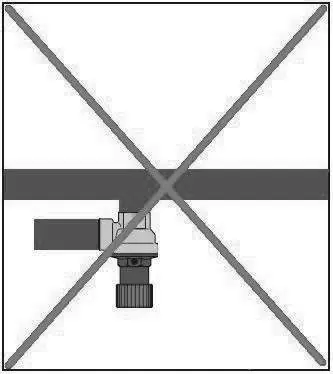
Water Connection: Must be performed by a qualified technician according to a professional project. Mandatory elements include an inlet pipe, stopcock, pressure regulator (if mains pressure > 6 bar), non-return valve, and a safety valve (calibrated according to EN 1487/1489). An expansion vessel is mandatory to accommodate water expansion during heating.
Heat Exchanger Connection: Connect the heat exchanger inlets and outlets (IS1/OS1, IS2/OS2) to the heating system. Ensure the system is free of air before operation. Maximum heat transfer fluid temperature is 110°C, and maximum pressure is 0.6 MPa.
Maintenance
Preventive maintenance is recommended every two years by an authorized service center. This includes cleaning the tank, inspecting the magnesium anode, and replacing it if necessary. Do not use abrasive or solvent-based cleaners.
Safety
The appliance must be installed in a room with floor hydro-insulation or a drainage system to prevent damage in case of leaks. The safety valve must be regularly checked and cleaned. If the room temperature may fall below 0°C, the tank must be drained.
Manufacturer information
TESY
Practical help
Common problems
Water dripping from the safety valve drainage opening
This is normal during the water heating mode. Ensure the opening is left open to the atmosphere.
No water flows from the safety valve drainage opening when the lever is raised
This indicates a malfunction. Stop using the appliance immediately and contact a technician.
Corrosion on connection fittings
Use an intermediate dielectric connection when connecting copper pipes to the inlets and outlets.
Before use
- Ensure the storage tank is completely filled with water.
- Verify that the appliance is correctly connected to the heating installation.
- Confirm that all required safety components (safety valve, expansion vessel) are installed.
- Ensure the room temperature is above 4°C.
- Check that the system is free of air.
Specs in practice
- Storage Volume
- The capacity of the tank in liters, specified on the appliance rating plate.
- Max. design pressure (water side)
- The maximum pressure the tank can withstand, specified on the rating plate.
- Max. temperature of heat exchangers
- The maximum operating temperature for the heat exchanger coils, specified on the rating plate.
Images and diagrams
- Fig. 21/22: Steps for removing the transport pallet and installing adjustable feet.
- Fig. 23/24: Typical connection schemes for tanks with one or two heat exchangers.
- Fig. 26: Example connection scheme for domestic hot water buffers.
- Fig. 28: Correct installation of the safety valve drainage pipe.
Model compatibility
- Heat exchangers are intended for use with clean water or a mixture of water and propylene glycol.
- Anticorrosion additives are mandatory for the heat transfer fluid.
- Electric heating elements must be approved by the manufacturer.

Manual page author
Emily Carter
User documentation editor
Prepares concise manual descriptions and highlights the most useful setup, operation, and maintenance information for readers.