Documents / Warranty Safety
Dogtra 1200X Remote Training Collar User Guide
Quick guide for the Dogtra 1200X remote training collar, covering setup, pairing, stimulation modes, battery charging, and safety precautions for effective dog training.
Table of contents
Manual images
Jump to the sectionQuick guide from the manual
The Dogtra 1200X is a remote-controlled dog training collar with a 1200-meter range. It features 100 stimulation levels, Nick/Constant stimulation, vibration (XPP), and tone modes. The system is expandable for up to 3 dogs and is IPX9K waterproof.

Safety Information
- Do not use on aggressive dogs; seek professional help.
- Keep out of reach of children; adult supervision is required.
- The device emits low-level electromagnetic radiation; consult a doctor if you use a pacemaker or defibrillator.
- Do not store near heat sources or flammable materials.
- The system includes a safety feature where the Constant stimulation button automatically shuts off after 12 seconds.
Operation

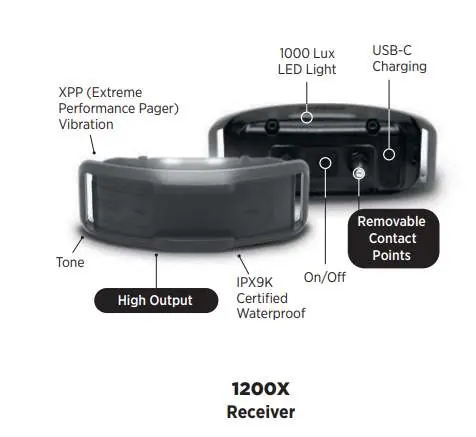
- Power On/Off: Hold the power button on the transmitter for 2 seconds. For the receiver, hold the power button between the contact points for 2 seconds.
- Stimulation Modes: Set the stimulation level to 0, then hold the main button and the side power button for 5 seconds to toggle between Nick and Constant modes.
- Boosted Constant: Allows for a higher stimulation level than the base setting. To set: turn level to 0, hold the Boosted Constant button for 5 seconds until the LED flashes, adjust the level with the dial, and confirm by pressing the button again.
- Stimulation Lock: Hold the top of the Rheostat dial for over 2 seconds to lock/unlock the stimulation level.
Pairing and Expansion
To add a receiver: set the transmitter to level 0 and select the dog number (1, 2, or 3). Put the receiver in pairing mode by holding the power button for 5 seconds until the LED flashes. Hold the transmitter's front button and side Boost button simultaneously until CD appears on the display.
Battery and Maintenance
- Charging: Use only original Dogtra chargers. A full charge takes approximately 2 hours. The LED turns green when fully charged.
- Non-Stimulating Contact Points: If you do not wish to use electrical stimulation, remove the metal contact points and replace them with the provided non-stimulating (dummy) points.
- Testing: Use the provided test lamp on the contact points while pressing the stimulation buttons to verify functionality.
Manufacturer information
Dogtra
Practical help
Common problems
Stimulation level does not change immediately in cold weather
The LCD may react slowly below -12°C, but the actual intensity sent to the receiver changes immediately.
Inconsistent stimulation
Ensure the collar is tight enough (two fingers should fit under the strap) and the contact points are touching the skin.
Reduced range
Keep the transmitter away from your body and do not touch the antenna. Ensure the device is fully charged.
Before use
- Charge the device for 2 hours before first use.
- Ensure the receiver is properly fitted on the dog's neck.
- Check that the skin is not irritated before each use.
- Test the stimulation using the provided test lamp.
- Verify the transmitter and receiver are paired correctly.
Specs in practice
- Rheostat Dial
- Rotary control for precise adjustment of 100 stimulation levels.
Images and diagrams
- The transmitter features a 100-level Rheostat dial, stimulation level lock, and an LCD display showing mode, level, and battery status.
- The receiver includes a 1000 Lux LED light, USB-C charging port, and removable contact points.
Model compatibility
- The system is expandable for up to 3 dogs.
- Only use original Dogtra chargers.
- Not suitable for use on humans or animals other than dogs.

Manual page author
David Miller
Documentation analyst
Organizes user manual content into clear summaries, with attention to model details, product context, and everyday usability.