Furniture / Storage Shelving
Assembly Instructions for The Home Depot 21046WH 2 Shelf Bookcase
A comprehensive assembly guide for The Home Depot 21046WH 2 Shelf Bookcase. This manual includes tools required, step-by-step assembly instructions, safety guidelines for stacking, and maintenance advice.
Quick answers from the manual
Quick answer
- This manual provides assembly instructions for the 21046WH 2 Shelf Bookcase, including parts lists, hardware, assembly steps, and safety guidelines for stacking. p. 1, 2, 3, 4
Key actions
- Assemble with 2 people p. 1
- Secure to wall if stacking height > 35 inches p. 3, 4
First start
- Prepare area with cardboard/blankets, assemble on flat surface, use Philips screwdriver. p. 1, 2
Problems and fixes
Loose hardware
Check and tighten after two weeks, then every six months.
p. 2Maintenance and reset
- Check and tighten hardware every 6 months. p. 2
Technical specifications
| Parameter | Value | Meaning | Pages |
|---|---|---|---|
| Max Stacking Height | 70.6 inches | Maximum height for stacked units | p. 4 |
Where to find it in the PDF
- Tools and Requirements p. 1
- Pre-assembly and Care p. 2
- Assembly Instructions p. 3
- Stacking Safety p. 4
Table of contents
Manual images
Click an image to enlargeQuick guide from the manual
This document provides assembly instructions for the 21046WH 2 Shelf Bookcase. It is recommended that two people perform the assembly. Ensure you have a Philips screwdriver and sufficient space to work. Protect your floor and the furniture by assembling on cardboard or blankets.

Parts and Hardware
Before beginning, verify all parts are present:
- Parts: Top & Bottom Panels (A), Side Panels (B), Shelf (C), Back Panels (D).
- Hardware: Screws (1), Dowels (2), Stickers (3), Fixative plates (4), Wall securing hardware (5).
Assembly Instructions
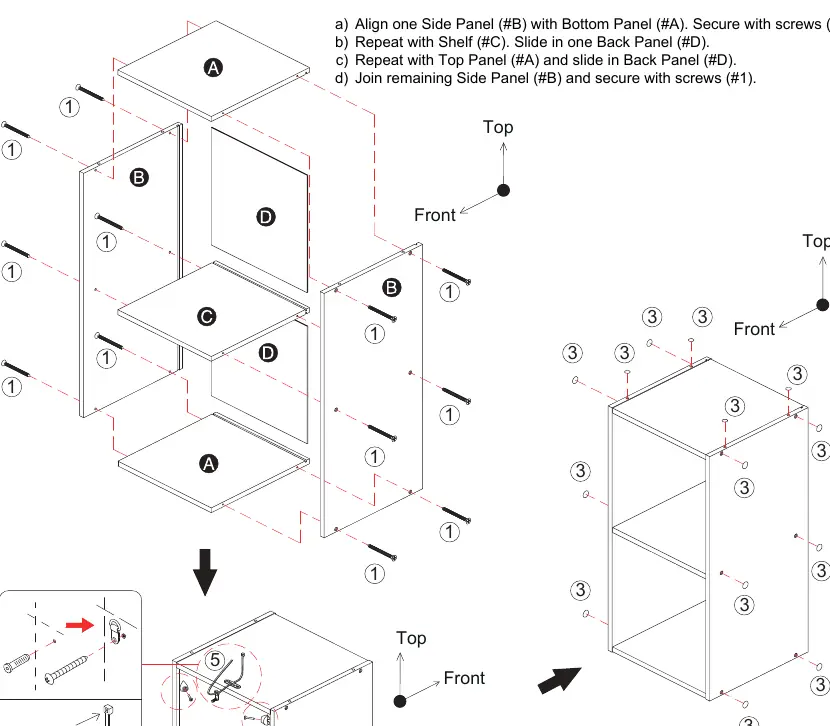
- Align one Side Panel (B) with Bottom Panel (A) and secure with screws (1).
- Attach the Shelf (C) and slide in one Back Panel (D).
- Attach the Top Panel (A) and slide in the remaining Back Panel (D).
- Attach the remaining Side Panel (B) and secure with screws (1).
- Use provided stickers (3) to cover any exposed holes.
Safety Measures for Stacking
This item can be stacked with other compatible pieces. Observe the following safety limits:
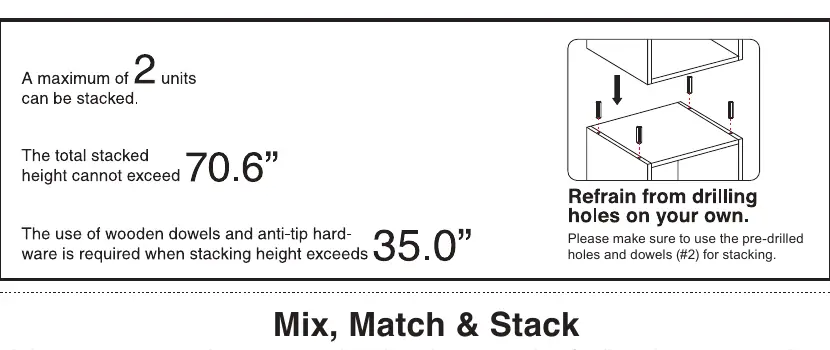
- Maximum units: 2 units can be stacked.
- Maximum height: The total stacked height cannot exceed 70.6 inches.
- Wall securing: You must use the provided hardware to secure the unit to the wall if the stacking height exceeds 35 inches.
- Drilling: Do not drill holes on your own; use the pre-drilled holes and dowels (2) for stacking.
Maintenance
To ensure the longevity and safety of your bookcase:
- Ensure the furniture rests on a flat and level surface.
- Turn screws clockwise to tighten; only tighten when the step is completed or instructed.
- After two weeks, check and tighten any loose hardware. Repeat this check every six months thereafter.
Manufacturer information
The Home Depot
Practical help
Common problems
Unit wobbles or is unstable
Ensure the furniture rests on a flat and level surface.
Hardware becomes loose over time
Check and tighten all hardware after two weeks of use, then repeat every six months.
Before use
- Verify all parts (A, B, C, D) and hardware (1-5) are present
- Ensure you have a Philips screwdriver
- Clear enough space to move around
- Use cardboard or blankets to prevent scratches during assembly
- Ensure you have a second person to assist with assembly
Specs in practice
- Max Stacking Height
- 70.6 inches
- Wall Securing Requirement
- Required if stacking height exceeds 35 inches
Images and diagrams
- Page 3 illustrates the step-by-step assembly sequence and hardware placement
- Page 4 displays various stacking configurations and safety limits
Model compatibility
- This item can be stacked with other compatible pieces in the collection

Manual page author
Michael Turner
Technical manual editor
Reviews PDF manuals for structure, safety notes, and practical product details so readers can find the right information quickly.