Mobile / Smartphones
Ulefone 10W Desk Charging Dock for RugKing 2 Series User Guide
Official user guide for the Ulefone 10W Desk Charging Dock, providing instructions on setup, charging indicators, and safety precautions for the RugKing 2 Series.
Table of contents
Manual images
Jump to the sectionProduct Overview
The Ulefone 10W Desk Charging Dock is a dedicated accessory designed for the RugKing 2 Series. It provides a convenient desktop charging solution using a Pogo Pin contact system to ensure stable and efficient power delivery.
How to Use
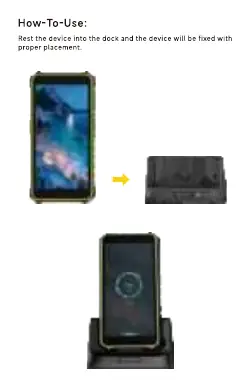
To charge your device, simply place it into the dock. Ensure the device is properly aligned with the Pogo Pin connectors to establish a secure connection. The dock is designed to hold the device in an upright position for easy viewing while charging.
Charging Indicators
The dock features visual indicators to communicate the charging status:
- Red Light: The device is currently charging.
- Green Light: The charging process is complete.
Connectors and Power
The dock is equipped with multiple ports to manage power input and output:
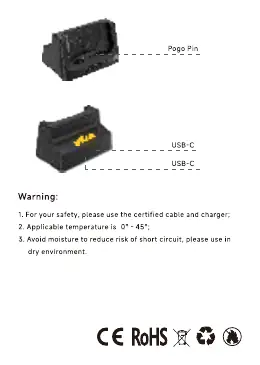
- USB-C Input: Supports a maximum of 5V/2A.
- USB-C Output: Supports a maximum of 5V/2A.
- Pogo Pin: Provides contact charging output at a maximum of 5V/2A.
- Total Power: The dual output capability of the Pogo Pin and USB-C port enables a total maximum power of 10W.
Safety and Maintenance
To ensure safe operation and longevity of the device, please adhere to the following guidelines:
- Always use certified cables and chargers to prevent damage.
- Operate the dock within an ambient temperature range of 0°C to 45°C.
- Keep the device in a dry environment at all times to avoid moisture, which poses a risk of short circuits.
Manufacturer information
Ulefone
Practical help
Common problems
Device not charging
Ensure the device is correctly aligned and seated firmly on the Pogo Pin connectors.
Risk of short circuit
Avoid exposure to moisture; use the dock only in dry environments.
Before use
- Use only certified charging cables and power adapters.
- Ensure the environment is dry and free from moisture.
- Verify the ambient temperature is between 0°C and 45°C.
- Check that the Pogo Pin area is clean and free of debris.
Specs in practice
- Total Power Output
- 10W maximum combined output via Pogo Pin and USB-C port.
- Input/Output Voltage
- Standard 5V/2A rating for both USB-C and Pogo Pin connections.
Images and diagrams
- The dock features a Pogo Pin interface for direct contact charging.
- The rear of the dock includes USB-C ports for power input and output.
Model compatibility
- Designed specifically for the Ulefone RugKing 2 Series.

Manual page author
David Miller
Documentation analyst
Organizes user manual content into clear summaries, with attention to model details, product context, and everyday usability.