Furniture / Tables Desks
Suptek DSF3 Desk Extender Tray Installation Guide
Quick installation guide for the Suptek DSF3 desk extender tray. Includes assembly steps, clamp adjustment instructions, and hardware requirements.
Table of contents
Quick guide from the manual
This document provides instructions for the assembly and installation of the Suptek DSF3 desk extender tray. The process involves attaching the mounting clamps to the tray and securing the unit to your desk. Ensure you have a screwdriver available, as it is required but not included.
Packing List
Before starting, ensure all components are present:
- A: Desk extender tray (1)
- B: Mounting clamps (2)
- C: M6x8 screws (4)
Installation
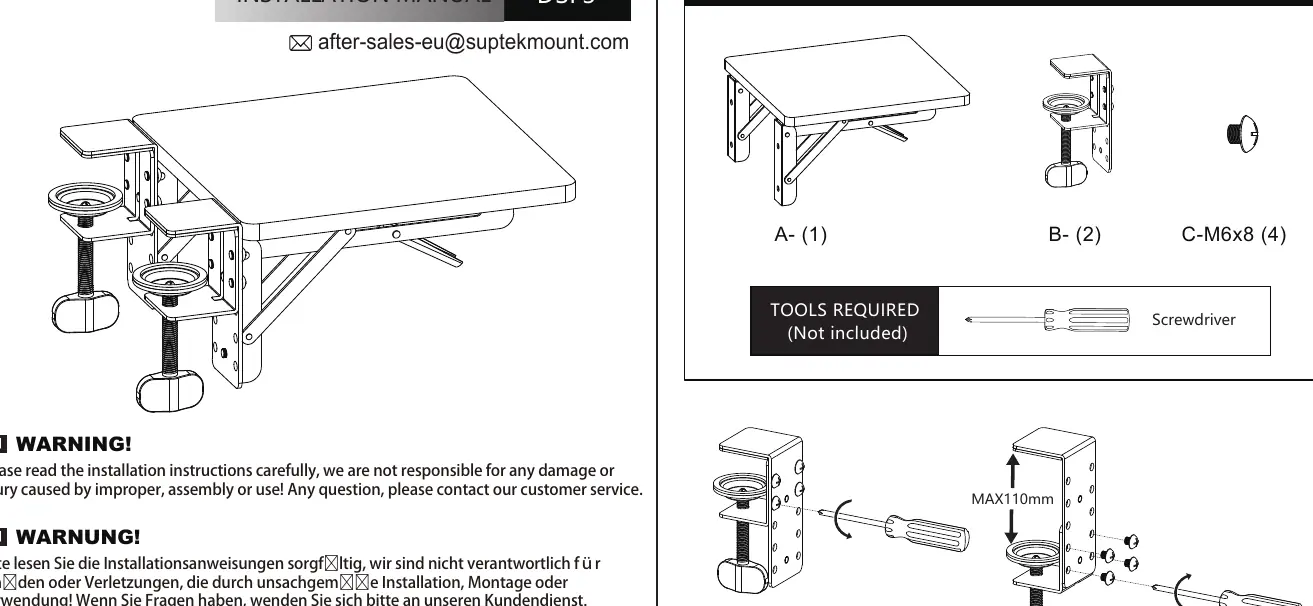
Step 1: Assemble A+B
Align the two mounting clamps (B) with the pre-drilled holes on the sides of the tray (A). Secure each clamp using the provided M6x8 screws (C) and a screwdriver.
Step 2: Clamp to the table
Position the assembled tray onto the edge of your desk. Tighten the clamp knobs underneath the desk surface until the tray is firmly secured. Ensure the tray is level and stable before use.
Adjustments and Safety
If the thickness of your desk does not match the default clamp size, you can adjust the position of the screws on the clamp bracket to accommodate different desk thicknesses (up to a maximum of 110mm). Always ensure the clamps are fully tightened to prevent the tray from slipping or detaching during use. For any issues, contact [email protected].
Practical help
Common problems
Desk thickness does not match clamp size
Reposition the screws on the clamp bracket to a different set of holes to accommodate your desk thickness.
Before use
- Verify all parts (A, B, C) are included in the package.
- Ensure you have a screwdriver ready.
- Check that your desk edge is clear of obstructions.
- Confirm the desk thickness is within the supported range (max 110mm).
Specs in practice
- Max desk thickness
- 110mm; the maximum thickness the clamp can accommodate.
Images and diagrams
- The manual shows the tray (A) being attached to two clamps (B) using four screws (C).
- The clamp mechanism features adjustable screw positions to fit various desk thicknesses.
- The final diagrams demonstrate how to fold and unfold the tray for use.
Model compatibility
- Compatible with most standard desk edges.
- Requires a flat surface for the clamp to grip securely.

Manual page author
David Miller
Documentation analyst
Organizes user manual content into clear summaries, with attention to model details, product context, and everyday usability.