Power / USB Chargers
User Guide for Verbatim GaN Charger 200W GNC-200U
Quick start guide and technical specifications for the Verbatim GaN Charger 200W (GNC-200U). Includes connection instructions, safety warnings, and detailed power output configurations for USB-C and USB-A ports.
Quick answers from the manual
Quick answer
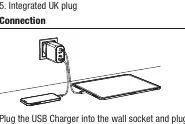
- To use the Verbatim GaN Charger 200W, plug the integrated UK plug into a wall socket and connect your devices using compatible USB-C or USB-A cables. The charger automatically manages power distribution based on the connected devices. p. 2
Key actions
- Connect devices to the appropriate USB-C or USB-A ports. p. 2
- Disconnect devices before removing the charger from the wall socket. p. 4
Maintenance and reset
- Disconnect from mains before cleaning. p. 4
Show 2 more answers Show less
Technical specifications
| Parameter | Value | Meaning | Pages |
|---|---|---|---|
| Total Output | 200 W | Maximum combined power output. | p. 4 |
| Input Voltage | AC 100-240 V | Supported input voltage range. | p. 4 |
Where to find it in the PDF
- Quick Start Guide p. 1, 2
- Safety Instructions p. 3
- Technical Specifications p. 4
Table of contents
Manual images
Click an image to enlargeQuick Start Guide
The Verbatim GaN Charger 200W is designed to charge multiple devices simultaneously using USB-C and USB-A ports. To use the charger, plug the integrated UK plug into a wall socket and connect your charging cables and devices to the appropriate ports.
Device Layout
The charger features four output ports:

- USB-C1 PD 3.0: Supports up to 100W.
- USB-C2 PD 3.0: Supports up to 100W.
- USB-C3 PD 3.0: Supports up to 65W.
- USB-A QC 3.0: Supports up to 60W.
Safety Instructions
To ensure safe operation, please adhere to the following guidelines:
- Use the product only in dry rooms and protect it from dirt, moisture, and overheating.
- Do not drop the product or expose it to major shocks.
- Keep the device out of the reach of children.
- Do not use the product near heaters, heat sources, or in direct sunlight.
- Operate only under moderate climatic conditions (0°C-35°C, humidity below 80%).
- Do not use in areas where electronic products are prohibited.
- Do not use in damp environments or near splashing water.
Operation Warnings
Risk of electric shock:
- Do not open the device or operate it if it is damaged.
- Check that your device is suitable for the voltage/mains frequency available in your country before connecting.
- Do not operate the product continuously.
- The product is not designed for use with other adapters.
Care and Maintenance
- Disconnect the device from the mains before cleaning or during prolonged periods of non-use.
- Plug devices directly into the adapter and the adapter directly into the wall socket.
- Remove all devices from the adapter before unplugging the adapter from the wall socket.
Technical Specifications
Input Voltage: AC 100-240 V 50/60Hz 2.5 A max.
Total Output: 200 W max.
Output Combinations:
- USB-C1+USB-C2: 100 W+100 W
- USB-C1+USB-C3: 100 W+65 W
- USB-C1+USB-A: 100 W+60 W
- USB-C2+USB-C3: 100 W+65 W
- USB-C2+USB-A: 100 W+60 W
- USB-C3+USB-A: 12 W+12 W
- USB-C1+USB-C2+USB-C3: 100 W+65 W+30 W
- USB-C1+USB-C2+USB-A: 100 W+65 W+30 W
- USB-C1+USB-C3+USB-A: 100 W+12 W+12 W
- USB-C2+USB-C3+USB-A: 100 W+12 W+12 W
- USB-C1+USB-C2+USB-C3+USB-A: 100 W+65 W+12 W+12 W
Protection Features: Output short circuit protection, over-voltage protection, over-current protection, and over-temperature protection.
Dimensions: 113mm x 64.8mm x 49.7mm
Weight: 323g
Practical help
Common problems
Device not charging
Ensure the charger is fully plugged into the wall socket and the cable is securely connected to both the charger and the device.
Charger feels hot
Ensure the charger is used in a well-ventilated area and not covered. If it becomes excessively hot, disconnect it.
Before use
- Check that the wall socket is compatible with the charger's plug.
- Verify that the device being charged is compatible with the output voltage/current.
- Ensure the environment is dry and within the 0°C-35°C temperature range.
- Inspect the charger for any visible damage before use.
Show more Show less
Specs in practice
- PD 3.0 (Power Delivery)
- Fast charging protocol for USB-C devices, allowing higher power output.
- QC 3.0 (Quick Charge)
- Fast charging protocol for USB-A devices.
- PPS (Programmable Power Supply)
- Allows the charger to adjust voltage and current in real-time based on the device's needs.
Images and diagrams
- The charger has 4 ports: 3 USB-C ports and 1 USB-A port.
- The integrated UK plug is located on the back of the unit.
Model compatibility
- Total output is limited to 200W.
- Output power is shared when multiple devices are connected simultaneously.

Manual page author
Emily Carter
User documentation editor