Power / USB Chargers
User Manual for Verbatim 4-Port 100W GaN Travel Charger VAPUC223
Quick guide for the Verbatim 4-Port 100W GaN Travel Charger (VAPUC223). Learn how to change international plugs, understand port output combinations, and operate your charger safely.
Table of contents
Manual images
Click an image to enlargeQuick Guide
The Verbatim 4-Port 100W GaN Travel Charger is designed for international use with interchangeable plugs. It features smart charging technology that automatically detects connected devices to provide optimal current. The total maximum output is 100W, which is shared dynamically depending on the number and type of devices connected.
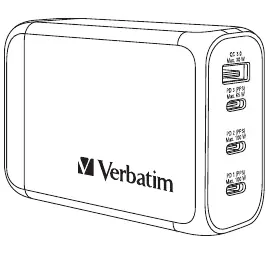
Product Description
Equipped with smart charging technology, this GaN charger automatically detects your device and provides an ample and stable charging current. It supports up to 4 devices simultaneously, including laptops, tablets, smartphones, and MP3/MP4 players. The construction uses fire-resistant materials and includes built-in short circuit protection.
Package Contents
- 1x GaN Charger
- 1x Storage Pouch
- 1x UK Plug
- 1x US Plug
- 1x EU Plug
- 1x AU Plug
Specifications
- Model: VAPUC223
- Input: 100-240 V AC 50/60 Hz 1.5 A (Max)
- Total Output: 100 W
- Dimensions: 77.6 x 61.2 x 29.9 mm
- Weight: 227g
- Materials: PC Flame resistant material
Operation
The charger comes with the UK plug installed by default. To use it in other countries, follow these steps to change the plug:
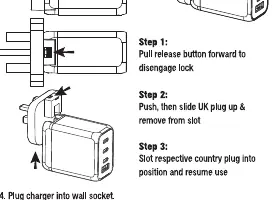
- Release: Pull the release button on the side of the charger forward to disengage the lock.
- Remove: Push and slide the existing plug up to remove it from the slot.
- Install: Slot the respective country plug (US, AU, or EU) into the position until it locks.
- Connect: Plug the charger into the wall socket.
Smart Charging Technology
The charger is enhanced with smart charging features that detect the specifications of your connected device to supply the best corresponding current. When a device is plugged in, the charger may restart charging to ensure optimal output is directed to each connected device and to protect user safety.
Safety Warnings
- Do not alter, modify, or disassemble the charging device.
- Do not drop or subject the device to strong mechanical shock.
- Do not expose to moisture, water, rain, snow, spray, heat, or direct sunlight.
- Clean the surface only with a damp soft cloth; do not use chemical solvents.
- Do not operate if the device has been dropped or damaged.
- Charge in a well-ventilated area; do not charge in environments exceeding 40°C/104°F.
- Keep out of reach of children.
- Unplug from the power source before maintenance or cleaning.
Practical help
Common problems
Charger not working
Ensure the wall socket is powered and the plug is fully locked into the charger body.
Plug is stuck
Ensure the release button on the side of the charger is pulled fully forward before attempting to slide the plug up.
Charging speed is slow
Check if multiple devices are connected, as the total power (100W) is shared between ports. Use the PD 1 or PD 2 ports for high-power devices like laptops.
Before use
- Verify the wall socket voltage is within 100-240V AC.
- Select the correct plug adapter (UK, US, EU, or AU) for your destination.
- Ensure the plug is securely locked into the charger body before connecting to power.
- Check that your device is compatible with USB charging.
Specs in practice
- PD 1 / PD 2 (PPS)
- Supports up to 100W output, ideal for laptops and high-power tablets.
- USB-A (QC 3.0)
- Supports Quick Charge 3.0 up to 30W for compatible smartphones.
- GaN Technology
- Gallium Nitride technology allows for a more compact, efficient, and cooler-running charger.
Images and diagrams
- The charger features 4 ports: 3x USB-C (PD) and 1x USB-A (QC 3.0).
- The plug release button is located on the side of the charger body.
Model compatibility
- Total maximum output is 100W when using multiple ports simultaneously.
- Output power per port varies depending on the number of devices connected; refer to the scenario table in the manual for specific power distribution.

Manual page author
Emily Carter
User documentation editor
Prepares concise manual descriptions and highlights the most useful setup, operation, and maintenance information for readers.